
Category: ERP Business Software
5 Things to Teach Your Competitors about Inventory
Inventory management has come a long way. In today’s fast paced, Internet-connected world, customers are not willing to wait for a product to be “made to order,” and then shipped in six to eight weeks. They expect it much sooner. This creates the need to stock the product in the warehouse so it is available for immediate shipment when an order is taken. When one firm offers rapid delivery by carrying stock, competitors are generally forced to do the same. And so goes the path of improvement for both businesses and consumers. You want your business to be the one in the lead. Here are five lessons you can teach your competitors about inventory.
Lesson 1 – Keep Fill Rates as High as Possible
If stock is depleted from the warehouse, and a customer’s order cannot be filled within a reasonable or requested amount of time, the customer will often cancel the order and then re-order from a competitor that has stock available.
Lesson 2 – Preventing Attrition is Critical
Once a customer switches to a competitor, it may be much harder to get future orders from that inconvenienced customer. You don’t want to lose the repeat customers that you worked so hard to build up over time.
Lesson 3 – Increased Order Cycle Time Increases Shipping and Fulfillment Costs
For customers who are willing to wait out the backorder fulfillment process, shipping and fulfillment costs will be higher, especially if the order requires partial shipments as stock becomes available. Delayed shipment notices may need to be sent to customers, and the liability for unearned cash prepayments with backorders must be tracked. The cost of filling separate backorders may exceed the profit of the original order, and the only remaining argument for filling the backorder will be to prevent customer attrition.
Lesson 4 – Inventory Turnover is Important
Inventory turnover measures the performance of your investment in your inventory. Carrying too much stock in the warehouse puts a burden on an organization’s cash flow, which can easily outweigh benefits that may be offered for “ordering in bulk” in excess of near-future demand. Carrying too much stock on hand also increases the risks of theft, damage, and obsolescence to inventory on hand during long-term storage.
Lesson 5 – Accurately Forecasting Demand is Critical
Obviously, forecasting is vital for keeping your inventory investment as low as
possible without negatively impacting fill rates. The ability to forecast customer demand accurately is advantageous for obvious reasons:
- It improves customer satisfaction.
- Shipping and fulfillment costs are reduced when orders can be shipped complete at once.
- Inventory quantity on hand is more level, which controls costs and reduces the risks associated with carrying excessive inventory quantities.
Demand forecasts developed within the inventory system must be generally consistent with planning numbers generated by the marketing and other departments. However, your ERP system must use inventory forecast methods that are proven most useful with inventory systems, rather than forecasts generated by marketing or budgeting departments. It is important that inventory forecasts be made by SKU, by warehouse location, and by time unit. Merchandising managers may perform SKU forecasting based on demand history, and market managers may perform forecasting based solely on the predicted sales curve of catalogs. If the marketing department is planning an unusually big promotion and expects to sell three million units of an otherwise unpopular product, and the merchandising department forecasts project a total demand of only one million units, senior management must reconcile these very different visions of the future. While you may influence your customers with pricing, catalogs, and promotions, customers ultimately will order what, where, and when they desire.
The heart of an organization’s forecasting success is knowing how customers will order. The best way to control inventory to your advantage is through an ERP system that plans for future actions of your customer base.


Use Your ERP Software to Avoid a “Big eCommerce Short”
 This article compares increasing eCommerce sales to the housing market bubble. It discusses loss of sales in the checkout process that merchants might know about, calling it a new “big short.” The article continues to explain where the sales breakdowns occur, including the checkout process, consumer confidence in the merchant, and how payment declines are handled.
You can use your ERP system to help avoid each of those breakdown points. Using a smart checkout process and your ERP system to its potential, your eCommerce business can provide your customers with a smooth purchase process and the information you need to monitor it. Here are just a few ways to help protect your eCommerce business against abandoned carts:
Checkout process – Keep it simple. Show your shoppers the checkout flow to let them know what to expect. Keep it efficient with as few steps as possible. Giving customers an up-front shipping estimate, or the option to bypass registration (when appropriate) can eliminate some of the breakdown at checkout.
Trust – This is a big deal. Customers don’t want to think about security – they want you to. And if you’re not easy to contact, they may go elsewhere.
It can be complicated for any business to keep up with all the cyber attacks and payment fraud going on around us, but you must be vigilant. Keep up with your PCI DSS requirements, have a security process and an incident response plan, and train your employees on them. A good ERP system can help with features such as fraud scoring, and it will support your PCI DSS efforts to keep your sensitive data safe.
Make sure your customers can reach you immediately with any questions. Display your phone number where it can be easily and quickly seen. If a shopper has a question or problem navigating your site, make sure you can help. Keep Customer Service always at your customers’ fingertips, and make sure your customer service reps can pull up the customer’s shopping cart, edit it, and help the customer get through checkout if necessary.
Payment Declines – This is when knowing your business and your customers is so important. While you can detect patterns that are typical of fraud, you may also be flagging valid transactions, especially if you do business internationally.
Know Your Business – Where are your transactions failing? Put a process in place to check your data regularly, and follow it. Review the tools from your payment gateway(s), Google Analytics, and reports from your ERP system to see what might be causing a problem. And use these suggestions to recover up to 30% of abandoned carts with Email reminders. Use your data to your advantage by making adjustments where they’re needed.
It’s your business; be aware of it. Don’t bet against yourself.
Increase Sales by Soliciting Customer Feedback
It is important to know what your customers think of your products because then you know how you can improve your offerings, and where you should consider raising or lowering prices. Additionally, reviews can increase sales by steering and bolstering confidence as new shoppers are considering a making a purchase.
InOrder lets you review the reviews, edit them when necessary while saving the original, but most importantly, it gives you a chance to discuss and resolve problems with customers who might not otherwise come back next time due to a misunderstanding or a solvable problem. It also lets your reps see a customer’s past reviews and thank the customer, or use their feedback to help make new recommendations.
Regardless of these conveniences, it is vital to keep customers engaged after a sale because then they are more likely to remember your website the next time they are ready to make their next purchase. A perfect way to seal this deal with busy customers is to send an email that offers a small compensation, such as a $5 coupon for customers who submit their first follow-up review to your site. The coupon code can simply be a key code linked to a promotion that allows one-time customer use. InOrder will only allow a discount up to the amount of the purchase.
Sales and Search Results – Opportunities for eCommerce with Responsive Mobile Design
A website with responsive design adjusts to the sizes of all devices shoppers are using, naturally providing optimal presentation. For a web store, the result is a single cart that functions for both PC and mobile, with a similar look and feel, regardless of device size, no longer requiring multiple web sites. This means a better shopping experience for your users, which can translate to more sales and higher search rankings.
The alternatives to responsive design are dynamic serving or maintaining a separate website for mobile shoppers. Dynamic serving uses different HTML for different types of devices, so when users search for information, results for the same site are shared between different versions of HTML. Hopefully, a mobile site using dynamic serving is set up properly; otherwise, Google might not even find the mobile content. Maintaining a separate web store for mobile shoppers is (at least) twice the work as having a single online web store. Each supported device requires a separate web site. Otherwise, it might not display properly to mobile users, increasing the number of people who leave the website after visiting only one page (raising bounce rates), and risking loss of would-be customers to frustration. If your site is awkward for mobile users, you could be decreasing your own search results and sales.
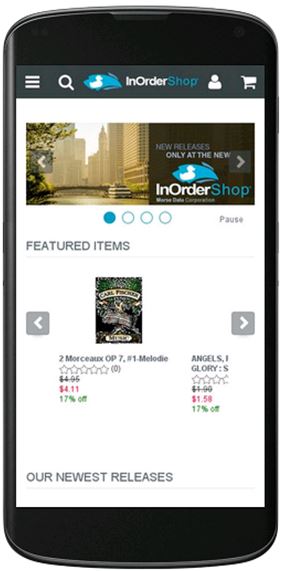 Responsive design eliminates these concerns. It is more cost-effective and easier to manage than maintaining two separate websites, it uses the same HTML for all devices, and it provides a better experience for users who switch between devices and for those who share links to websites. It is also Google’s recommended design for all devices
Google can more efficiently index your website if it uses responsive design, and it isn’t necessary to redirect a URL, which doesn’t increase the time it takes to load your website. In addition, responsive design provides a better experience for all users. Font sizes have a consistent appearance, so users don’t have to work hard to see the content (no double-tapping or pinch-to-zoom necessary), and links are large enough for fingers to use accurately.
There is a lot of research to support the decision for responsive design. According to a survey by Signal, 85% of respondents plan to shop using PCs or laptops, 67% plan to browse more from phones or tablets, and 60% plan to buy more from phones or tablets than they did last year. And according to this article, 75% of adult internet users have two or more devices for online use, and 67% switch between devices them, so responsive design is a sound business decision.
For details about InOrder’s responsive mobile design, or for a demo of InOrder eCommerce, contact Morse Data Corporation.
eCommerce Experience is Important to Business Customers
eCommerce companies seem to be realizing more and more that their business customers appreciate the convenience of online shopping just as much as retail customers do.
While potential new business customers might not respond to “Call for Pricing” messages on your web site, they may be more likely to order when the pricing information is readily available. And they want other conveniences, like quick search results, pictures, and descriptions. They want easy reordering and if products are backordered, they need to know when to expect them. And once they log in to an established web account, they want personalized services, like the ability to see their negotiated prices and discounts applied as they shop on-line, with a presentation relevant to them.
B2B companies using eCommerce are making sure they don’t miss out on opportunities to grow their business. They can choose to add multiple customer bases to their eCommerce businesses – for example – direct consumers, or businesses in other countries.
If you are ready to grow your B2B on-line business, consider InOrder. With its central database and the ability to offer on-line integrated real-time inventory, InOrder can help manage and keep product information accurate and consistent for multiple customer bases. The days of having a separate computer system for each channel are long gone!
Contact us to request a demo showing how InOrder can help you attract new business.
Getting the Most From Your Enterprise Resource Planning (ERP) Software
When you purchase a new software system, it typically comes with many features and functions that can be used to help enter, manage, and process your transactions. But it also pulls together all of this data over time, and gives management the ability to see what is happening across the entire organization, enabling better decision making. What are the most important decisions you need to make every day? It’s one thing to confirm that you are keeping up with customer orders and accurately filling them the first time. It’s another thing to be able to service those orders with in-stock inventory while still minimizing your inventory investment. But there are also growth decisions, such as how to best market to your customers, how to analyze marketing results. There are other questions, such as how to keep the customers you’ve acquired, and keep them coming back for more.
Getting the most from your enterprise system means exploring, testing, and implementing new procedures and functions that maximize throughput, maximize the use of your resources, and maximize growth. To accomplish this, you must fully understand how the system works today in your organization, as well as other ways it can potentially be configured to be used more effectively. This especially becomes important when new versions of the system become available to you because they always include new capabilities, as well as improvements to existing functionality. In some cases, years go by, and the system might be considered “stable,” so the managers do not want to upgrade it. In the meantime, they are manually performing tasks every day that the latest version of the software can do automatically.
Several years ago, we asked customers what their biggest wish list items were, and the top request was for smoother upgrades. We made this a top priority and completely re-invented every aspect of our development infrastructure and our new version roll-out processes. Not just one time changes, but rather we put into place a “process for continuous improvement” that has been going now for the last five years or so. Great emphasis was placed on collaboration, testing, documentation, build and deployment automation, faster patch rollouts, and additional service offerings, such as SQL Health Monitoring and Website Update Services. All of this has resulted in a better customer experience, as well as our ability to now develop and offer more functions and capabilities, such as the new RF subsystem and the new adaptive mobile shopping cart.
A recent analysis of the InOrder versions currently under maintenance (pictured below) shows that while most of our customers stay relatively current on their upgrades and their annual on-site refresher training, there are still users utilizing older versions of the software. For example, do you still require your customers to call for order status information, or do you send out email confirmations with online order and shipment tracking capabilities? InOrder’s latest email communications and marketing capabilities include a multitude of communication pieces to keep your customers “in the loop” at all times. And not only can you give customers the ability to “unsubscribe” by type of email, you can let them personalize the frequency for each type of email you might send them. To help introduce new InOrder features, we send out several regular publications including “InSight,” “InOvation” for InOrder Customers, and “InSide” for the I.T. people managing InOrder systems. We also publish to our customers, an “InOrder ReadMe.txt” listing of software changes, and updated InOrder context help libraries, as the InOrder weekly new versions are released.
Of course, none of this matters if your system has not been upgraded in years. Perhaps the oldest version of InOrder still in use is over 15 years old and can serve as a testament of system stability. But at Morse Data, the development and introduction of new modules and functionality is steadily accelerating, and keeps pace with the latest expectations of today’s and tomorrow’s technology-enabled customers.
7 Must-Have Mobile eCommerce Features
You’ve made great progress with your eCommerce business: inventory is available and your web store is ready to go live. But first, make sure you have these basic features in you mobile store.
Optimize
Use full-size images with zoom capability so your shoppers aren’t frustrated by being taken away from their page. Make sure your site is compatible with all devices. Using Google’s recommended Responsive Design Plan, your mobile store will automatically adjust to the sizes of all devices customers are using to provide optimal presentation. The design has the added bonus of a single cart, so multiple web sites are no long required. Good for your customers, good for you!
Easy to Find Products
If shoppers search for something specific, it means they know what they want, and they want to find it immediately. If you have multiple product categories, make sure your customers can easily find what they’re looking for. Provide them with the ability to combine different search criteria, in whatever combinations they choose, with tools such as Facet Filtering. Check your search analytic results to see how shoppers are searching for your products. Remember that a search engine-optimized design gives you additional edge over the competition.
Real-Time Availability
Sync your inventory with your web cart, so your customers know if they have to wait for something, or if they’ll get it when they need it. This is especially important for your reputation during the holidays. You don’t want to be the source of added frustration because you customer counted on you for a delivery, only to find out at the last minute that the product was out of stock when the order was placed. A good ERP system can prevent this type of disappointment by letting your customers know what to expect when they order from you.
Let Your Customers Share
Let your customers spread the word about your cart and share it with their favorite social media sites. Allowing customers to share product pages with their social networks is a great way to bring in more traffic and find new customers.
Easy Checkout
Make the checkout process as efficient as possible with as few steps as possible. Keep it simple and quick. Keep page and image loading fast so customers won’t give up on you because it’s taking too long or you require registration or want them to enter too much information.
Security
It can be complicated for any business to keep up with all the cyber attacks and payment fraud going on around us. It’s particularly tough for small merchants, but you must be vigilant.
A good ERP system can help you as well. Features such as Fraud Scoring are designed to assess orders based on criteria known to indicate fraudulent purchases.
Be Available
Be sure to display your phone number where it can be easily and quickly seen. If a shopper has a question or a problem navigating your site, you want to make sure you can help. Not only should customer service be always at your customers’ fingertips, but your customer service people must be able to pull up the customer’s shopping cart, edit it, and help the customer get through check out if necessary!
3 Reasons Why Employee Security Training is So Important
Thieves will take advantage of every opportunity available to them, and your employees are an important line of defense against them.
Do you have a security policy? Do your employees know about it? One way your employees can help try to protect against these activities is to be trained to follow your procedures. If they don’t know what to watch for, or what to protect, or how, then how can they help you?
Here are 3 reasons why it is so important to have a security process and make sure your employees know it well.
- Card-reading devices at point of sale locations may be used to steal cardholder data. Devices are stolen or exchanged, or tampered with to get cardholder data. Thieves may try to impersonate device maintenance personnel to try switching devices, or they may even try adding another device on top of yours. Without proper training, employees may not recognize when this happens or what to do to try to prevent it.
- While a Customer Service Representative helps a customer with an order and payment entry, sensitive data is written to the Customer Service Rep’s desktop. Without training, the Customer Service Rep doesn’t know that this is against PCI-DSS requirements.
- While checking email, a purchasing agent clicked a link for a great offer with a vendor he thought he knew, and used the company’s account information. Without proper training, the agent didn’t know to go to the website manually and check the creditability of the offer.
There are many more reasons to have a security process and train your employees on it, and the PCI Security Standards website is a good place to start for more information. For details about InOrder’s PA-DSS-validated ERP software, contact Morse Data Corporation.
Does Your ERP Software Embrace Your Comparison Shoppers?
People research products. As shoppers, we check out all our options. We gather information about what’s available, we read reviews, and then we decide where to shop.
Shoppers want to know what they’re buying before they buy it. They want to know if they’ll like a product, how it works, and what others think about it. They also want to know about you. They need to know that their information is safe with you and that their purchases will arrive quickly and without incident. They look for opinions before they shop, while they’re shopping, and when they’re finished, they tell others all about the product and their shopping experience.
Motivate shoppers to use your website for researching your products and make it easy for them to buy from you by providing what they need.
Build confidence and trust
Add a social aspect to your website that keeps your shoppers involved. Keep them engaged with Ratings, Reviews, Comments, and Q&A. Reply to feedback, add comments to a thread, encourage questions, and offer suggestions.
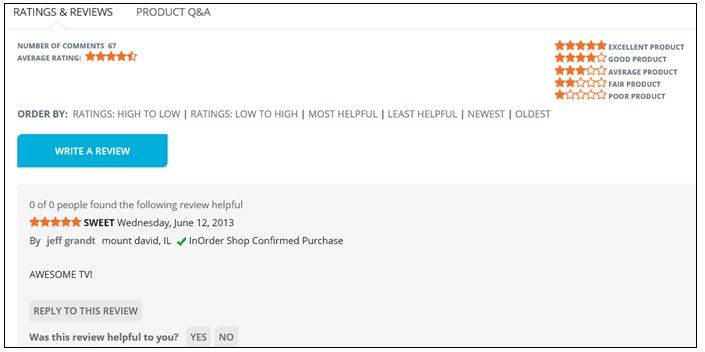 Further engage your customers with the InOrder Email Communications Enhancement. Thank them for their purchases, and invite them to rate the products they purchased or add their comments.
Set up a page of FAQs about your products, with answers for information purposes. You can also provide a place for your customers to ask questions with answers contributed by your experts or other customers.
With full control over feedback, you can allow customers to post directly to your website, or you can approve or edit reviews and comments before publishing them.
Increase participation
Interact with your shoppers and help keep them involved in the shopping experience.
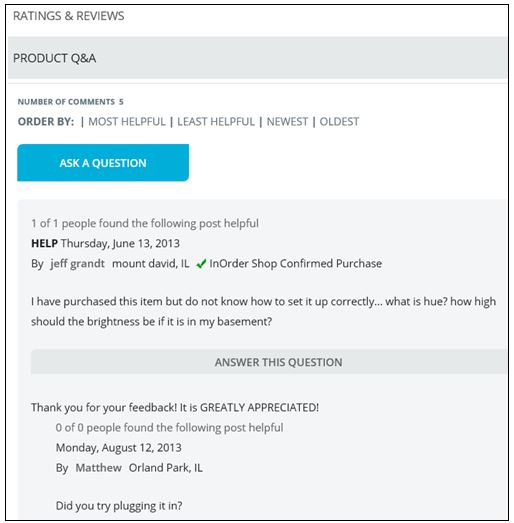 You can even create a community where shoppers can share information and ideas about your products. There are many ways to encourage participation in your web store community. Here are some examples:
If you sell parts for antique cars, you can start a thread about local car shows and invite customers to post pictures of their cars with your parts.
If you sell fishing equipment, you can define a forum about fishing equipment and start a thread about fishing lures. Or, explain different types of fishing poles and what type of fishing each are used for, such as ice fishing, or salmon fishing, etc. Invite customers to post pictures of fish they caught with your products.
Forums, FAQs, and other community pages can be created at the category level, or they can be created at the product level so you can have details specific to a product.
Rather than outsource these features, implement them with InOrder’s built-in functions that tie your products with reviews and your customers, keeping the details all in one place so you don’t have to maintain it in separate systems. All this participation also contributes to your search content. When shoppers search for reviews and find your site in their search results, your website has a better chance of being seen. Shouldn’t your website be the one they go to for trusted information – and final purchase – when making informed decisions?
Good ERP Systems have everything you need to run your business. From ordering your inventory, to setting up your web store, to taking and processing orders, to paying your bills, and so much more. Make sure you’re using it to its fullest potential – and to yours.
For more information about InOrder, contact Morse Data Corporation.
Coming Soon: New InOrder User Interface
The Morse Data Development Team has released details about a new project (code name “Dynasty”), which will migrate InOrder into a web-based user interface with .NET.
The new programs will expedite the development process, improve usability for our clients, and enhance portability of the software. This furthers our on-going vision of enhancing the user experience, and it enables an expedited development process by using the same technologies that currently exist in our RF application and our responsive mobile cart.
Dynasty features the ability to re-size any windows, support for CSS-based interface customization, and the ability to run InOrder on any browser-enabled device.
This is the third system re-write by Morse Data in over 40 years, but this one is different because it enables us and our InOrder users to fully leverage their existing InOrder investment. The database tier and the logic tier are rock-solid, and already take advantage of the latest capabilities offered by SQL Server 2014, such as AlwaysOn Availability Clustering. This rewrite only affects the user interface tier, which is being completely re-built to take advantage of the latest object programming platforms and techniques that were not available when the desktop client was initially developed.
The Dynasty rollout will occur in phases, beginning with warehouse components to compliment the recently-completed web-based InOrder RF Interface. The phased release schedule will begin mid-2016, with completion expected in 2017. This rollout will be released to existing InOrder customers as updates become available. The new interface will initially overlap with capabilities of the existing client/server based desktop programs, which will be replaced when functional equivalence is achieved.