
Add Your Brand to Your Boxes to Encourage Your Customers to Shop
Packing materials are not things you think about every day. But if you ship orders, you have to consider how important they are to your customers. You have to think about boxes, padding, packing tape, and other supplies to take your merchandise safely to your customers. You need to make sure your packing materials keep your merchandise clean and protect it from damage that may occur from the environment outside the box. Packing is serious business when you ship orders, and it can considerably add to the cost of the merchandise.
One concept to consider in packing materials is advertising. Inserts and catal ogs are great, but using packing materials to encourage your customers to place more orders is brilliance. There are many ideas, such as printing pictures of items you sell with taglines. Because of the expense, it might be worth discussing a cost-sharing arrangement with your vendors to purchase boxes printed with their logo. Likewise, vendors might consider printing boxes with their logos and making them available to their distributors.
Often, when I get a package delivered in a plain, unmarked box or simple padded envelope, I see missed opportunities. That unmarked box, which traveled from who-knows-where, could have been broadcasting the brands it carried all along the delivery route. Sometimes, though, when I get a package delivered, I see evidence of a smart business that took advantage of a great opportunity!


InOrder’s RF Guided Putaway Saves Time with Alternate Bin Selection
InOrder’s Guided RF tasks control where inventory is put away and how it gets to the correct storage location in the most efficient way possible. What if your items do not always end up in the bin determined by the system? With another RF system, you might have to put the item in the location identified, and then use the system to again move the item to another location.
If your items do not always end up in the bin determined by the system, you could save a lot of time by selecting an alternate to-bin during guided putaway.
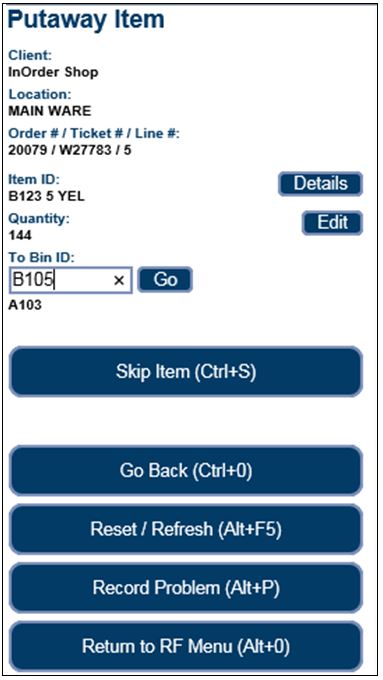 The alternate to-bin is confirmed with a Complete Putaway prompt.
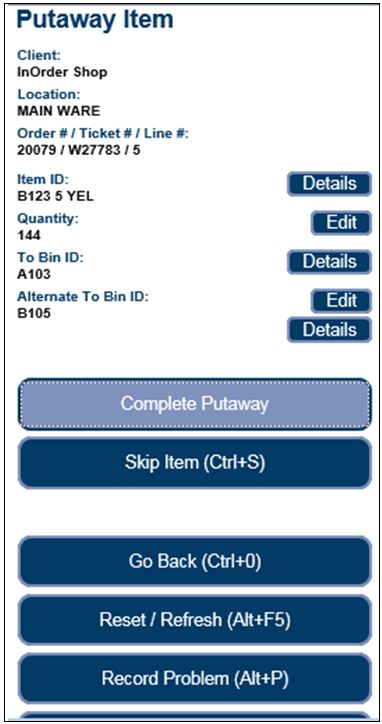 When an alternate to-bin is selected, the putaway quantity to the original bin is de-allocated, removed from the original bin, reallocated for the alternate to-bin, and the added to the alternate bin.
If there is no longer sufficient stock in the original putaway bin (e.g., the stock has been allocated from that bin for another order), an alternate putaway bin may not be selected. However, a partial quantity may be putaway to an alternate bin. Additionally, an alternate putaway bin with a different hold access code that the line item being putaway may not be selected. Overpick bins behave similarly.
For more information about the InOrder RF Module, contact us for a demo, or call us at 888-667-7332.
Provide Quality Service and Optimize Selling Opportunities with InOrder
InOrder’s Outbound Sales Call Center is perfect if you spend your days talking to customers. It is fully integrated with other InOrder modules, including Inventory Management and eCommerce, to provide quality service and optimize selling opportunities.
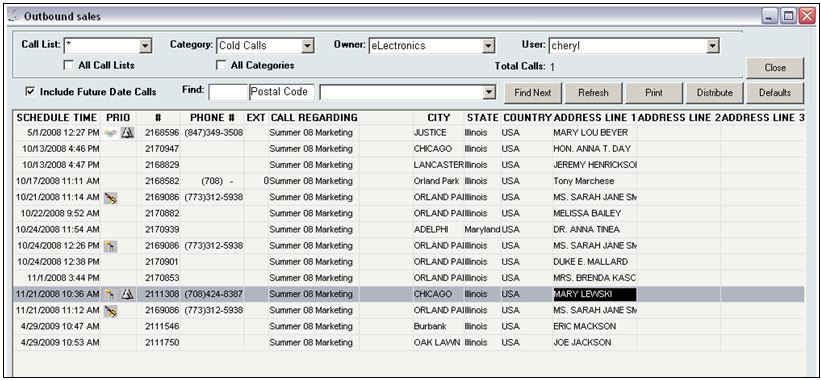
The InOrder Outbound Sales Call Center provides a list of prospects and customers to call. This list may be generated manually, or automatically using a selection from the House prospect list. You can display calls for past, current, and/or future dates.
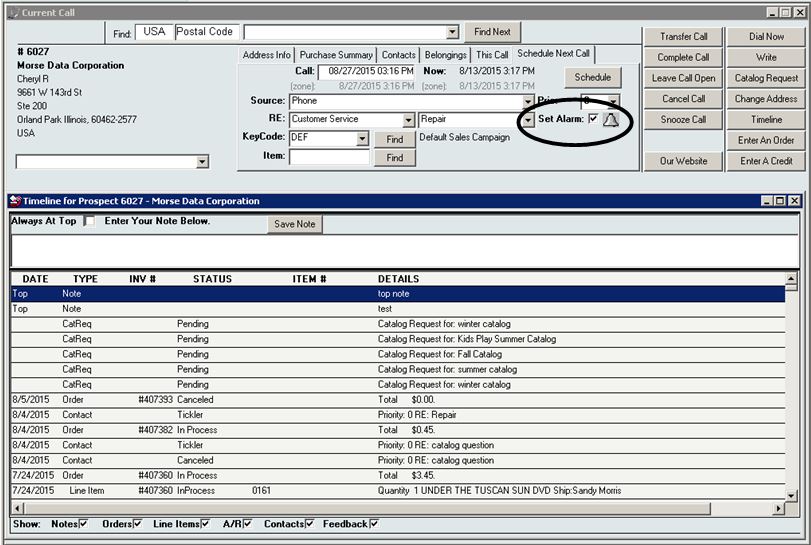
 The Current Call Window is used to take or place calls with Prospects and Customers. Among its many valuable features is the option to set reminders on your Outlook calendar for scheduled calls by simply clicking a checkbox.
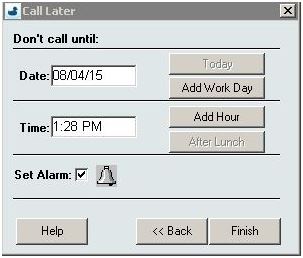
 Every pending call in the Call List specifies a target call date and time. When you select a call to be made and do not get through or agree to call the customer back at a later time, you can update the Call List by clicking the “Snooze Call” button. This pop-up window gathers the information to be used for re-scheduling this call.
 From the Current Call window, you can also access customer address and purchase information, call and Timeline details, schedule calls, enter an order or a credit, enter a catalog request, or send a fax, mail, or Email using one of the Microsoft .dot templates.
For more information, contact us for a free demo or call us at 888-667-7332.
Make Your Items Unique With InOrder ERP Software
The InOrder Gift Wrap Enhancement is perfect for when your customers want to surprise someone. You can use it to easily offer gift wrapping and other customized services for your products. You can offer a variety of wrapping paper, ribbons, bows, cards, messages, and more.
It doesn’t stop there. You can even offer to personalize messages with selections of fine paper and custom calligraphy. Items within an order may be grouped so customers can identify which items are shipped in each box, and which items within each box gets wrapped.
You can also apply specific rules and additional charges to specific services or other options. Each selection is easily set up and may be associated with separate charges.
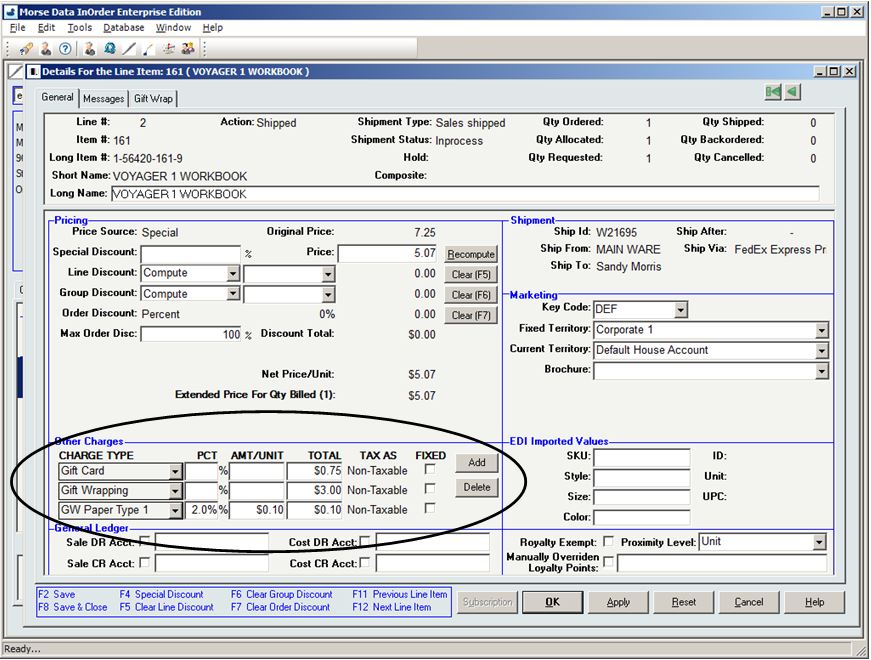
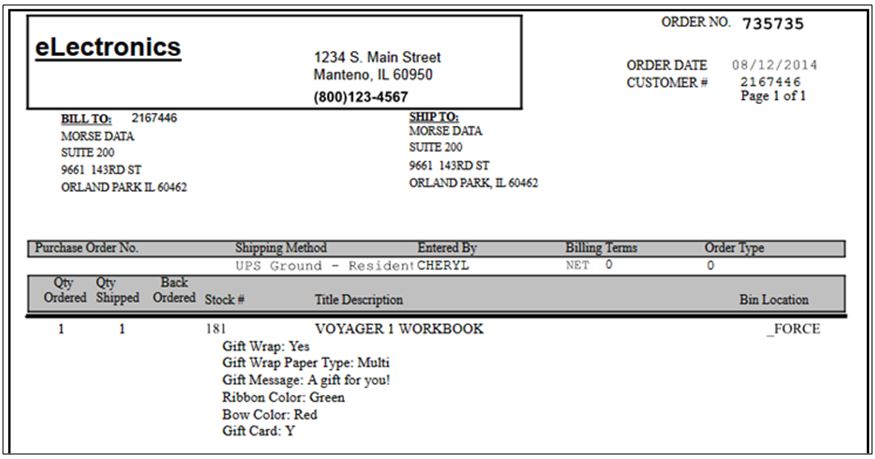
Gift wrap selections are printed on pack lists. With additional Reports formatting, Gift Wrap choices can be used to group line items into gift groups, and Packing Slips may also be customized to conditionally hide or show some options based on the choices made on previous options.
 When used with the InOrder Item Personalization Enhancement, you can further personalize your services by offering additional options that are unique to specific items.
6 Reasons Why InOrder is Ideal for eCommerce
You already know that InOrder is a high-end enterprise management system with functions found in systems that cost thousands more. With real-time inventory and order tracking, a single database to keep all of your information in one place, InOrder also integrates with everything you need to manage your business.
Here are 6 reasons why InOrder is ideal for attracting new customers and keep them coming back to your online store.
1. Product Browsing Features
A search engine optimized design, allowing additional edge over the competition. InOrder supports mobile browsing (and shopping), graphics, dimensioned inventory, item personalization, and Facet Filtering. AddThis allows your web customers to share pages from your website on social media websites.
2. Product Pricing Features
Extended price breaking information, reflecting special prices and most discount scenarios, is shown as customers add inventory to the shopping cart. InOrder’s eCommerce module also supports volume discounts, wholesale ordering, and special offer-driven pricing and promotion line items. International shopping is also supported, allowing customers to view prices in their preferred currency.
3. Shopping Cart Features
InOrder’s eCommerce shopping cart provides flexible login for customers, including soft logins, which allow web customers to be remembered across shopping sessions, guest checkout, and pre-login requirement option based on owner.
Customer acquisition cookies are supported, as well as open order resume cookies with expiration timer to clean up abandoned carts.
You can keep your customers informed with shipping charge computations, estimated shipping, estimated number of days for delivery, and rate shopping. When real-time stock allocation is used, backorder notifications are presented as items are added to the shopping cart.
4. Checkout and Payment Features
Ship via and payment pages may be skipped to support one-click checkout. Customers may always return to add or edit information on these pages. InOrder’s eCommerce module supports many forms of payment, including:
- Gift cards and gift certificates
- PA-DSS credit card processing, including the re-use of saved credit cards
- PayPal
- Installment payments
- COD
- Saved payment methods
- Cash payments
- Intranet/inter-department orders by G/L account with budget tracking
- Purchase orders
- Credit memo application to new orders
Real-time address verification using calls to your InOrder Address Validation interface subscription enhancements, as well as tax computation interfaces, are supported.
5. Customer Account Features
InOrder eCommerce provides full support for multiple ship-to addresses, browsing history, address books that can be maintained by Customer Service Representatives, and support for multiple customers using the same Email address. Give your customers the best features with control over their own information. Here is a list of what they can do:
- Check gift card balances and loyalty point history
- Set Email preferences to improve deliverability
- Sign up for back-in-stock notification when an item is out of stock
- Check order history and real-time order status
- Repeat orders for seasonal gift reordering
- Manage their address books
- Set payment methods and preferred payment method
- Add feedback, ratings, product Q&A
- Set ordering preferences
- Request catalogs; sign up for mailing lists & interest groups
- List subscriptions, continuity series, standing orders, and memberships
- Maintain Wish Lists
6. Marketing Features
Marketing is crucial to the support and growth of your business, and there is a lot involved. From the way you display your products to measuring the success of your efforts, InOrder eCommerce has what you need.
- URL specification of owner/order class/click-through ad promotion key code
- Navigation bar with special promotions that are displayed based on inventory browse criteria and customer purchase history. Promotions continue randomly throughout the checkout process.
- Loyalty Programs and promotional shipping charges
- Support for the Simple Fade Slideshow plug-in.
- Multiple item relationships for additional cross-selling and up-selling opportunities
- Multiple carousel displays on home page for different types of cross sells
- Display and selection of related items, including:
- Items related to items in the cart
- Items related to the current item
- Items from the customer’s Wish List
- Items other customers bought
- Items related to previous purchases
- Items related to/replacing a discontinued item
- Items related to a discontinued hierarchy
- Integration with the InOrder Email Marketing Enhancement and the Email Communication Enhancement.
For more information about eCommerce with InOrder, contact sales@morsedata.com.
InOrder ERP’s Export / Import Saves Promotion Setup Time
While setting up InOrder Promotions isn’t complicated, you probably don’t want to be setting up the same filter lists on multiple promotions that you offer over time. With InOrder, you can quickly transfer Promotional Shipping data from one promotion to another using InOrder’s export and import functions.
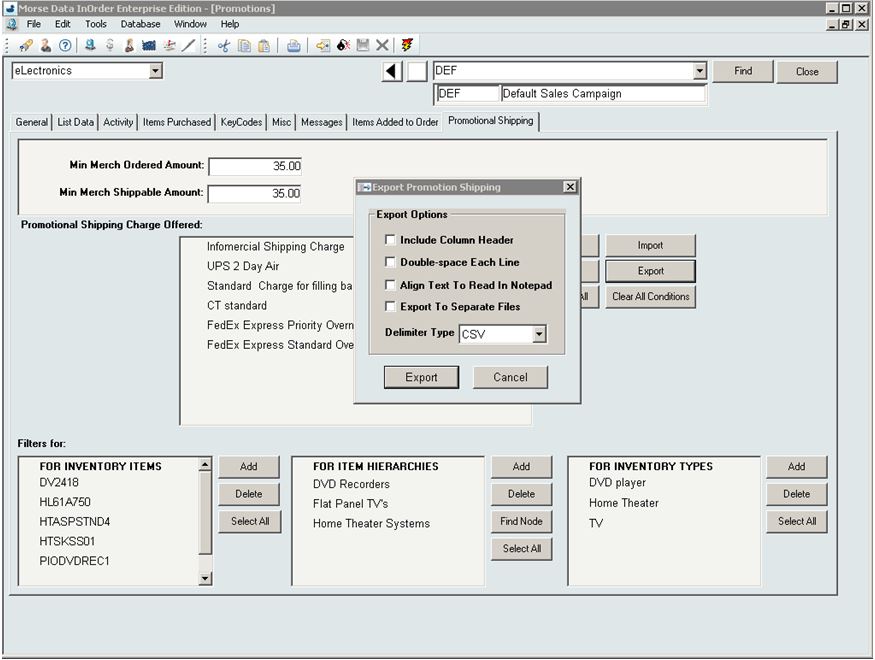 Using InOrder’s Export function to gather all the data together is quick and easy.
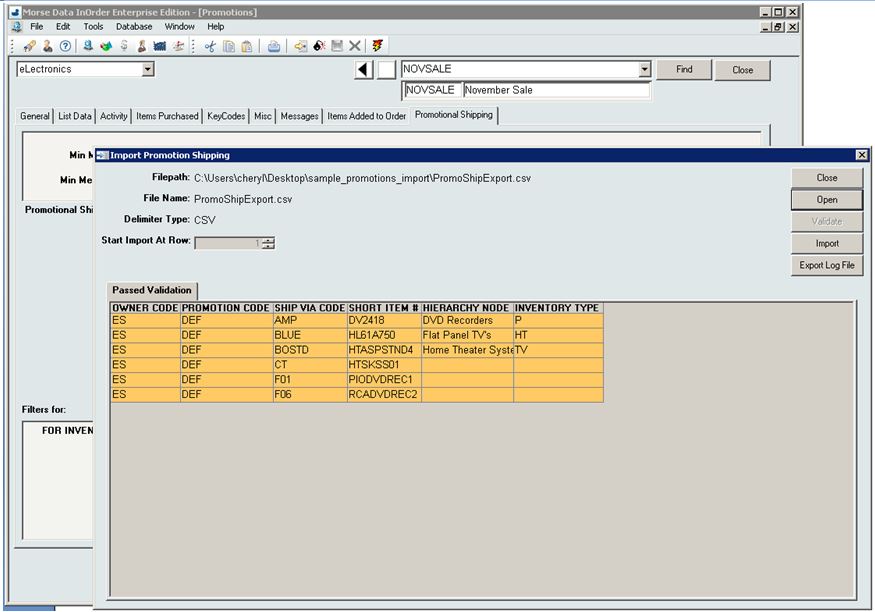 Simply import to another promotion, and InOrder does all the hard work!
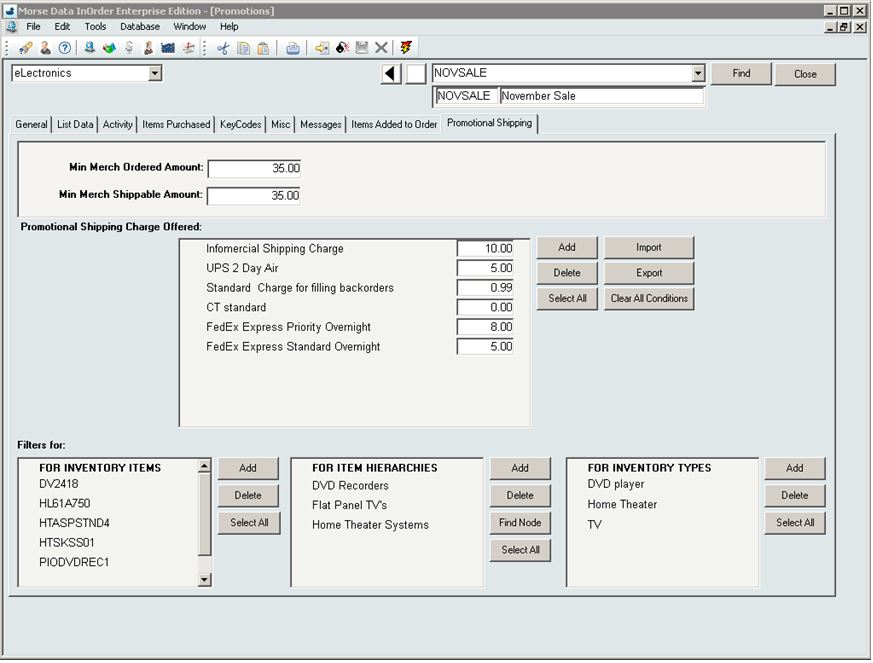 For more information about InOrder and any of its features, please contact sales@morsedata.com.
InOrder Enterprise Management Software Version 9.9 is a PA-DSS Validated Payment Application
We are proud to announce that InOrder version 9.9 has been successfully validated according to Payment Card Industry Data Security Standards (PCI-DSS) Payment Application Data Security Standard (PA-DSS) v2.0, and may be used by merchants who are PCI-DSS compliant.
The PCI Security Standards require merchants and service providers that store, process or transmit customer payment card data to adhere to information security controls and processes that ensure data protection.
InOrder has been successfully revalidated annually since it was originally certified in 2012. To achieve PA-DSS validation, a report documenting software changes since the previous validation was provided to Trustwave, a PA-DSS Qualified Security Assessor (QSA) who audited compliance of the software, and submitted the report with the InOrder PA-DSS Implementation Guide to the PCI Security Standards Council. These reports are also available for our clients and their PCI-QSAs.
Trustwave is a security company that provides services and solutions that include security for compliance and risk, SpiderLabs, and managed security, as well as network, database, and application security services and products. For more information about Trustwave, please visit their website.
For more information about PCI-DSS and PA-DSS, please visit the PCI Security Standards Council website.
InOrder Packing Verification Provides Heads Down, Hands Free Data Entry
With the InOrder Packing Verification Enhancement, your warehouse personnel can scan and pack items to record and verify the contents of individual shipments. As items are scanned, InOrder compares what was packed with what was ordered and allocated.
InOrder reports to the packer with distinct audible signals throughout the process. This speeds the verification process by not requiring the packer to constantly view the results on the screen. When the order is complete, the shipment is accepted.
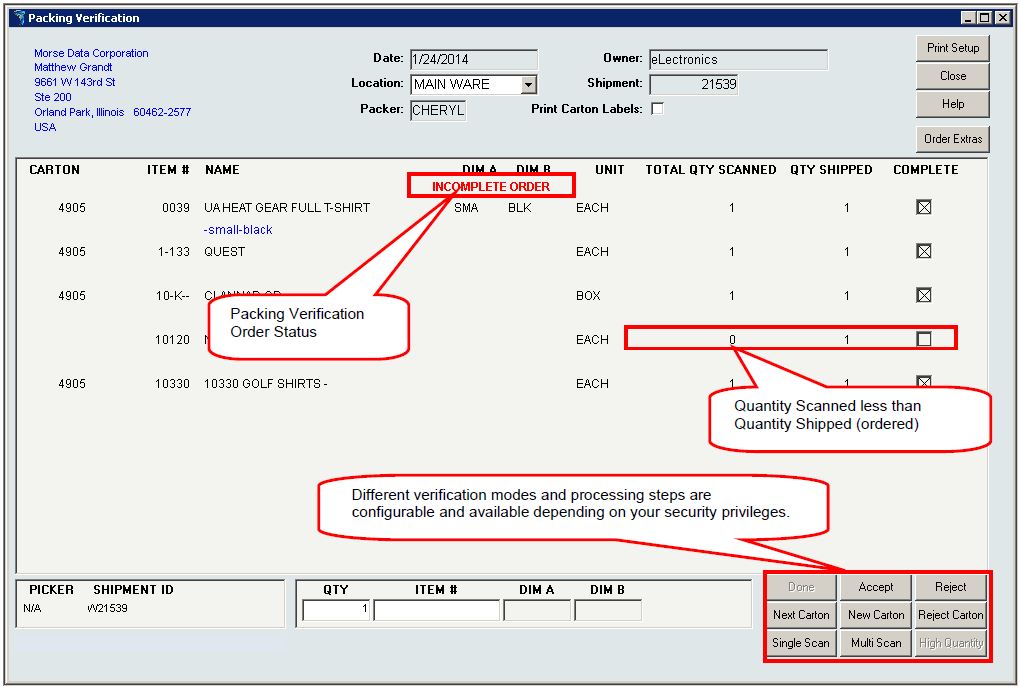 Packing is at the shipment level and recording is at the order level. InOrder can check for unprinted / ready to print orders that are shipping to the same customer as the shipment currently being packed.
Picker and packer initials are recorded, along with carton details and shipment summary.
 The InOrder Packing Verification provides three different packing verification methods:
- Single Scan – Each unit in the shipment is individually scanned. This method is used when line item quantities are typically low enough to scan each unit.
- Multi Scan – This method is used when line items often have higher quantities, so the process is streamlined for keying in the quantity when a line item has more than one unit to ship.
- High Quantity – This method allows quicker packing verification when the quantities are unusually large and difficult to count during packing. Each SKU is scanned once, regardless of quantity to be packed in a single carton.
The Packer Analysis Report provides at-a-glance analysis of packer productivity.
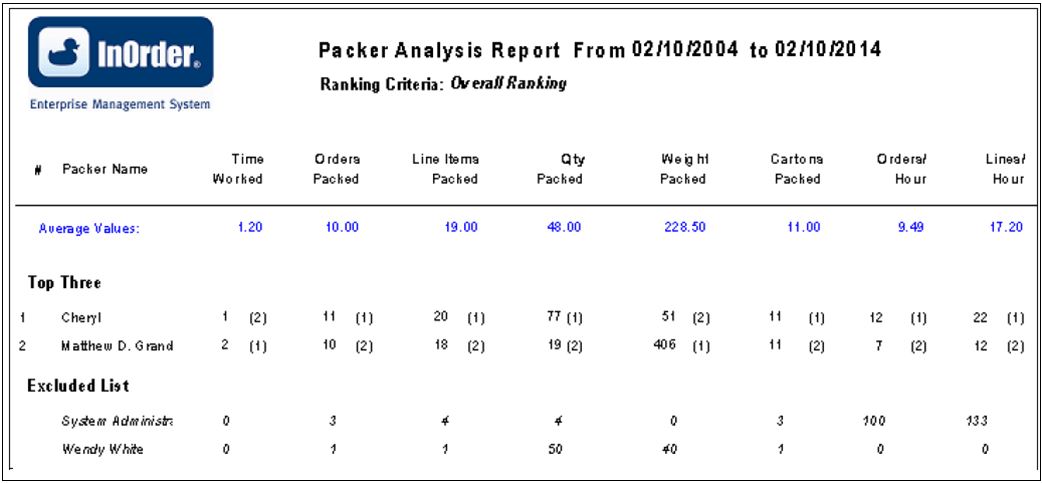 When you pack your shipments with InOrder, you can assemble all available items for the shipment at the packing station, use picking forms or produce separate packing slips, pack cartons for EDI orders, and track lot or serial numbers. You can even control if a shipment can be posted without packing verification.
For more information about the InOrder Packing Verification Enhancement, contact sales@morsedata.com.
Use Order Fill Rate to Measure Customer Service
The F. Curtis Barry & Company, a consulting company that provides solutions for multichannel operations and fulfillment, recommends that multichannel companies use Initial Order Fill Rate (IOFR) to measure customer service and inventory availability by order.
We agree. Both of these metrics are provided on InOrder’s Order Statistics Report. This data shows where you stand in regards to providing what customers expect – that inventory is available when ordered, and orders are shipped in a timely manner.
Initial fill rates are shown for orders within a range of weeks that you specify, along with the average number of hours it takes to fill those orders.
 For the complete article by F. Curtis Barry & Company, click here.
InOrder ERP Integrates with Experian Pro On-Demand Address Verification
As of version 10.00.07, InOrder ERP integrates with the Pro On-Demand Address Verification service from Experian. This service uses a contemporary address validation technique, providing 24-hour address validation service in real-time via the Internet. If an address is entered with missing information, the Experian address validation even displays possible matches for the user to select.
InOrder currently supports the Experian address validation for USA, Canada, and USA with residential/commercial flag. If you would like additional information about using the Experian address validation with InOrder ERP, please contact sales@morsedata.com.