
Category: ERP Business Software
Finding an Invoice Number with [Order Extras]
Do you have a carton number or warehouse shipment I.D. but not the invoice number? It’s easy to find with [Order Extras]. Here’s how:
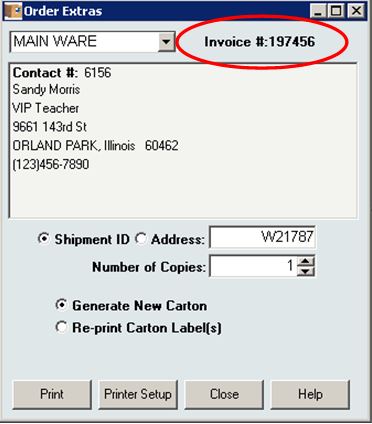
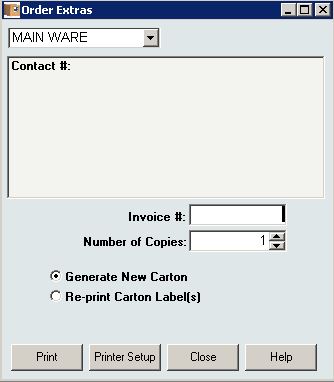 When you first open [Order Extras], a blank Invoice # field is available. Enter the carton or warehouse shipment I.D. in that Invoice # field and press Tab or Enter.
The Invoice number is displayed, along with the customer contact information.


InOrder ERP Guides Pickers Through the Warehouse with RF Picking
We know that InOrder’s RF capabilities are impressive, like the fact that it supports any internet-capable device. As always, we’re constantly making improvements, and InOrder RF is no exception. We added RF functionality for Guided Picking, Guided Putaway, and Item Counts. Here is an overview of the new Guided Picking.
To generate guided picking tasks, orders are entered and printed according to the normal order processing procedure. Then warehouse shipments are quickly and efficiently batched / assigned to pickers by a Warehouse Manager.
On the [Warehouse Traffic] window, the Assign Tickets tab has been updated to accommodate the new RF functions and assign the tickets to pickers to begin immediately. The assignment process starts a timer that evaluates how long a picker works on the assignment.
Currently, the warehouse manager scans one shipment I.D. at a time to assign them to pickers. Alternatively, a new picking batch number already assigned to the batch may be entered. Optionally, a picking batch number may be used to group / batch orders to pick or putaway together.
Using customized Crystal Report forms, different processes for this can be conceived. For example, cart picking, when your cart summary includes peel-off shipment I.D. labels for each cart slot, allowing you to forgo printing pick tickets.
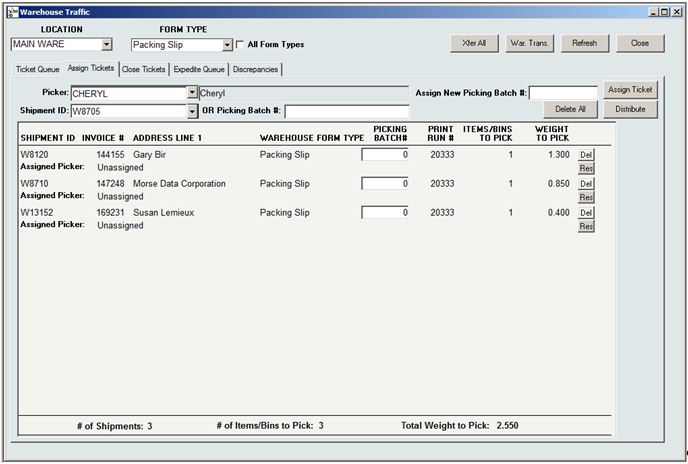 Tickets may also be assigned in bulk to several different pickers using the Distribute Tickets feature. This feature is useful for assigning putaway tasks, or for picking with a Crystal Report that prints shipment I.D. labels by picker after they are assigned.
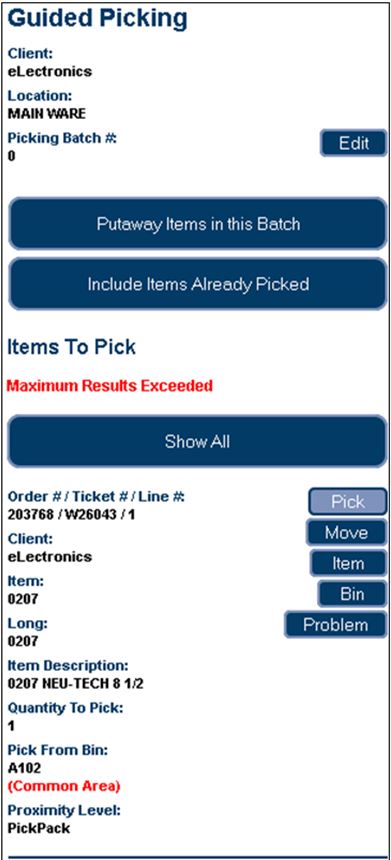
 When RF transactions have been assigned / distributed, the RF personnel picks the batch by first scanning the barcode label of the bin from which an item is being picked, then the barcode label and quantity of the item. (One or more of these scans may be bypassed using security privileges.) Items are then Putaway to the packing area, where they may pack verified, if applicable.
For example, when you are picking an inventory transfer (e.g., using cart picking), you walk through the warehouse picking all the items in your batch. When you are done, you tell the system by putting the items away (e.g., a ‘pack’ bin for cart or batch picking).
 Watch for future articles for more great RF features. But if you can’t wait, just call us and we’ll tell you all about it!
10 Surprising Ways InOrder is Like Super Heroes

Super heroes always stand above the crowd and are favorites because they can do amazing things. Here are just a few of the many ways InOrder reminds us of these super heroes.
- Batman – Both are always available to save the day when a crisis arises.
- Captain America – Both have the determination and ability to improve. InOrder is always improving and adding surprising new tricks; just check out our blogs for some of our newest features. Our customers also get our monthly InOvation for a more thorough overview of new features.
- Green Hornet – Both have a sidekick who helps them along to solve the problems of the day. InOrder’s sidekick is Crystal Reports.
- The Hulk – Both have incredible strength and can handle unexpected workloads.
- Iron Man – Both are smart, and can conquer just about any order, warehouse, or customer challenge.
- Superman – Both are sighted in many places. InOrder can be seen operating in many places from Maine to Hawaii, from New York to Chicago to LA, all along the east coast and as far Northwest as Portland, Oregon. InOrder has even been seen operating in several European countries as well.
- Teenage Mutant Ninja Turtles – All are willing to go the extra mile to help you.
- Wolverine – Both have a complex history that resulted in success and made them what they are today, with experience and wisdom that others don’t have.
- Wonder Woman – Both have amazing versatility and can adapt quickly to do what is needed.
What other super heroes can you compare with InOrder?
Click here for more ways InOrder can help with your Enterprise Management.
InOrder Supports PCI DSS Compliance Efforts for Protecting Stored Cardholder Data
PCI DSS contains requirements for the protection of stored cardholder data using cryptographic keys. These keys must be changed at least once a year. This is a straightforward procedure for you and your key custodians using the InOrder Key Management Wizard.
The network administration / security personnel, along with the designated Key Custodians, run the InOrder Key Encryption Wizard to change the key. If a key is old or suspected to be compromised, it is replaced. This procedure is audited by the system so your PCI QSA can confirm it has been done.
The InOrder Key Management Wizard supports PCI DSS compliance efforts by assisting with the following tasks for handling cryptographic key material:
- Generation of strong cryptographic keys
- Secure cryptographic key storage by generating key encrypting keys
- Split knowledge and dual control of cryptographic keys
- Periodic cryptographic key changes
- Rendering cryptographic material irretrievable by retirement or replacement of old or suspected compromised cryptographic keys
- Re-encrypting historic data with new keys
- Requirement for cryptographic key custodians to acknowledge that they understand and accept their key custodian responsibilities
- Backup and restore of keys
- Audit of all key maintenance operations
- Required use of complex passwords
- Restricting key access to the fewest number of custodians necessary
- Storing keys securely in the fewest possible locations and forms
Please refer directly to PCI DSS for your responsibilities under these requirements. If you have specific questions relating to your responsibilities for PCI DSS compliance, please direct them to your Qualified Security Assessor (QSA).
5 Big Enterprise Management Challenges You Can Solve with InOrder
Enterprise management comes with unique business challenges. This article discusses five of those challenges, and how you can use InOrder to address them.
Problem – You buy too much inventory because you don’t know how much you need. If you order a million dollars in inventory and don’t sell it in a timely manner, your money is losing interest because it is tied up while inventory sits in the warehouse.
Solution – Reduce your perpetual inventory investment. Maybe you need to spend only $550 for inventory and still service your customers effectively. InOrder helps you track accurate inventory on hand, and track your demand to know how much inventory you need to keep on hand and when to order it.
Problem – There are a lot of mistakes and returns on orders, costing money for each return, or you can’t fill orders quickly enough, or you get them out quickly but they’re not accurate.
Solution – Increase your order processing throughput potential. This means maximizing your overall capacity to accurately take, process, and ship your orders. InOrder helps you fill orders quickly AND accurately, so overall throughput is increased, with the ability to fulfill orders the same day they are received with 100% accuracy.
Problem – You have high perpetual costs and inefficient processes.
Solution – Minimize your perpetual costs by maximizing your process efficiency throughout the organization. InOrder’s tightly integrated modules allow each employee to have the up-to-date information they need at their fingertips when they need it, and to reduce overhead, for overall time savings.
Problem – Customers can’t get what they need and are frustrated because they can’t communicate with you the way they need to.
Solution – Improve your partnerships with your customers and your vendors. InOrder’s integrated Email communications, integrated eCommerce functionality, and EDI modules allow you to get the most of your relationships with your retail and B2B customers and your vendors.
Problem – You can’t get the decision making information you need to market as effectively as you can.
Solution – Advance your marketing decision making to the next level using InOrder and SQL Server for state of the art decision making and data mining.
If you’d like to share your experience with other InOrder users, tell us how InOrder helped you solve a problem or improved a process.
Generating Income with Loyalty Programs
Loyalty Programs continue our series on 5 ways to generate income with your ERP system. Loyalty programs give customers incentives / reasons to buy. They bring customers back so they buy more and buy again.
Loyalty programs provide benefits for both your business and your customers by generating additional income and expressing appreciation to your customers. You can reward your loyal customers by offering free or discounted items and other incentives. For example, offering points for placing orders or spending a minimum amount encourages order building while giving something in return. You can offer points for many more activities that build your business, including these:
- Each dollar spent
- Placing the first order or creating an account
- Buying a specific item
- Spending a minimum amount
- Ordering during a specific time
- Referring a specific number of friends to your website
- Joining a mailing list
- Ordering frequently
- Buying extra points
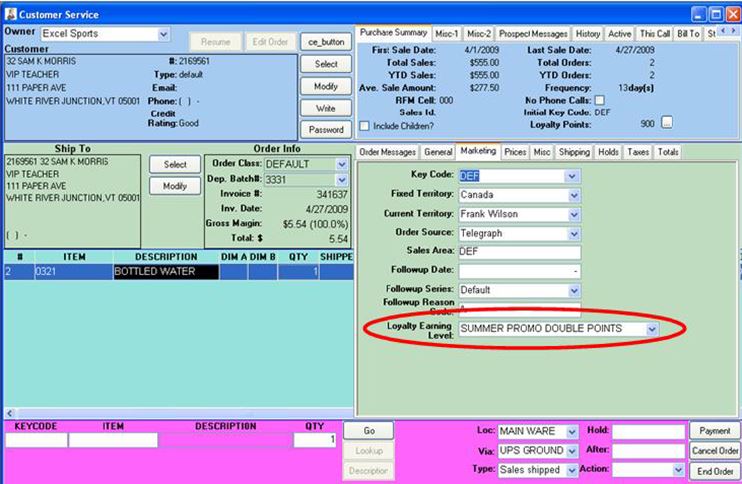
You can even offer points for sale. There are many, many possibilities. With InOrder, the loyalty earning level for an order can be changed while editing the order.
Points are earned and redeemed by placing an order. When a loyalty award is added to an order, the points are instantly deducted from the customer’s loyalty award account. You can give your customers choices, and redeem points in the form of free merchandise, dollar amounts, merchandise credit, and shipping discounts.
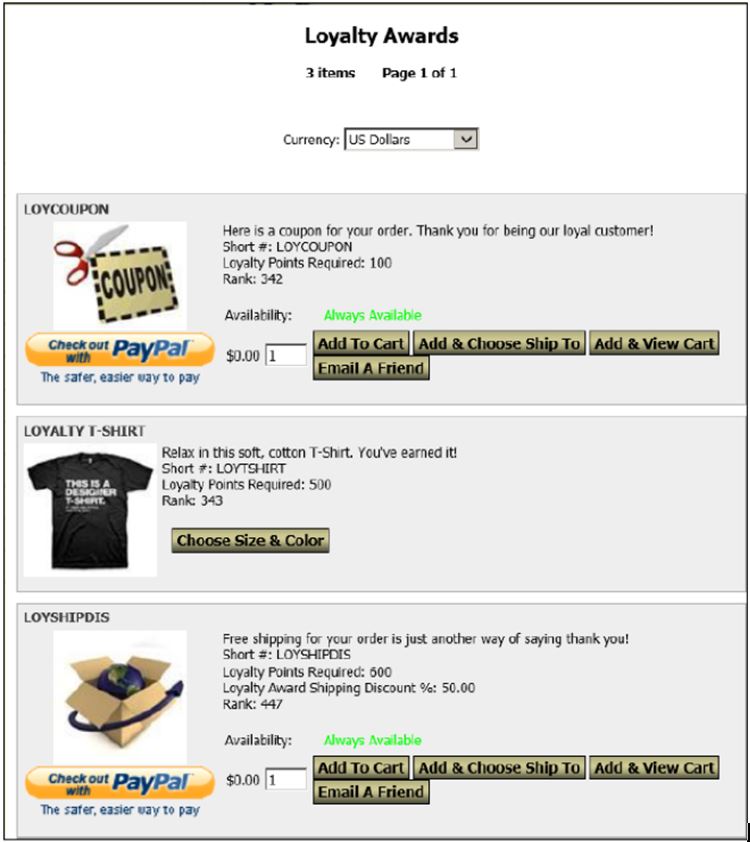
You set the limits. Points and awards may be handled a number of ways:
- Points can be awarded based on dollars or using resolutions based on quantity.
- Award points for the items of your choice.
- Assign earning levels based on customer types and order classes.
- Points may be manually overridden.
- Points are awarded when the order posts.
- Points may or may not expire.
- Identify the awards to offer.
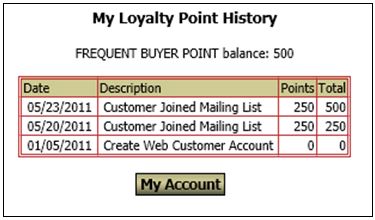
Track point balances and redemptions. Reports list each customer’s loyalty point balance and point redemptions for a date range by inventory item. Customer service reps can view earning details, balances, and access orders/transactions that generated or redeemed points. Customer may view their point balance and history on-line.
Protect Your Customers With Fraud Scoring Protection
To decrease fraudulent orders from being processed, orders placed with InOrder’s Enterprise Management Software may be assessed as they are received based on a variety of criteria known to indicate fraudulent purchases.
How it Works
Fraud point values are defined and assigned to criteria to compute a fraud score for each order source. Fraud scoring criteria may include whether or not an item is considered risky, and may be weighted to establish how risky an item is relative to other items.
As criteria are met, point values are added and saved on the order. If the overall score exceeds the defined threshold values, the order is placed on hold for review and/or manager approval.
Fraud scores may be computed in real-time as each line item is added to an order, or once for all items when the order has ended.
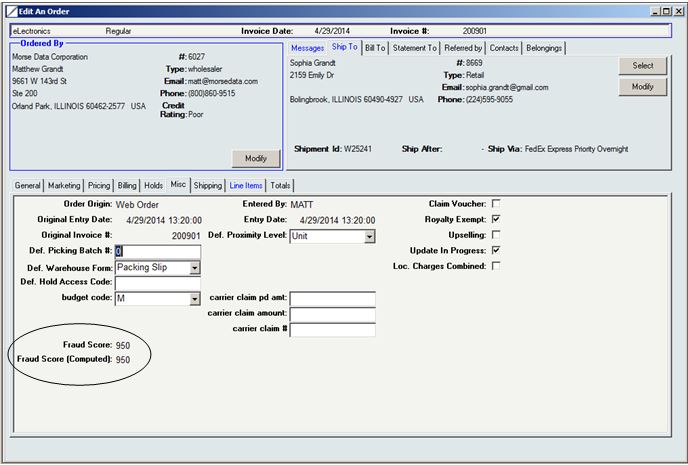
The [Order Lookup], [Order Entry], and [Customer Service] windows show the order’s saved fraud score.
InOrder Fraud Scoring Protection
A new report, Frequent Returns and Replacements, lists customers who exceed a number of returns / replacements within a date range, along with their returns and replacements. Also included are order level messages, and the customer’s lifetime sales and returns.
5 Easy Ways to Generate Income With Your ERP System

Generate Income With Your ERP System
In addition to supporting your business, every ERP system should have capabilities that help you build your business. Here are five features of great ERP systems that you can use to drive traffic to your store, add customers, and build orders.
Cross-Sell / Upsell
When a customer views or orders any item, this feature provides an alternate item or additional item to complement the one originally viewed. When used on an eCommerce site, items are displayed to the customers. When used with a POS or other order entry system, items are displayed to the customer service rep to suggest to the customer.
But don’t stop there! Make sure the suggestions make sense. For example, are you showing items that you have in stock? Are you grouping related items by the reason they are related?
Loyalty Programs
Use loyalty programs to reward your loyal customers and offer free or discounted items and other incentives. For example, you could offer points to customers for many activities that build your business, such as these:
- Each dollar spent
- Placing the first order or creating an account
- Buying a specific item
- Spending a minimum amount
- Ordering during specific times
- Referring friends to your website
- Joining a list
- Ordering frequently
- Buying extra points
Customers can redeem points in the form of free merchandise, dollar amounts, merchandise credit, or shipping discounts. Using a Loyalty Program not only generates additional income, but is a way to express appreciation to your customers.
Promotions
Promotions provide incentives to customers for ordering, or for increasing the size of their order. For example, you might include a free item with every order over $100. Promotions can also be used to entice customers to buy from other product categories they have not tried yet, or to test prices and new product offerings.
Installment Billing
Installment Billing allows you to make your products available immediately to your customers while accepting payments over time. Installment Billing can be used for subscriptions or large purchases, which customers might otherwise put off indefinitely. You can even link an installment plan to a promotion so your customers can take advantage of special purchasing opportunities before an offer expires. Installment Billing is the perfect tool for providing your customers with a personalized and professional shopping experience.
Email Marketing
Email Marketing provides an efficient way to communicate with your customers through your ERP system. Email marketing is used to let your customers know about new products and promotions, and to drive traffic to your website with newsletters, reminders, and other targeted marketing efforts via Email. Effective Email marketing pieces include the “abandoned cart reminder” and the “we’re sorry so here is a discount.” These types of emails are known to catch customers’ attention by letting them know that you care about them and their business personally (in the context of previous interaction with them, as opposed to a general “cold” marketing effort).
Click here for Email marketing messages every ERP system should have.
Get Your Shipping Rates InOrder
FedEx Corp. recently announced the following changes to its rates.
As of Monday, June 2, 2014, the FedEx Freight fuel surcharge indices increase by 3 percentage points.
As of Thursday, January 1, 2015, FedEx Ground will apply dimensional charges to all ground packages, regardless of their sizes.
InOrder customers with a shipping manifest system interface under support can rest assured that they will receive updates necessary to support these computations for the carriers that require them. Interfaces to other shipping systems that do not require the new features will not be affected.
NOTE: Shippers must coordinate any necessary upgrades with their shipping manifest vendor, allowing enough lead time to test the upgrades before the new rates begin.
4 Email Marketing Messages Every ERP System Should Have
You know it’s critical to be able to communicate with your customers through your ERP system. You need to acknowledge orders, notify customers about shipments, approve returns, reset passwords, send digital products, and provide various services through Email messages. In addition to supporting your business, every ERP System should have Email Marketing capabilities that help you build your business. To let your customers know about new products and promotions, and to drive traffic to your website with newsletters, reminders, and other targeted marketing efforts via Email, make sure your ERP System can send these messages.
Welcome Messages
Welcome messages are sent to customers who create new accounts and can set the tone for your new relationship. They remind new customers of their basic account information that may be needed to return, such as their login information, customer number, etc. They are sent to thank new customers and announce any coupons, points, or other promotion for creating the account. Welcome messages may also contain links, discuss benefits of the company, privacy policies, customer support information, other promotional offerings, and more.
Abandoned Cart Email Series
These all-important messages can generate income for your business by converting lost revenue. Include a link to the cart so your customers can simply pick up where they left off. You can even offer promotion codes to encourage customers to complete their orders or add items to their carts.
A good practice is to send abandoned cart Emails as a series. For example, you can either define a series for Emails that are sent at specific time intervals and stop after the final Email is sent, or based on minimum/maximum delay settings until the maximum delay is reached.
Back in Stock Notification
Use these messages to drive traffic back to your site by notifying shoppers when items they want become available or promote related items as alternatives. A great ERP system will even receive requests directly from shoppers to let them know when an item is back in stock.
Email Blasts
Email Blasts distribute Email messages to members of a mailing list to advertise new products or upcoming sales, distribute newsletters, and more.
Other Considerations
Be sure to look for Email tracking as well. Tracking clicks and reads shows your customer services reps when a customer is interested in a specific offering or item. Other information related to customer contact is also tracked, such as orders, returns, inquiries, mailings, and call lists, and even your conversions so you know which promotions are the most successful. A great ERP system organizes all of these Email functionalities by customer and prospect, so customer service and list management functions can see and act on a clear and integrated timeline of events. This helps customer service reps provide first-rate, personalized service to your customers.
All of these Email functionalities are tracked by customer and prospect, so customer service and list management functions can see a clear and integrated timeline of events in one place.
When evaluating or setting up your ERP Email Marketing messages, be sure you can send text or html-based messages, or both, so you can reach all your customers where they want to be reached. Ideally, the system will have templates to get you up and running faster, and let you personalize your content for top-notch targeted marketing.