
Category: ERP Business Software
Morse Data Corporation Offers Data Conversion Services!
When you purchase InOrder as your ERP system, our Discovery process has you covered. First, we work with you to fully assess your legacy data, and then we provide you with a detailed Data Conversion Proposal, by phase and category. This allows you to choose precisely which data and level of detail you would like your InOrder system to have when you turn it on.
Our data conversion team experts work with you throughout the process, as we build a reproducible data conversion process that extracts, cleanses, and imports your data. This allows you and your staff to learn and test the new InOrder ERP system using data that you are familiar with. Over the years we have refined this process, and so many of our techniques will surprise you, but they are extremely effective.
Checking the converted data on the new InOrder ERP system not only helps your staff to get familiar with the new system, it helps them feel more at home, and more involved in the conversion process.
We convert Your Data to your new InOrder ERP System!


InOrder ERP New Transfer All From Bin Feature Saves Time for Your Warehouse Personnel
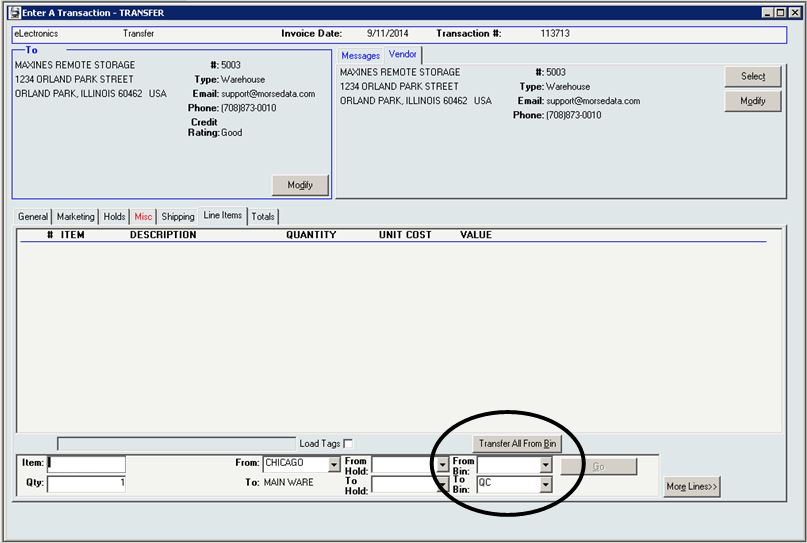
When entering Transfer transactions, InOrder users may have already noticed the new Transfer All From Bin button on the Transactions window.
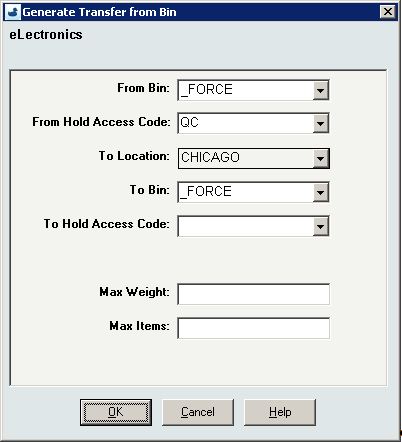
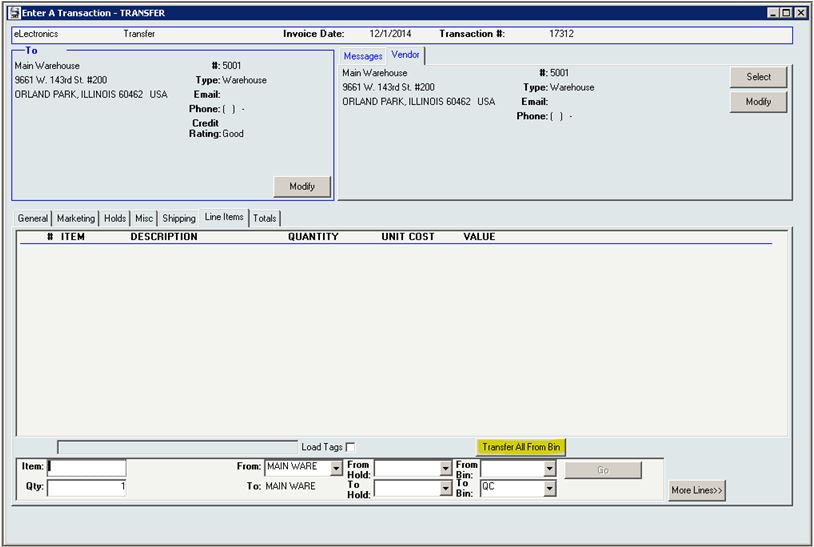 This new function generates an inventory transfer to move all contents from the specified bin to their final destination en masse (rather than individual bin moves) to facilitate guided putaway transactions.

This function is useful for companies that participate in exhibits or use other temporary storage, manually moving stock from one place to another. Now you can update InOrder with the new information with the push of a button.
If you take a trailer out on the road, use Reorder List and Local Reorder Points (as usual) to load the trailer. This loads from multiple bins in the main warehouse to the trailer. When you return to the warehouse and putaway your stock, use the Transfer All from Bin button to generate a transfer to move all stock from the trailer (single location / single bin) back into the warehouse. The Transfer All feature is also useful when you have many items in a bin designated as a “staging area” and you are ready to move them all to the destination. In this case, the staging area bin can be transferred to a remote storage location or exhibit/trailer.
This eliminates the need for individual bin moves and allows transfers across locations from one warehouse to another. You can also print your transaction and use it as a work order.
Previously, when stock was transferred, InOrder identified the From-Bins. Now, you can also select the bin from where you want to transfer your stock, which is also very useful.
How much time will this new feature save you?
Quick Tip – Copying Deposit Batch Details to a Spreadsheet
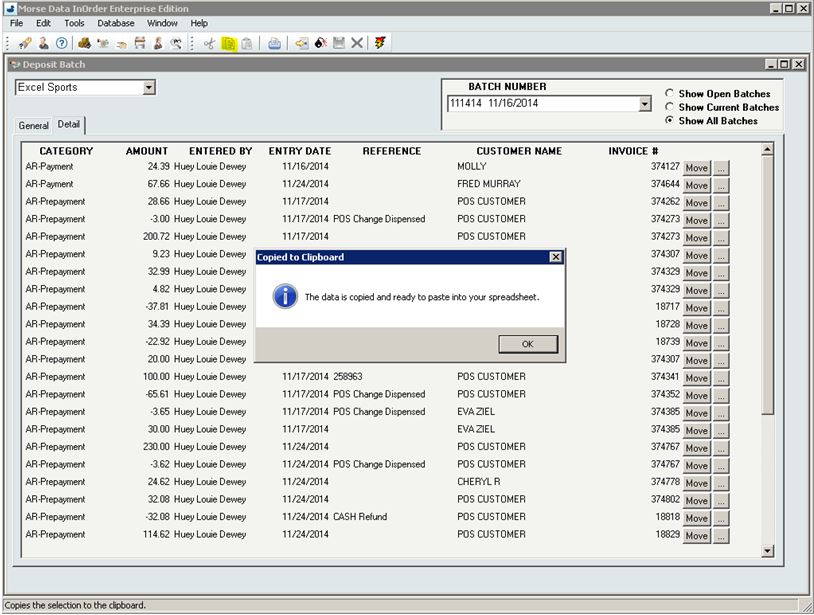
Do you need to quickly get deposit batch details to a spreadsheet? To copy the details, use the copy shortcut (Ctrl+C) or click the copy button on the InOrder toolbar.
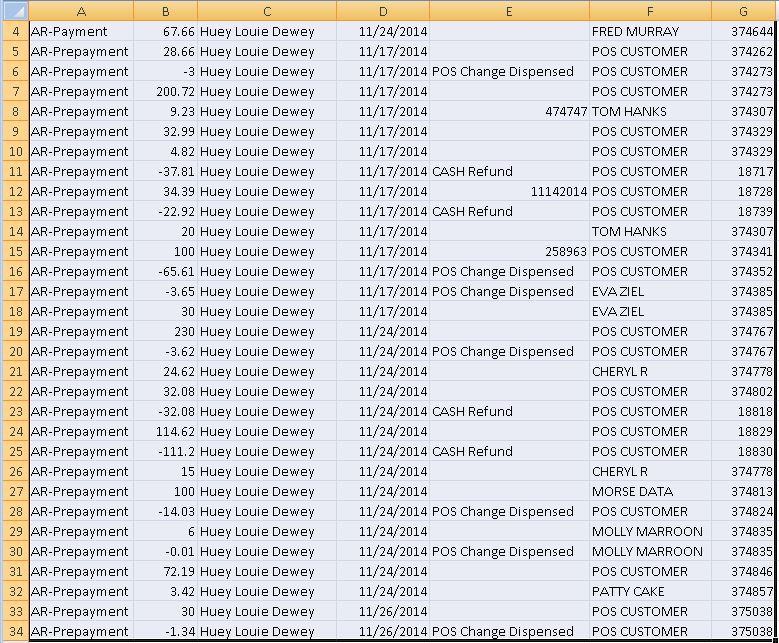
Then paste (CTRL+V) the details into your spreadsheet:
Study Shows Promotions Can Significantly Influence Purchases
A recent study made available by RetailMeNot.com explains the significant influence of promotions on purchasing decisions, sales, and loyalty. The study revealed that coupons, promotion codes, sales, and special offers were used by 49% of online purchases and 56% of in-store purchases.
Promotions have a big enough influence that consumers will use them to plan what they buy, where they will buy it, and when. They will personally seek out promotions from websites, mobile apps, printed coupons, emails you send them, and they will follow you on social media to get them. According to the study, 60% of one group of consumers surveyed said promotional offers were the reason they “like” retailers on Facebook.
The majority of consumers (91% of shoppers who used in-store promotions and 89% of shoppers who used online promotions) said that promotions were the reason they made their purchases. As shown by the study, promotions can increase the number of new customers and significantly increase the average order amount.
Interestingly, the study also reports that 39% of consumers abandon online shopping carts, 78% of them look for a promotion first, 68% of them used a promotion to return to the cart, and 24% have completed their purchases with a promotion. This presents yet another opportunity to encourage customers to complete their orders or add items to their carts.
68% of one group of consumers expressed loyalty to a brand offering online coupons or promotion codes and a willingness to tell a friend about them, and 50% even said they would be likely to buy at full price later.
This all ties in with what we previously said about promotions and how you can use them to generate income with your ERP system. And InOrder supports them all – Promotions, Email Marketing with Abandoned Cart Notifications, and even Loyalty Programs to say thank you.
Are You Realizing the Full Potential of your ERP Software System?
Your company purchased the software, training and setup work was completed, and then it was turned on. A few years have gone by. Now some of the employees and even a few managers have come and gone. Few people in your department remember anything from the training, but you know the basics to get your day to day work done.
The software has a few buttons that you’ve never used. A few are grayed out, and the desk you inherited might even have sticky notes that you don’t understand, like “NEVER PUSH F12!” or “F6Tab F8Total”.
When you connect to the software, it says Copyright © 2009. You realize that was five years ago. OK, maybe it’s not that bad. Let’s say your company does upgrade to the latest version at least once a year. But the process goes like this: The latest version is installed to a Test Environment, where each department assigns someone to follow a testing script that confirms each process can still be performed successfully. Once everyone signs off on this new version, it is installed into the Production Environment. At this point everyone notices some new buttons, but nobody really knows what they do, and so everyone agrees not to press them.
If any of these things have happened to you, then it’s time for an Annual Software Implementation Audit!
The Annual Implementation Audit lasts two to three days. During this time, an Implementation Specialist from the software company visits your office to meet with representatives from each department of your organization, to review your processes that relate to how you use the software system. At this time, employees and especially any managers who have joined the organization can attend some refresher training sessions. This is also a good time to discuss any wish list items, annoyances such as low priority bugs that have never been reported, and especially burning questions about those new buttons that you were told to never press, but you are suspect could solve some problems!
So often, we hear “Why didn’t anyone tell us the system could do this?” Implementation Audits commonly reveal shortcuts that were not being used, but also often find processes being done manually that can be automated, and functions, features, or optional modules that are not being used at all because nobody knew they existed. Instead, these functions are being performed manually, day in and day out, when your software could be doing them for you.
When was your last Annual Implementation Audit? Maybe it is time?
Every Item Counts With InOrder
The Item Count function within InOrder may be used for period inventory counting, as well as continued inventory counting. For example, after daily warehouse activities (such as picking, packing, putaway, etc.) have been completed, the Warehouse Manager may generate a Daily Physical Count report to generate Inventory Tags for each RF user to complete that day.
InOrder RF allows RF personnel to complete item count tasks that have been assigned to them. The barcode of the bin is first scanned, then the barcode of the item is scanned and the quantity is entered.
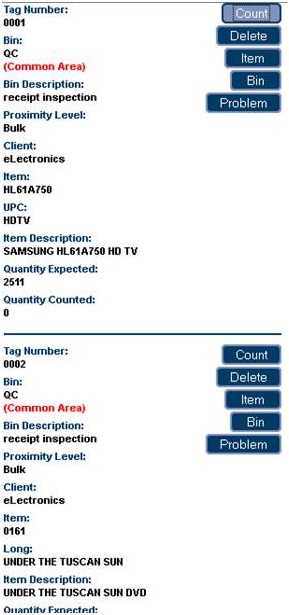 Item count tasks are generated via the Daily Physical Count report, which assigns inventory tags to RF users.
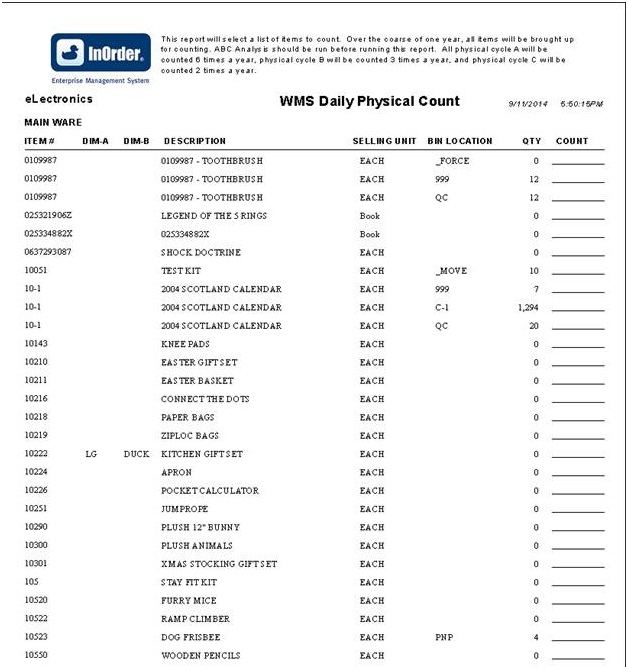 Assigned tags are displayed on the InOrder [Inventory Tags] window. Unassigned items may also be counted manually.
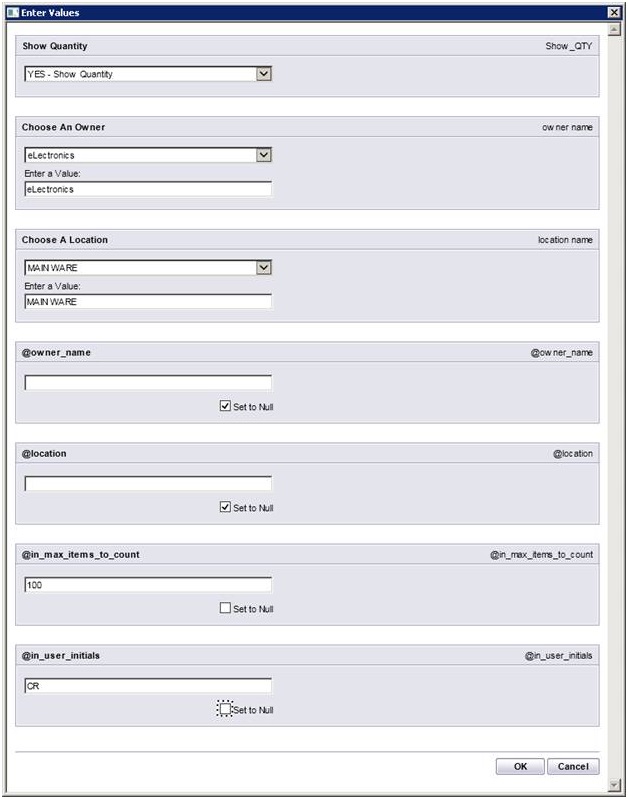
The Daily Physical Count report template supports the Item Count function. New parameters include the maximum number of items to count and the initials of the user who will be counting.
For more information about any of these features, call 888-667-7332
or send email to support@morsedata.com.
InOrder Quick Tip – Searching by Check Number
You may occasionally need to find an order by searching for a specific check number. If the check number was specified when the payment was entered, then finding that order is as easy as searching for the invoice. Here’s how:
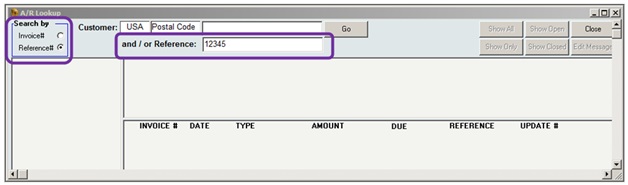
- In A/R Lookup, select the Reference # option in the Search By box.
- Enter the check number in the Reference field.
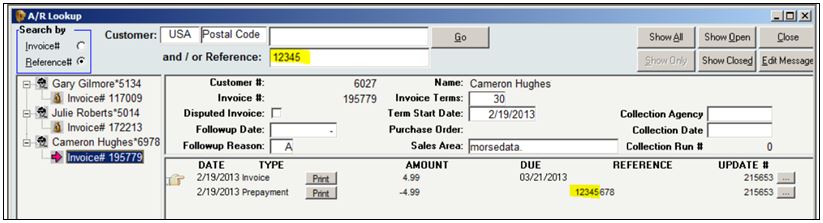
All invoices containing that check number are listed in the search results.
Today’s Winner Is: 3rd Party Fulfillment Companies!
If your company is a 3rdParty Logistics Company (3PL) or a 3rd Party Fulfillment Company (3PF), then you need to do Warehouse Management and Order Fulfillment for each of your clients, and they all have their own unique discounts, charges, and business rules. If you are reading this, then you’ve found the right software to manage this problem! InOrder Software is one database, but it lets you define these rules for each company that you process orders for.
With one login, your call center reps, warehouse people, and accountants can view the data from each company that they want to work with. Your clients can also connect to securely view their own data.
Just a few of the business rules you can define for each company include shipping methods and shipping rates, customer types with pricing and discount rules for B2B and B2C shipments, taxes, warehouse forms and forms routing, integrated shopping cart websites, EDI rules, promotions, integrated loyalty reward programs and gift card processing, payment rules such as PA DSS certified credit card processing, and even installment plans.
Of course, since it is so flexible, there is a lot to learn if you wish to fully take advantage of this. The saying “With great power comes great responsibility” applies here. However, if you are up to this challenge, then the more you learn up front to understand how the rules are defined and what they can be used for, then the more you will be able to take advantage of these virtually endless capabilities.
InOrder ERP Guides Warehouse Personnel through the Warehouse with RF Guided Putaway
Warehouse Management, in part, means controlling where inventory is put away and how it gets to the correct storage location in the most efficient way possible. InOrder does it with precision and innovation using tried and true logic while keeping up with the latest technology.
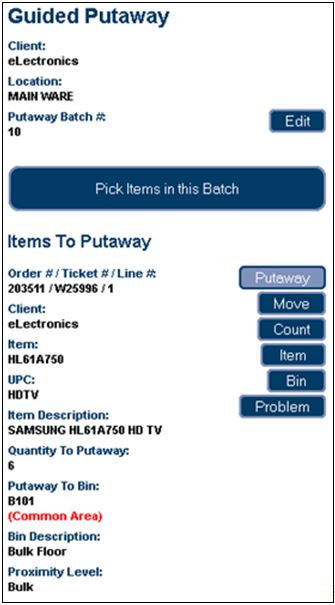
Guided putaway tasks are generated by inventory transactions. An item being received may be put away directly using the inventory receipt transaction, by processing received inventory in the Receipt QC window to generate a put-away inventory transfer, or by manually entering an inventory transfer after the receipt.
Inventory transfers may also be generated to move all contents of a selected warehouse bin, to their final destination, en masse (rather than individual bin moves).
 The [Inventory Transaction] window’s line item entry section for inventory transfers provides convenient entry of both “From” and “To” Bins.
 As with Guided Picking, these tasks are also assigned by the warehouse manager.
The Guided Putaway process includes scanning the item in the receiving area (picking), entering the quantity being putaway, and scanning the label of the putaway bin as the item is put away into the bin. One or more of these scans may be bypassed using security privileges.
The following options are available for RF Putaway:
- Pick and Putaway Items in Batch – This process directs the RF user to first pick all items in the batch, if applicable, then the RF user is directed to putaway the items.
- Pick Entire Batch – This option is available if your batch includes items being picked from a single bin location (such as the dock, for example). Then items may be putaway.
Just Kitting Around With InOrder
If your company buys lots of parts, and then puts them together before shipping them to customers, InOrder Software is the Warehouse Management System for you!
If your company has trouble keeping enough quantity on hand for your common components, or does not know how many parts to keep in stock, then InOrder is for you.
InOrder solves so many problems for Kit Assembly Companies:
- Managing and tracking work orders to Pre-assemble kits
- Nested kit definitions, with sub-assemblies to sub-assemblies and so on
- Kits on the fly that are built to order
- Easy Kit Definition Access for Customer Service and On-Line, enabling assistance with replacement parts orders
- Part substitutions in a kit or a customer order for replacement parts
- Kit dis-assemblies are also supported, for example, to free up common components needed elsewhere.
- Inventory forecasting and vendor reordering
- Multi-Dimensional Inventory
- Full featured warehouse RF capabilities, including guided or manual put away, and guided cart picking
- Warehouse employee time capture and job costing
- Multi-client support for Kit Service Companies doing Third Party Logistics
InOrder delivers the capabilities you need to improve your warehouse automation, and to increase your warehouse throughput, for the best Return on Investment you will find.