
Easy Return Policies Could Attract More eCommerce Customers
Most (if not all) eCommerce websites include a section with their return policies, which include details about returning items with or without receipts, which products can be returned and when, which products cannot be returned, and more. When I shop online, two options I find particularly appealing are the ability to return an item to the store, and free return shipping.
Free Return Shipping
Free Return Shipping could make a difference in where your customers shop. Customers want this. Free return shipping doesn’t mean customers will return everything they buy, but they’re trusting that your products are worth buying without seeing them or touching them first-hand. It assures them that you stand by your products and care enough to provide top-notch service. Shoppers prefer to shop at stores that offer free returns, so it could be a small price to attract more customers. If you offer this, be sure to promote it clearly so shoppers don’t miss it.
Return to Store
 This option is attractive to shoppers who actually prefer to take their returns to a physical store. It involves no shipping expense, it’s faster in some cases, it’s convenient, it provides immediate credit, and shoppers don’t have to walk out empty-handed if they want an exchange. This provides golden opportunities for retailers to make these experiences easy for shoppers, who might make additional purchases while making their returns. It can also create a positive experience and lead to future shopping.
If you offer either of these return options, be sure to promote them on your website – it might make a difference in where shoppers spend their money.
Contact us for more information about eCommerce solutions with InOrder.


Offer These Services to Attract More eCommerce Shoppers
Businesses are making it easier and easier for shoppers to buy from them. One service that has grown in popularity and value for both businesses and shoppers is the ability to buy online and pick up orders from the store. This has become a common option, with a focus on convenience and speed. When shoppers pick up their orders, they may not have time to continue shopping. Instead, they want the pickup process to be easy, efficient, and fast. Some businesses simply have the orders ready at a common checkout counter, while others may provide a dedicated pickup area. Another option is to reserve an item online and then check it out or try it on in the store. If you’re considering theses services for your customers, be sure to include all of the following qualities:
- Easy – Identify items that are available for this service so customers can find them in search results. When it’s time for pickup, make sure it’s easy to find your pickup counter, even if it’s in the back of the store. If shoppers must search for a pickup counter, they may very well get frustrated enough to avoid it in the future.
- Efficient – If customers wanted to go through the in-store shopping experience, they probably wouldn’t spend the time shopping online first. Don’t make them endure a lengthy process or long lines that include in-store shoppers. Instead, give them their orders quickly. If possible, designate a separate area to pick up online orders, where it will be easy to access and check out.
- Fast – If customers are in a hurry, they need to get their orders and go. When convenience is important and you meet that need, chances are they’ll be back.
 Another option that is gaining popularity is outside pickup service, which allows customers to remain in their cars while you bring their orders to them. This service may include filling shopping lists, packing items, and loading cars. It is especially valuable to people in a hurry, parents with a carload of kids, people for whom it is difficult to shop, emergency purchases, and last-minute gifts. People taking advantage of these services could even shop online more often, so be sure your customers know about these options if you make them available.
You can also make an app available for mobile shopping and pickup arrangements. Restaurants and grocers have offered these services for years, providing same-day delivery and having orders ready at a drive-through. Retailers are recognizing the value of these services for both themselves and their customers, and customers are embracing them.
Contact us for more information about eCommerce solutions with InOrder.
Helpful Articles for Your Business
 In its 2017 Pulse of the Online Shopper Study, UPS provides insights for attracting shoppers. As we’ve mentioned, access to customer service during checkout, searching, and browsing is important. Now you can see statistics. The results of this study are provided in a series of five volumes, including:
- Volume 1 – Digital Evolution
- Volume 2 – A Mobile Mindset
- Volume 3 – Channel Dynamics
- Volume 4 – Savvy Shoppers
- Volume 5 – Retail Fundamentals
This link provides a download request for Volume 1. Use this valuable information to help you make decisions for winning these shoppers. And, in doing so, grow your business.
If your business is concerned about PCI-DSS Compliance, read this article from the PCI Security Standards Council. It explains SSL/early TLS, its risks, and what to do to protect against its vulnerabilities.
Is it hard to find people willing to work in a warehouse? This article discusses using robots as a possible solution.
Love your product, listen to your customers, and care about their needs. This article provides these 3 tips for success in direct sales. All 3 also apply to eCommerce, wholesale, and so many other service-related activities.
Customer Service Options for eCommerce
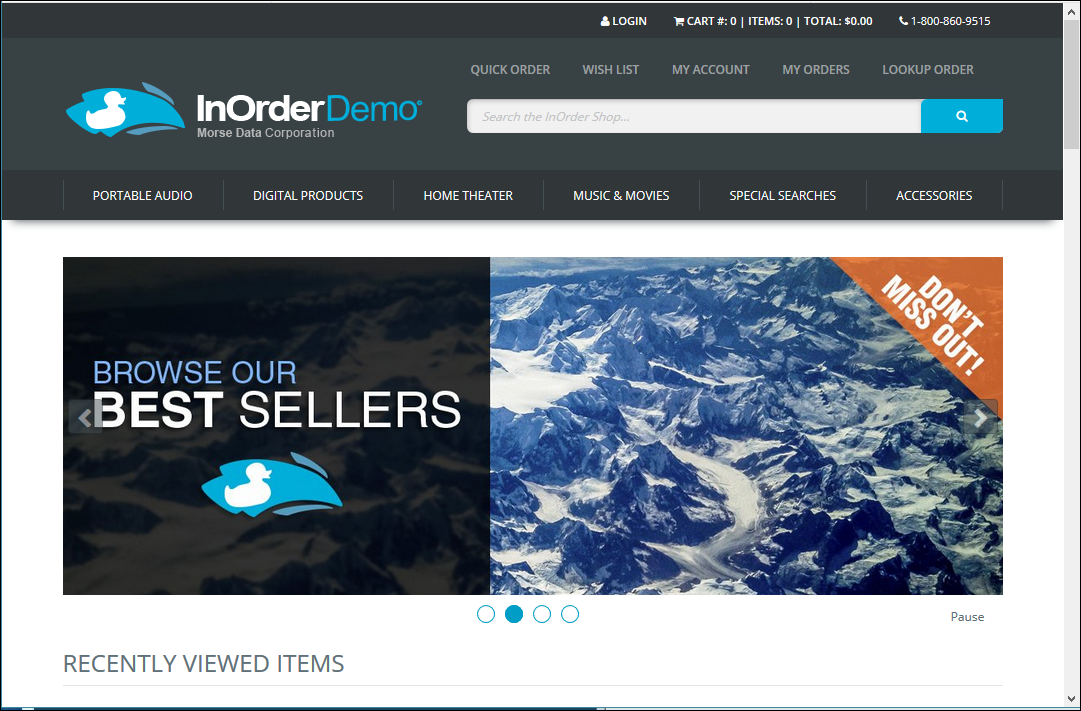 You know that exceptional Customer Service is critical. It can determine whether you get sales, good references, and future customers. You can use a variety of services to attract and keep your eCommerce customers, each with its own benefits. Here is a list of options and how they can be useful.
- Email – Some people prefer to use Email, so be sure you can be reached this way as well as all of the others. Just as it’s important for customers to contact you, it’s also important for you to contact your customers. You can use Email to acknowledge orders, notify customers about shipments, approve returns, reset passwords, send digital products, promotions, and other targeted marketing efforts. Make sure to keep your mailing lists current, and allow shoppers to choose which messages they receive to increase their effectiveness. Use your ERP system to log messages that are sent, providing customer service reps more opportunity to enhance the service experience when customers call.
- FAQs/Q&A – As people get more comfortable shopping with their devices, they need less personal contact less and less. This makes it more important for you to anticipate all the information they will need, such as answers to the most common questions you receive. Providing this information with each item or service gives your customers the information they need make purchase decisions.
- Phone – Too often, online businesses use Email as the only means of contact, or a phone number is not easy to find. If shoppers have a question about your business or products, or a problem navigating your site, make sure you can help without making them wait. Customer Service should always be at your customers’ fingertips. Make sure your customers can reach you immediately with any questions. Display your phone number where it can be easily and quickly seen. If shoppers have questions or problems navigating your site, make sure you can help without making them wait.
- Social Media – Word of mouth can be the best form of reference. It can also be the worst. Whether someone is asking neighbors if they know a good plumber or roofer or telling neighbors about their plumber or roofer, personal experiences spread fast with social media. If your customers are on social media (or if you want to attract customers who are on social media), your business must be there too.
- Community / Customer Participation – Reviews can increase sales by steering and bolstering confidence as shoppers are considering their purchases. If your ERP system provides the capability, you can enable live crowd sourcing so your customers can provide feedback for products. You can even create your own form of social media, providing online forums or Q&A sections that allow customers to contribute.
Clear communication and availability is critical in providing exceptional customer service to your eCommerce customers. Sometimes, something may happen to make a customer unhappy. Build your reputation as the business that responds appropriately and professionally.
5 Ways InOrder ERP is Perfect for Managing your Inventory
Your products, your services, your location, your tools, and of course, your employees. All of these help your business succeed. If they’re not working together efficiently, it will impact your customer satisfaction and your bottom line. Here are five ways your ERP system can help.
Inventory Item Dimensions
If your company sells multiple variations of single items (style, color, size, etc.), then InOrder is for you. InOrder’s inventory management system allows you to define up to eight variations (dimensions) for a product, with unlimited values for each dimension.
When placing an order for an item with dimensions, simply enter the item number, and InOrder shows all available options in an easy to use grid.
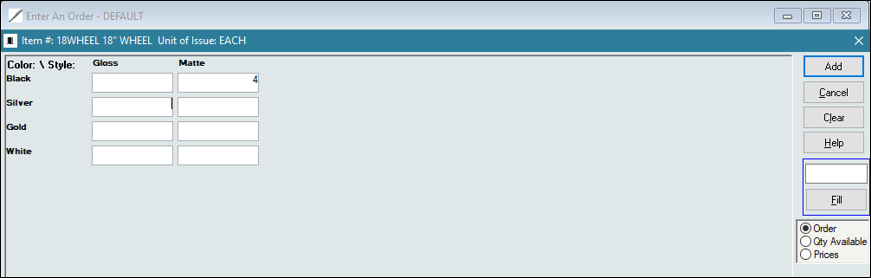
Alternatively, you can specify the dimensional SKU or UPC code.
Reserving Inventory
What happens when a wholesale customer unexpectedly orders the last of your inventory for a particular product? How long do your retail customers have to wait for the backorder? And how many customers will you lose because they don’t want to wait?
With a good ERP system, you can prevent this from causing you to lose revenue from non-wholesale orders. Simply reserve a specific quantity of each item for your retail customers. When an order is placed by a wholesale customer, that reserved quantity isn’t even available.
Inventory Labels
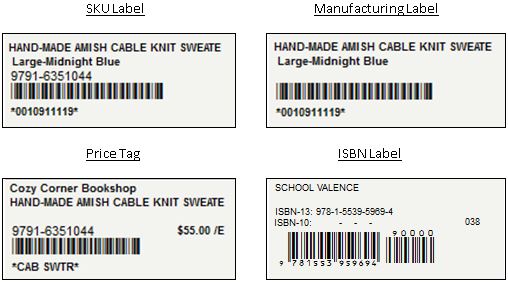
Inventory barcodes are a necessity. Placing labels with barcodes on your products helps quickly identify them and can help prevent mistakes during picking, Point of Sale (POS), and physical inventory.
 Kits and Kits on the Fly
The InOrder Kit Definitions feature allows you to assemble multiple items for sale as a single item. With this functionality, you can track the inventory, component assembly and disassembly, sales, and costs of the assembled kit and its component items.
When an out-of-stock inventory item is ordered, you can substitute either a single in-stock inventory item for another brand of the same item, or you can substitute a group of inventory items (Kit-on-the-Fly). This feature works best when you have many items that are typically ordered together, but you need the ability to ship what is in stock.
RF Communication
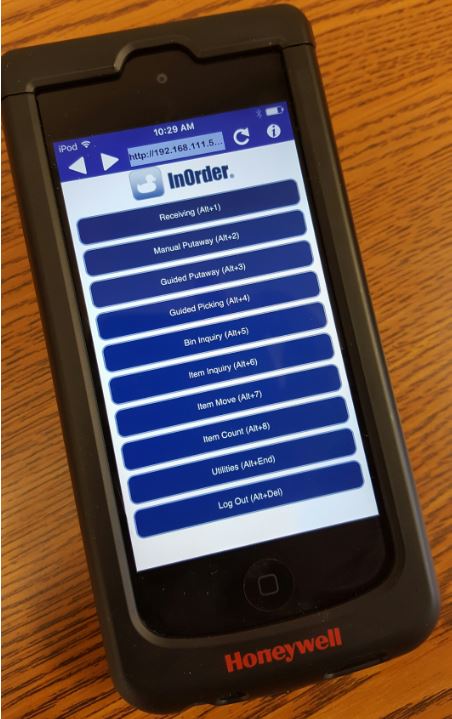 Use an RF communication system from top quality ERP software to efficiently handle inventory through real-time inventory tasks, improving productivity and control for major warehouse functions. After rolling out an RF system, a warehouse can significantly decrease paper processing and increase its inventory receipt processing from an average of 20 line items per hour to 55 line items per hour, per person. InOrder RF also supports inventory dimensions.
For more information about Inventory Management with InOrder, contact sales@morsedata.com.
6 PCI DSS Best Practices to Become Requirements in 2018
 Version 3.2 of the PCI DSS requirements was published in 2016, but several items are considered best practices until January 31, 2018. On February 1, 2018, they become requirements. One is for everyone meeting PCI DSS requirements, while the rest are for service providers.
Following are the best practices that become requirements on February 1, 2018.
Requirement 6.4.6 is for everyone meeting PCI DSS requirements. Whenever you implement a significant change to your system/network, verify that all appropriate PCI DSS controls are applied where needed, and update your documentation to reflect the change.
Requirements for Service Providers
- Document your cryptographic architecture (Requirement 3.5.1).
- Have a process to detect and report failures of critical security control systems. See PCI DSS Requirements 10.8 and 10.8.1 for examples of failures and what processes must include to respond to security control failures in a timely manner.
- If segmentation is used to isolate the CDE from other networks, perform penetration testing on segmentation controls/methods at least every six months and after any changes to them (Requirement 11.3.4.1).
- Executive Management must assign responsibilities and define a charter to maintain PCI DSS compliance. PCI DSS Requirement 12.4.1 provides details about what the compliance program must include, and who is considered “executive management.”
- Perform reviews at least quarterly to confirm personnel are following security policies and operational procedures, and document the results of those reviews (Requirements 12.11, 12.11.1).
Please refer to PCI DSS for your responsibilities under these requirements. If you have specific questions relating to your responsibilities for PCI DSS compliance, please direct them to your Qualified Security Assessor (QSA).
Helpful Articles for Your Business

- You can’t hide from Cyber Threats, but this article can help you organize a strategy to defend your business against it.
- B2B companies – Don’t miss out on opportunities to grow your business! Use your eCommerce store to attract new customers in surprising ways.
- This interesting article discusses billion dollar digital marketplaces.
- It’s no secret that content increases search results and traffic to your website, but how does that happen? This article offers helpful tips.
InOrder ERP Kits and Substitutions Can Benefit Your Business
If your company buys lots of parts, and then puts them together before shipping them to customers, InOrder’s Kit Definitions feature will benefit your business. If your company doesn’t always keep enough quantity on hand for your common components, or does not know how many parts to keep in stock, then the InOrder Substitutions feature is for you.
Kit Definitions
The InOrder Kit Definitions feature allows you to assemble multiple items for sale as a single item. With this functionality, you can track the inventory, component assembly and disassembly, sales, and costs of the assembled kit and its component items.
Using InOrder for Kits is great for items you always sell together. It allows you to stock and sell multiple part numbers together under one Top Number. A good example of this would be a Lowering Block Kit, which has u-bolts, blocks, and hardware. 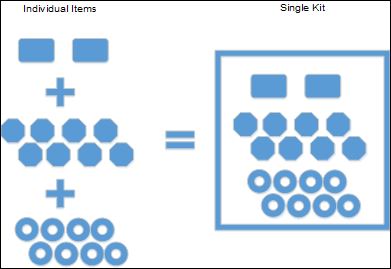
The InOrder Kit Definitions feature provides the ability to:
- Control the inventory and cost for each item individually.
- Base the total cost for the kit on all the items included.
- Discount the retail price (buy in a kit and save).
- Replenish kits based on individual SKUs in stock.
- Disassemble kits when you no longer need them, or to free up common components needed elsewhere.
- Provide easy Kit Definition access to your Customer Service Reps and online, enabling assistance with replacement parts orders.
InOrder Reports for Kit Definitions include the Kit Management Report, which lists kits, their components, and the information about them. Because assembled kits and components are inventory items, they appear on inventory reports and sales reports as any other inventory item. In addition, the InOrder Replenish Report instructs you on how many kits to build based on total number of kits sold and how many of each individual item is in stock. (For example, you can run the report on how many kits were sold in the last 30 days.) Kits are either in stock or out of stock. If one item in the kit is out of stock, the entire kit will be out of stock.
Substitutions
When an out-of-stock inventory item is ordered, you can substitute either a single in-stock inventory item for another brand of the same item, or you can substitute a group of inventory items (Kit-on-the-Fly). This feature works best when you have many items that are typically ordered together, but you need the ability to ship what is in stock. (All items do not have to be in stock at one time to ship, as with Kit Definitions.)
A good example of a Substitution would be an order for the following:
- Interior kit
- Seat Upholstery
- Door Panels
- Headliner
- Carpet Kit
- Rear Seat Shelf
In a Substitution, if the Carpet Kit is out of stock, you can still process the order and ship the remaining in-stock items. The carpet will ship as a backorder (when it is back in stock) and retain the substitution price. InOrder will exchange the price for each item, so it will equal the Substitution Price (buy all the items together and save). In addition, it will break all the items out on an invoice, and you can remove items that may not be needed; the price will adjust.
Unlike Kit Definition, Substitutions do not show in stock or out of stock. Once invoiced, the items are displayed on the invoice with the exchanged price and will either be in stock or backordered (the Top Number will not have inventory).
You can use this feature for Build-to-Order Kits-on-the-Fly as your customers request them, or for Buy-X-Get-Y free offers.
This great feature is very flexible, allowing you to offer up a discounted price for bundled items, and still ship items regardless of inventory status of the items included.
Contact us for more information about how the InOrder Kits and Substitutions features can benefit your business.
Tools for your eCommerce Shoppers
There are many ways you can help shoppers navigate your eCommerce store. But not all of these features provide the same benefits for all shoppers – or for you. Let’s explore 4 tools that are easy to provide and your customers will appreciate.
Search Filters
If shoppers search for something specific, it means they know what they want, and they want to find it immediately. Check your search analytic results to see how shoppers are searching for your products. Remember that a search engine-optimized design gives you additional edge over the competition.
If you have multiple product categories, make sure your customers can easily find what they’re looking for. Provide them with the ability to combine different search criteria, in whatever combinations they choose.
Reviews
Reviews can increase sales by steering and bolstering confidence as shoppers are considering their purchases. Google recognizes the benefits of ratings and reviews, and you can encourage Google to show them with schema markup. Additionally, it is important to know what your customers think of your products because then you know how you can improve your offerings, and where you should consider raising or lowering prices. If your ERP system provides the capability, you can enable live crowd sourcing so your customers can provide feedback for products. You can even provide online forums or Q&A sections. After each purchase, ask for a review of both the shopping experience and the product. This lets the customer know that you still care even after the sale. And when your customers take the time to send their valuable opinions, make sure to review and display them as soon as possible.
Chat-bots
A chat-bot is a messaging system between you and your shoppers. An artificial customer service agent represents your side of the conversation, providing assistance that is always available.
Chat-bots can help your business by sending automatic texts and Emails to customers, informing them of specials, sending coupons and reminders to finish the checkout process to reduce cart abandonment.
Chat-bots can be helpful when they’re needed, as long as they’re not intrusive and don’t get in the way of browsing a website.
Videos
Videos are can be very useful shopping tools. Customers can use videos to learn the purpose of a product, how to use it, and why they would want it. Videos can provide information that might be missing from an item’s description, answer questions that might not otherwise be asked, and they often help shoppers decide to buy an item.
Videos also help shoppers decide not to buy an item, which is a benefit to you if customers don’t buy something they won’t be happy with or will be disappointed in, or will return.
From simple search filters to virtual reality, many shoppers want your assistance, and if you don’t provide what they expect, they’ll find another eCommerce site that will.
Can Free WiFi Benefit Your Business?
 Free WiFi is common in many retail stores, and, in many cases, it provides benefits to both the business and its customers. Everybody likes “free” and WiFi is no different. For example, customers may linger longer, buy more, and return to a store with free WiFi. Could this make as big a difference as targeted marketing? If you’re exploring this service, here are some ways it could benefit both you and your customers.
Competitive – As mentioned, free WiFi is common, and in some cases, customers expect it. So don’t lose shoppers to the store down the street because they have free WiFi and you don’t.
Opportunities – You know it’s critical to interact with customers, and free WiFi can earn its keep when it comes to this. Customers begin at your site, where you have a chance to relay your message and thank them with a promotion that’s valid during that visit.
Engagement – With free WiFi, customers may stay longer, browse more, enjoy their stay and possibly buy more. When shopping is pleasant, you expect customers to come again. Shoppers may post their locations on social media, where they might even encourage their friends and families to shop – Bonus!
Customer Service / Loyalty – Use your free WiFi to embrace your comparison shoppers. Motivate them to research your products on your website, making it easy to buy from you. Keep shoppers involved and build confidence and trust by providing a community environment and participating with them.
Analytics – You know how important it is to make relevant offers. Studies also show that customers get annoyed with too many irrelevant messages, so use your WiFi service to observe customer preferences and provide them with offers they’ll appreciate.
There are both pros and cons to offering free WiFi. Speed is one concern, and security is another. You want control over how it is used so it isn’t abused. And while it’s nice to have customers sit in your coffee shop or restaurant and surf (or work) all day using your free WiFi, that practice could seriously inhibit table turnaround. While free WiFi has its benefits, it might not be the smart choice for every business.
What are your thoughts on offering free WiFi?