
Increase Sales and Attract New Customers with InOrder Gift Cards and Gift Certificates
Businesses have been using gift certificates and gift cards for a very long time, and for good reasons. They’re convenient for your customers and profitable for you. They increase sales and attract new customers through gift giving. You can customize them with your logo and your message to put your brand in front of your customers and future customers.
Here are a few benefits of using InOrder gift cards and gift certificates. Look for these features when you’re considering gift cards or gift certificates to support your business.
InOrder Gift Cards
Your customers may download gift card serial numbers from the web immediately after placing the order, or as an attachment in an Email. InOrder gift cards may be activated during line item entry, packing verification, or electronically at point of sale. Use InOrder gift cards with line item personalization and digital delivery to maximize your customization capabilities on E-gift card notification Emails.
InOrder Gift Cards provide the ultimate in flexibility for your customers to provide confidence that their money is well spent with your company. Web customers can easily check the balance on their gift cards. PINs may be reset, and lost cards may be re-issued (not typically allowed with other pre-paid cards). Flexible refunds may be made either to the customer who bought the card or to the gift card recipient.
Your customer service reps can lookup gift cards easily in the familiar InOrder lookup interface. They can check transactions on the gift card, values associated with a gift card program, links to the order or credit adjustments, and an audit trail of changes to the gift card.
Reports provide gift cards sold, balances, transactions, and service fees. Strong security features include online e-PIN and card scratch-off PIN for secure redemption.
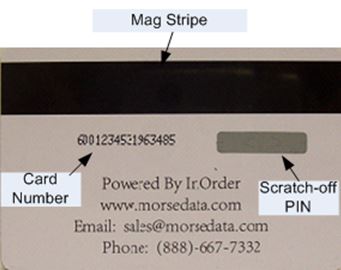 InOrder Gift Certificates
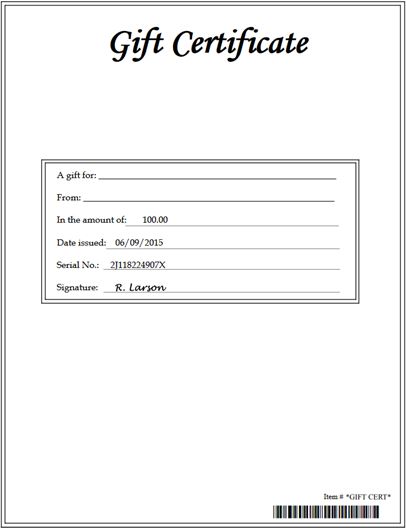
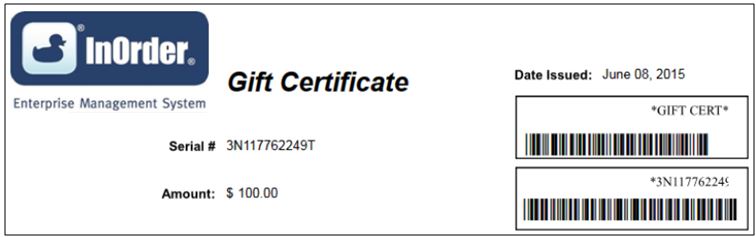
InOrder gift certificates may be customized to meet your requirements, so you can design them for promotions, loyalty awards, birthdays, graduations, or any other occasion or special event. They may be used on your web page or order window. Serial numbers are generated by InOrder, or they may also be customized.
 InOrder Gives You – and Your Customers – More Choices
InOrder supports both gift certificates and gift cards, which means you can chose one or both – as your business demands. Both provide convenient purchase and redemption across all channels, including Customer Service, Web, and Point of Sale.
InOrder gift cards and gift certificates both work with Emails InOrder and the InOrder Digital Delivery Enhancement for immediate delivery to your customers and your recipients.
Use this comparison to help decide which features your business needs.
Features |
Gift Certificates |
Gift Cards |
Issue Using Crystal Report |
X |
|
Issue Using Physical Card |
X |
|
Supports Mag Stripe |
X |
|
Supports Electronic Delivery |
X |
X |
Double Check Digit Serial Number |
X |
X |
Customizable Check Digit Algorithm |
X |
|
Double Length Serial Number Option |
X |
|
Scratch-off PIN |
X |
|
Online Security Required |
Customer I.D./Certificate Value |
PIN |
Fixed or Variable Dollar Amounts |
X |
X |
Redeem on Web |
X |
X |
Redeem at POS |
X |
X |
Redeem by Phone or Mail |
X |
X |
Re-issue New Certificate for Remainder |
X |
|
Multiple Purchases per Card |
X |
|
Refund Balance to Card |
X |
|
Service Fee Supported |
X |
|
Reissue/Reactivation Fee Supported |
X |
|
Expiring Balance Notices |
X |
|
Statement Summary on Web |
X |
|
Multiple Card Funds Supported |
X |
For more information about the InOrder Gift Certificate and Gift Card Enhancements and how they can increase your sales, contact sales@morsedata.com.


Survey Shows Customers Want Relevant Offers
Aimia Institute surveyed over 10,000 people about communications from brands. Over half of the consumers surveyed were annoyed by too many irrelevant messages. They avoided the brands sending those irrelevant messages and simply deleted the messages without reading them, or after reading only the titles.
As the Aimia Infographic shows, 66% consumers unfollow those brands on social media, 70% close their accounts with them, and 54% delete apps as a direct result of poorly targeted communications.
However, 56% of those surveyed still share their personal information for relevant offers. That means they want to hear from you! However, the magic word is “relevant.” If a customer gives you his or her Email address, he or she is waiting to hear from you, and you have a golden opportunity to communicate your message. Would you waste that opportunity on something that doesn’t apply to that customer?
InOrder can help you send only relevant information to your customers without over-sending by letting them opt-in and specify a maximum frequency to receive Emails from you. When they can make these decisions, they know that when they get a message from you, you’re telling them about deals they’re interested in, and they know they’re getting information they requested.
Using InOrder’s Email Marketing Enhancement, you control which Email types are listed for the customer to view, and you define the choices they have to subscribe to each Email type. Web customers can also control the format for their Email from your website. They can elect to receive either text or HTML format.
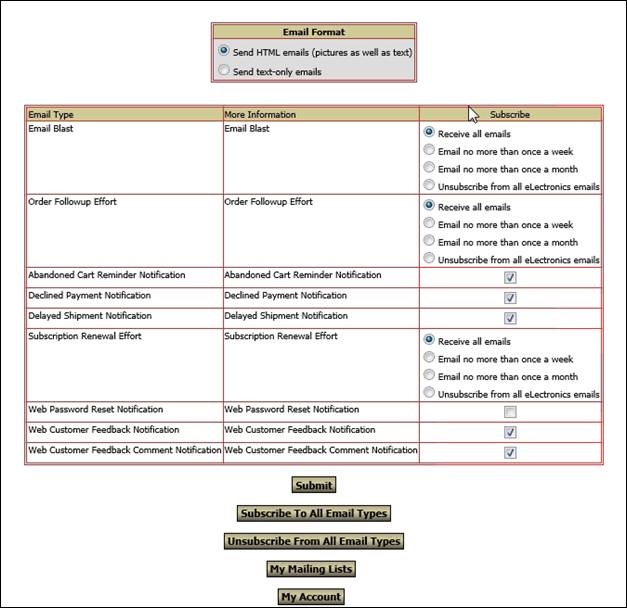 All the data on this screen is configurable based on what choices you want to offer your web customers.
For more information on how the InOrder Email Marketing Enhancement can improve your Email deliverability, contact Morse Data Corporation today.
InOrder’s Web Cart Provides Faster Access to Your Products
InOrder has top of the line search capabilities, and we keep improving it. Along with Facet Filtering, the web cart uses search functionality that stores phrases for faster suggestion lookups and populates the search field with matches.
This makes searching easier for your customers and gives them faster access to your products, which helps you improve the shopping experience you deliver.

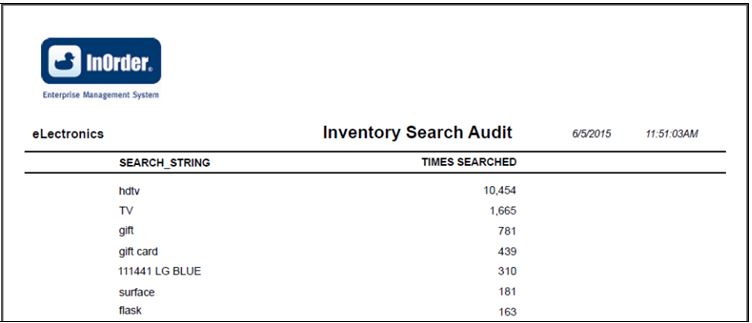
Check InOrder’s Inventory Search Audit report to see how users are searching your products. What do your shoppers search for and what are the results? If necessary, use InOrder’s superb flexibility for any modifications by setting up products to match how users are searching for them.
IRCE 2015
IRCE in Chicago is always a great experience. It’s an opportunity to learn, meet new people, and connect with partners, like Endicia, Avalara, and Advanced Pricing Logic (just to name a few). Here are a few thoughts from Morse Data staff after the conference:
From Joe:
“My impression of IRCE was an “All-In-One” shop to find anything businesses would need relating to eCommerce. I found it to be an interesting opportunity to learn about what businesses need and how InOrder can help them. I also had the chance to visit every booth at the expo, and noticed that many exhibitors provided some of these features (shipping, or packing, or web carts, or warehouse management, etc.). But, like the IRCE, InOrder has everything integrated in one package. Businesses can buy the entire package with integrated solutions for eCommerce, inventory and warehouse control, RF, accounting, marketing, and more. Or they can start with a few basic modules and add more as they grow.”
From Adeel:
“Reflecting on the different exhibitions seen at the IRCE last week, it’s quite interesting that InOrder offers most of the capabilities that most enterprises might be interested in to streamline their operations. There were many booths at the IRCE from companies that specialize in software for specific areas that meet the needs of an enterprise. However, I think InOrder stands out as one solution that offers users a single platform for all their business operations. Having a centralized database for different types of transactions, including PO’s, Sales Orders, Accounting, Inventory Transactions etc., InOrder can make it easier for enterprises to streamline their operations. In addition to that, any discrepancies in the data at any part of the business cycle can also be efficiently identified and resolved.”
From Jackie:
“It was exciting to be at the IRCE 2015 in Chicago. I was fortunate to speak with both software vendors and show attendees. When discussing software, I was surprised to learn how many vendors offered “partial” solutions, yet they claimed to offer a complete package to their clients. I asked an eCommerce vendor, “How does your client know when to reorder inventory or send a PO to the vendor? The answer was that the software does not do that. Don’t get me wrong, they offered some slick eCommerce solutions, but they only focused on product marketing and taking web orders. I asked another competitor what they provided and again, I was surprised to learn they only cover desktop order entry and purchase orders.
When I spoke to show attendees, many times I heard how frustrated they were with managing multiple systems, and the lack of congruity. For a company to function efficiently without losing precious data, time, and orders, an integrated system is required. One that handles their processes from start to finish: Order Management (Customer Service & Store), Warehouse Management and eCommerce all in one solution. I was thrilled to share with them that InOrder provided the integrated solution they were looking for.”
Do you notice a pattern to these comments? InOrder is a totally integrated, all-in-one solution for eCommerce, multi-channel merchants, publishers, and fulfillment service providers. Start with only the components you need, and add them as your business grows. Each new component is integrated with the existing ones.
InOrder Quick Tip – Moving Toolbars
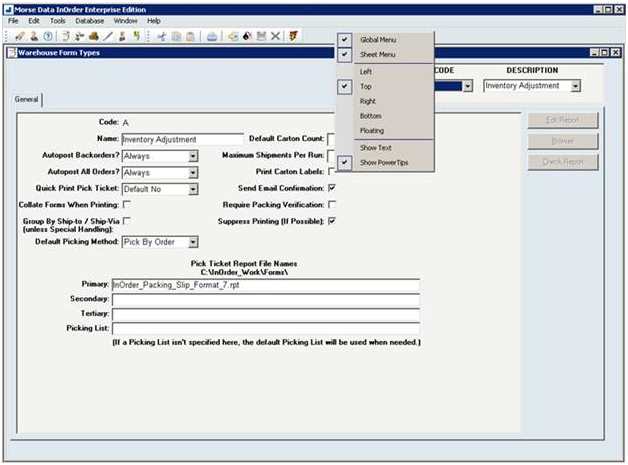
InOrder gives each individual user flexibility to move toolbars to different parts of the window. Did you know you can also turn a toolbar on or off, or show text on the toolbar with the icons
Simply right-click on the toolbar and make your selection.
Toolbars are reset when you exit InOrder.
PCI Council Announces Taskforce to Help Small Merchants with Payment Data Security
It can be complicated for any business to keep up with all the cyberattacks and payment fraud going on around us. It’s particularly tough for small merchants that are vulnerable to attacks.
PCI Security Standards are intended to increase payment data security, but they can be intimidating for a small merchant with limited resources.
The PCI Security Standards Council (PCI SSC) announced a task force to help small businesses improve payment data security. The announcement was made at the National Restaurant Association (NRA) Show on May 19, 2015. The task force will be co-chaired by Barclaycard and the NRA to guide small merchants and simplify payment data security. The taskforce will provide best practices, simplified guidance, and market insight. Additional details are provided in the PCI SSC press release.
InOrder WMS Guides Warehouse Personnel with Receiving
The InOrder RF Receiving functionality is useful when you’re expecting a purchase order to be filled, or when a surprise delivery is made to your dock. After purchase orders are created and printed, they are immediately available for RF receiving. When material is delivered, any RF user (with the appropriate user permissions) may enter or lookup the purchase order with the RF device and begin the receiving process. Multiple RF users may receive items for the same purchase order, which is useful for large purchase orders. RF users may leave their transaction while other RF users continue to receive items on the purchase order, or the user who started the transaction may pause it.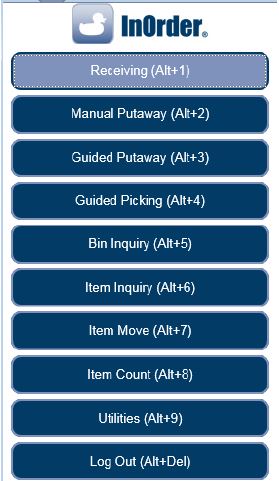 The RF user is guided through the receiving process to first select or lookup a purchase order. The RF User then selects a receiving bin location. Buttons for common receiving bins and hold codes may be configured to represent your specific bins and codes.
 If there are existing, open receipt transactions for the same purchase order (these may be receipt transactions that were paused by the current user or a receipt transaction started by another RF user for a team receiving scenario), the InOrder RF user chooses whether to receive on an existing receipt transaction or start a new receipt transaction.
The receiving section lists open purchase order line items. This section is useful for receiving small purchase orders (few line items). The open PO line items are presented and may be received one at a time via a button click and confirmation.
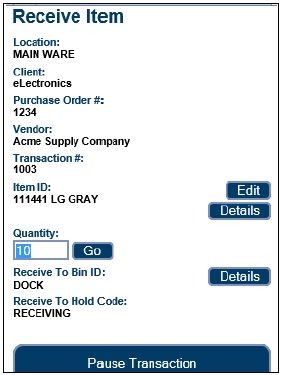 If an item is damaged, a button directs the RF user to a new page to receive the PO line item as damaged.
Options are also provided to manually receive the purchase order. This option is useful when receiving very large purchase orders with many line items. The item to receive is scanned and the quantity is entered.
A “Receive All” option automatically receives all open line items / quantities for the purchase order. The “View Received Items” button displays a list of line items received for the current purchase order.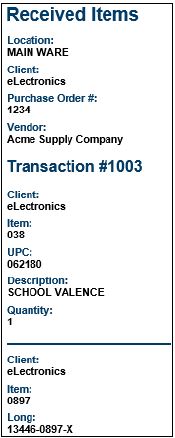 Check out these other great InOrder WMS RF features:
InOrder ERP Quick Tip – Find all Royalty Contracts with the Same Item
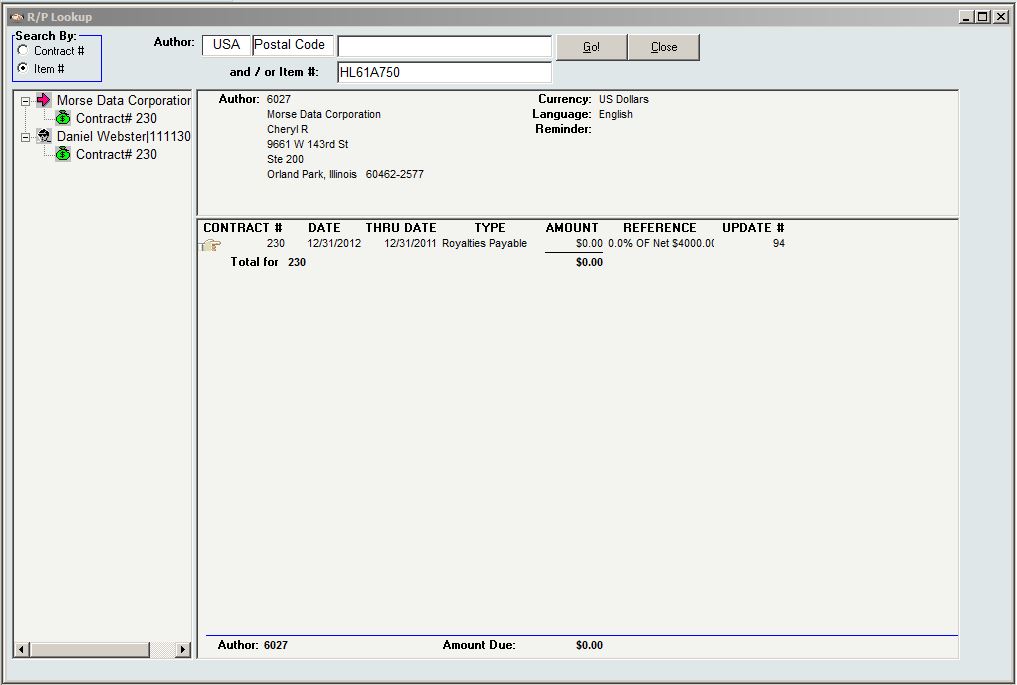
When you need to know which royalty contracts have a specific item, simply search Royalty Lookup.
- Click Item # in the Search By area.
- Enter the Item #.
- Click Go.
See InOrder ERP Software at IRCE 2015
In June, the InOrder Team is attending the IRCE, which is the world’s largest eCommerce event. If you’re looking for a leading ERP system with a strong eCommerce platform, stop by our booth (#813) and ask what InOrder can do for you.
If you’re in the Chicago area for the IRCE and you’re looking for good food, check out Tony’s list of places within a 30 minute drive of McCormick Place.
New InOrder ERP Reports to Encourage Customers to Place Orders
Loyalty Programs give customers incentives to buy. They provide benefits for both your business and your customers by generating income and expressing appreciation to your customers. Companies from grocery stores to your local day spa use loyalty award programs to help keep customers coming back, increase sales, and improve customer engagement.
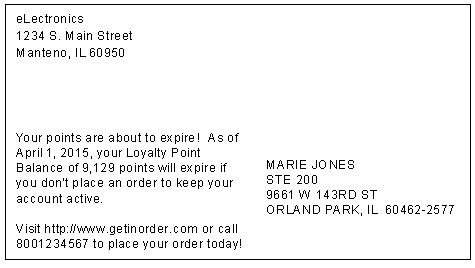
Two new reports, Loyalty Point Expiration Card and Loyalty Account Statements, have been added to the InOrder ERP Loyalty Program Enhancement.
The Loyalty Point Expiration Card is used to generate postcards to send to customers when their loyalty points are nearing expiration.
 Loyalty Account Statements are generated with the customer’s loyalty point activity and balance.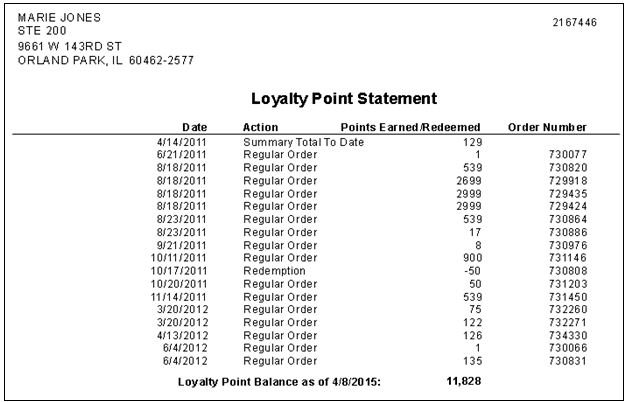
Contact us for more information about the InOrder Loyalty Program Enhancement.