
4 Ways to Retain Customers with InOrder
We know how hard it can be to attract new customers, which makes it so important to keep your current customers. Not losing customers can be as easy as sending Email messages to keep in touch.
- When a customer first makes contact, start at the beginning of the relationship with a welcome message as soon as an account is created or after the first purchase. The customer reached out to you with that purchase – acknowledge it and say thank you. Offer to be available for help when you’re needed.
- After each purchase, ask for a review of both the shopping experience and the product. This lets the customer know that you still care even after the sale. Make sure the product was received and the customer is happy with it. Ask for a referral to a friend, offering a discount or coupon for the favor.
- If a customer hasn’t ordered in awhile, simply reach out again with an Email – this time, offering a discount may provide a smart incentive for additional purchases.
Using InOrder’s List Creation features, send messages often enough to control the quantity of results, and use promotions or campaigns to control the frequency of messages.
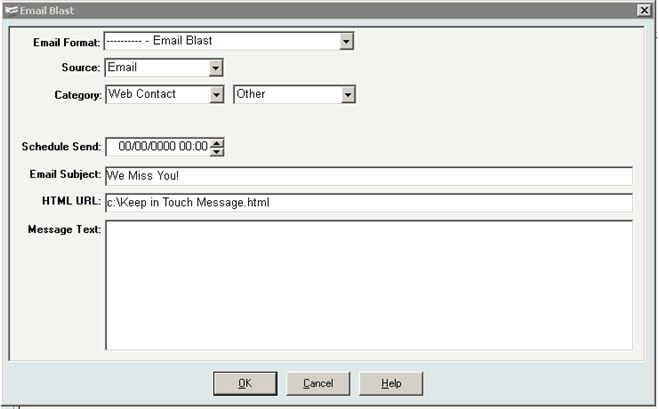
- Remember to recover any abandoned carts. When customers (and potential customers) leave items in their carts, messages with links to the carts can help guide shoppers to checkout. A series of 2-3 messages at specific intervals provides subtle reminders that keep you in mind.


Use Ratings and Reviews (and Help Google Find Them) to Increase Conversions
It’s well-known that consumers research businesses and products before they buy. In fact, this study reports that 85% of consumers use online reviews for their research. Bad reviews are used as well as good reviews, telling both pros and cons of a product or business. Additionally, this research explains that, when negative reviews are included with the good reviews, they can increase consumer trust and contribute favorably to conversion.
Such high numbers reveal that it is beneficial to your business when customers provide honest opinions about your products.
Google recognizes the benefits of ratings and reviews, and you can encourage Google to show them with schema markup. (While you’re reading about schema markup for ratings and reviews, be sure to also check out the details for using markup for your products.)
After a customer’s order is delivered, send a series of Email messages that thank the customer and ask for a review. Our experience shows that these Email requests with a convenient link to the product page results in far more reviews. Be sure to provide links that are as convenient as possible, and format your review page so it is quick to submit.
And finally, if your customers take the time to send their valuable opinions, make sure to review and display them as soon as possible!
4 Helpful Articles for Your eCommerce Business
- If you saw a rise fraud attempts this holiday season, you weren’t alone. Check out these findings from ACI Worldwide detailing an increase in eCommerce Transactions and corresponding fraud attempts.
- Security is a big deal in retail, and hackers know it. Trustwave has advice for holding them at bay.
- If you use Magento, make sure you address these critical cross-site scripting vulnerabilities.
- Use these suggestions to recover up to 30% of abandoned carts.
Use Your ERP Software to Avoid a “Big eCommerce Short”
 This article compares increasing eCommerce sales to the housing market bubble. It discusses loss of sales in the checkout process that merchants might know about, calling it a new “big short.” The article continues to explain where the sales breakdowns occur, including the checkout process, consumer confidence in the merchant, and how payment declines are handled.
You can use your ERP system to help avoid each of those breakdown points. Using a smart checkout process and your ERP system to its potential, your eCommerce business can provide your customers with a smooth purchase process and the information you need to monitor it. Here are just a few ways to help protect your eCommerce business against abandoned carts:
Checkout process – Keep it simple. Show your shoppers the checkout flow to let them know what to expect. Keep it efficient with as few steps as possible. Giving customers an up-front shipping estimate, or the option to bypass registration (when appropriate) can eliminate some of the breakdown at checkout.
Trust – This is a big deal. Customers don’t want to think about security – they want you to. And if you’re not easy to contact, they may go elsewhere.
It can be complicated for any business to keep up with all the cyber attacks and payment fraud going on around us, but you must be vigilant. Keep up with your PCI DSS requirements, have a security process and an incident response plan, and train your employees on them. A good ERP system can help with features such as fraud scoring, and it will support your PCI DSS efforts to keep your sensitive data safe.
Make sure your customers can reach you immediately with any questions. Display your phone number where it can be easily and quickly seen. If a shopper has a question or problem navigating your site, make sure you can help. Keep Customer Service always at your customers’ fingertips, and make sure your customer service reps can pull up the customer’s shopping cart, edit it, and help the customer get through checkout if necessary.
Payment Declines – This is when knowing your business and your customers is so important. While you can detect patterns that are typical of fraud, you may also be flagging valid transactions, especially if you do business internationally.
Know Your Business – Where are your transactions failing? Put a process in place to check your data regularly, and follow it. Review the tools from your payment gateway(s), Google Analytics, and reports from your ERP system to see what might be causing a problem. And use these suggestions to recover up to 30% of abandoned carts with Email reminders. Use your data to your advantage by making adjustments where they’re needed.
It’s your business; be aware of it. Don’t bet against yourself.
Sales and Search Results – Opportunities for eCommerce with Responsive Mobile Design
A website with responsive design adjusts to the sizes of all devices shoppers are using, naturally providing optimal presentation. For a web store, the result is a single cart that functions for both PC and mobile, with a similar look and feel, regardless of device size, no longer requiring multiple web sites. This means a better shopping experience for your users, which can translate to more sales and higher search rankings.
The alternatives to responsive design are dynamic serving or maintaining a separate website for mobile shoppers. Dynamic serving uses different HTML for different types of devices, so when users search for information, results for the same site are shared between different versions of HTML. Hopefully, a mobile site using dynamic serving is set up properly; otherwise, Google might not even find the mobile content. Maintaining a separate web store for mobile shoppers is (at least) twice the work as having a single online web store. Each supported device requires a separate web site. Otherwise, it might not display properly to mobile users, increasing the number of people who leave the website after visiting only one page (raising bounce rates), and risking loss of would-be customers to frustration. If your site is awkward for mobile users, you could be decreasing your own search results and sales.
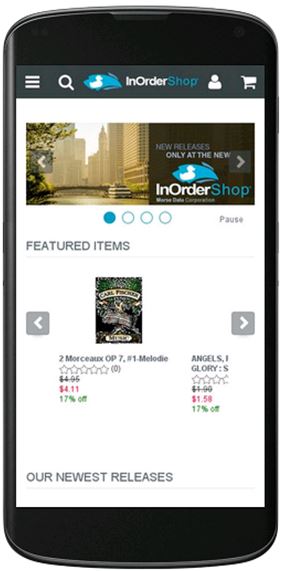 Responsive design eliminates these concerns. It is more cost-effective and easier to manage than maintaining two separate websites, it uses the same HTML for all devices, and it provides a better experience for users who switch between devices and for those who share links to websites. It is also Google’s recommended design for all devices
Google can more efficiently index your website if it uses responsive design, and it isn’t necessary to redirect a URL, which doesn’t increase the time it takes to load your website. In addition, responsive design provides a better experience for all users. Font sizes have a consistent appearance, so users don’t have to work hard to see the content (no double-tapping or pinch-to-zoom necessary), and links are large enough for fingers to use accurately.
There is a lot of research to support the decision for responsive design. According to a survey by Signal, 85% of respondents plan to shop using PCs or laptops, 67% plan to browse more from phones or tablets, and 60% plan to buy more from phones or tablets than they did last year. And according to this article, 75% of adult internet users have two or more devices for online use, and 67% switch between devices them, so responsive design is a sound business decision.
For details about InOrder’s responsive mobile design, or for a demo of InOrder eCommerce, contact Morse Data Corporation.
eCommerce Experience is Important to Business Customers
eCommerce companies seem to be realizing more and more that their business customers appreciate the convenience of online shopping just as much as retail customers do.
While potential new business customers might not respond to “Call for Pricing” messages on your web site, they may be more likely to order when the pricing information is readily available. And they want other conveniences, like quick search results, pictures, and descriptions. They want easy reordering and if products are backordered, they need to know when to expect them. And once they log in to an established web account, they want personalized services, like the ability to see their negotiated prices and discounts applied as they shop on-line, with a presentation relevant to them.
B2B companies using eCommerce are making sure they don’t miss out on opportunities to grow their business. They can choose to add multiple customer bases to their eCommerce businesses – for example – direct consumers, or businesses in other countries.
If you are ready to grow your B2B on-line business, consider InOrder. With its central database and the ability to offer on-line integrated real-time inventory, InOrder can help manage and keep product information accurate and consistent for multiple customer bases. The days of having a separate computer system for each channel are long gone!
Contact us to request a demo showing how InOrder can help you attract new business.
7 Must-Have Mobile eCommerce Features
You’ve made great progress with your eCommerce business: inventory is available and your web store is ready to go live. But first, make sure you have these basic features in you mobile store.
Optimize
Use full-size images with zoom capability so your shoppers aren’t frustrated by being taken away from their page. Make sure your site is compatible with all devices. Using Google’s recommended Responsive Design Plan, your mobile store will automatically adjust to the sizes of all devices customers are using to provide optimal presentation. The design has the added bonus of a single cart, so multiple web sites are no long required. Good for your customers, good for you!
Easy to Find Products
If shoppers search for something specific, it means they know what they want, and they want to find it immediately. If you have multiple product categories, make sure your customers can easily find what they’re looking for. Provide them with the ability to combine different search criteria, in whatever combinations they choose, with tools such as Facet Filtering. Check your search analytic results to see how shoppers are searching for your products. Remember that a search engine-optimized design gives you additional edge over the competition.
Real-Time Availability
Sync your inventory with your web cart, so your customers know if they have to wait for something, or if they’ll get it when they need it. This is especially important for your reputation during the holidays. You don’t want to be the source of added frustration because you customer counted on you for a delivery, only to find out at the last minute that the product was out of stock when the order was placed. A good ERP system can prevent this type of disappointment by letting your customers know what to expect when they order from you.
Let Your Customers Share
Let your customers spread the word about your cart and share it with their favorite social media sites. Allowing customers to share product pages with their social networks is a great way to bring in more traffic and find new customers.
Easy Checkout
Make the checkout process as efficient as possible with as few steps as possible. Keep it simple and quick. Keep page and image loading fast so customers won’t give up on you because it’s taking too long or you require registration or want them to enter too much information.
Security
It can be complicated for any business to keep up with all the cyber attacks and payment fraud going on around us. It’s particularly tough for small merchants, but you must be vigilant.
A good ERP system can help you as well. Features such as Fraud Scoring are designed to assess orders based on criteria known to indicate fraudulent purchases.
Be Available
Be sure to display your phone number where it can be easily and quickly seen. If a shopper has a question or a problem navigating your site, you want to make sure you can help. Not only should customer service be always at your customers’ fingertips, but your customer service people must be able to pull up the customer’s shopping cart, edit it, and help the customer get through check out if necessary!
3 Reasons Why Employee Security Training is So Important
Thieves will take advantage of every opportunity available to them, and your employees are an important line of defense against them.
Do you have a security policy? Do your employees know about it? One way your employees can help try to protect against these activities is to be trained to follow your procedures. If they don’t know what to watch for, or what to protect, or how, then how can they help you?
Here are 3 reasons why it is so important to have a security process and make sure your employees know it well.
- Card-reading devices at point of sale locations may be used to steal cardholder data. Devices are stolen or exchanged, or tampered with to get cardholder data. Thieves may try to impersonate device maintenance personnel to try switching devices, or they may even try adding another device on top of yours. Without proper training, employees may not recognize when this happens or what to do to try to prevent it.
- While a Customer Service Representative helps a customer with an order and payment entry, sensitive data is written to the Customer Service Rep’s desktop. Without training, the Customer Service Rep doesn’t know that this is against PCI-DSS requirements.
- While checking email, a purchasing agent clicked a link for a great offer with a vendor he thought he knew, and used the company’s account information. Without proper training, the agent didn’t know to go to the website manually and check the creditability of the offer.
There are many more reasons to have a security process and train your employees on it, and the PCI Security Standards website is a good place to start for more information. For details about InOrder’s PA-DSS-validated ERP software, contact Morse Data Corporation.
Does Your ERP Software Embrace Your Comparison Shoppers?
People research products. As shoppers, we check out all our options. We gather information about what’s available, we read reviews, and then we decide where to shop.
Shoppers want to know what they’re buying before they buy it. They want to know if they’ll like a product, how it works, and what others think about it. They also want to know about you. They need to know that their information is safe with you and that their purchases will arrive quickly and without incident. They look for opinions before they shop, while they’re shopping, and when they’re finished, they tell others all about the product and their shopping experience.
Motivate shoppers to use your website for researching your products and make it easy for them to buy from you by providing what they need.
Build confidence and trust
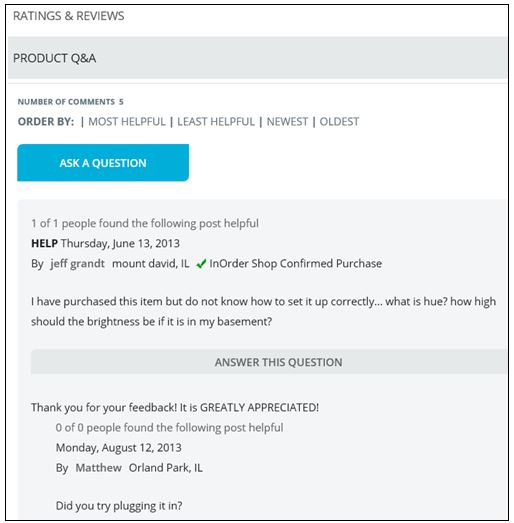
Add a social aspect to your website that keeps your shoppers involved. Keep them engaged with Ratings, Reviews, Comments, and Q&A. Reply to feedback, add comments to a thread, encourage questions, and offer suggestions.
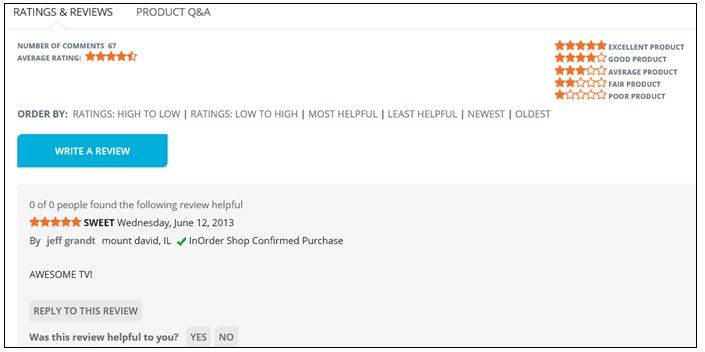 Further engage your customers with the InOrder Email Communications Enhancement. Thank them for their purchases, and invite them to rate the products they purchased or add their comments.
Set up a page of FAQs about your products, with answers for information purposes. You can also provide a place for your customers to ask questions with answers contributed by your experts or other customers.
With full control over feedback, you can allow customers to post directly to your website, or you can approve or edit reviews and comments before publishing them.
Increase participation
Interact with your shoppers and help keep them involved in the shopping experience.
 You can even create a community where shoppers can share information and ideas about your products. There are many ways to encourage participation in your web store community. Here are some examples:
If you sell parts for antique cars, you can start a thread about local car shows and invite customers to post pictures of their cars with your parts.
If you sell fishing equipment, you can define a forum about fishing equipment and start a thread about fishing lures. Or, explain different types of fishing poles and what type of fishing each are used for, such as ice fishing, or salmon fishing, etc. Invite customers to post pictures of fish they caught with your products.
Forums, FAQs, and other community pages can be created at the category level, or they can be created at the product level so you can have details specific to a product.
Rather than outsource these features, implement them with InOrder’s built-in functions that tie your products with reviews and your customers, keeping the details all in one place so you don’t have to maintain it in separate systems. All this participation also contributes to your search content. When shoppers search for reviews and find your site in their search results, your website has a better chance of being seen. Shouldn’t your website be the one they go to for trusted information – and final purchase – when making informed decisions?
Good ERP Systems have everything you need to run your business. From ordering your inventory, to setting up your web store, to taking and processing orders, to paying your bills, and so much more. Make sure you’re using it to its fullest potential – and to yours.
For more information about InOrder, contact Morse Data Corporation.
At-a-Glance Snapshot of Item with InOrder Enterprise Management Software
We say a lot about the eCommerce and Customer Service functions of InOrder. Along with everything else, the foundation of the InOrder system is its order processing and inventory, which brings you a number of benefits that permit you to process orders and track inventory under a variety of scenarios. This flexibility keeps inventory accurate at all times and provides the order department with the tools they need for fast and accurate order processing.
InOrder’s Inventory system is functional and practical. You can check everything you need to know about an item from one convenient window. Check the on-hand quantity, how much is available, backordered, or even when the item was last shipped or received.
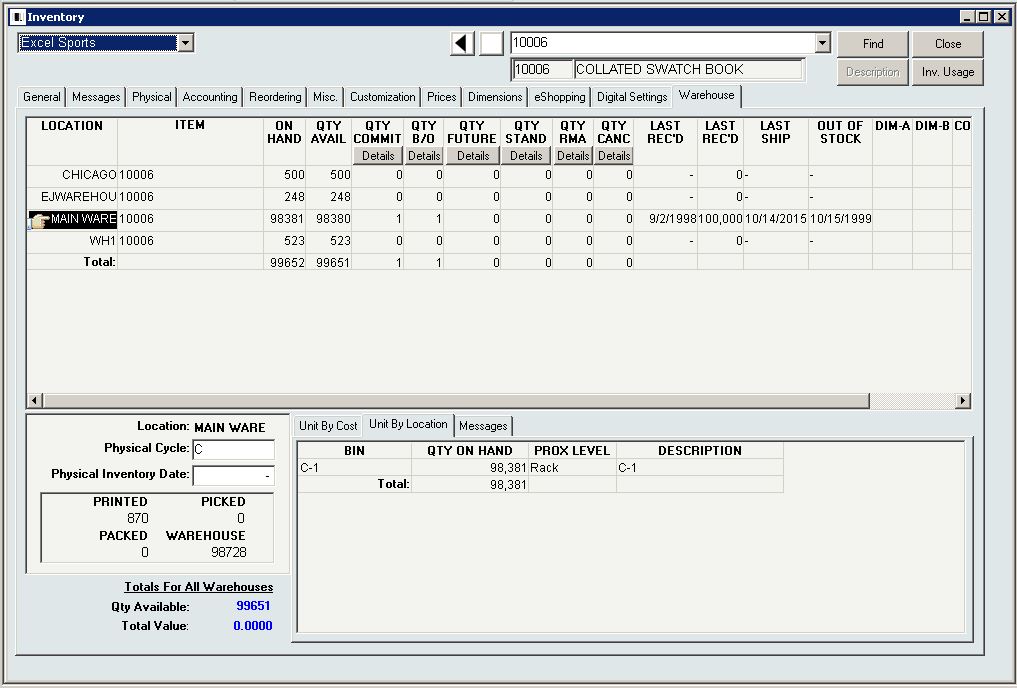
If you need more details for the item at a specific location, you can drill-down to details, check units by cost or location, or see quantities printed, packed, picked, and in the warehouse.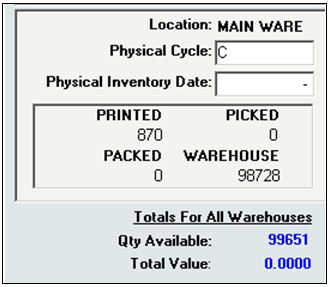 The Warehouse shows the sum of the quantity available for stock allocation, plus the quantity allocated to orders being picked, plus the quantity already picked and packed into boxes that are in the process of shipping.
Call us at 888- 667-7332 for more information about Inventory Management with InOrder, or to request a demo.