
Category: Morse Data News and Events
PCI Council Announces Taskforce to Help Small Merchants with Payment Data Security
It can be complicated for any business to keep up with all the cyberattacks and payment fraud going on around us. It’s particularly tough for small merchants that are vulnerable to attacks.
PCI Security Standards are intended to increase payment data security, but they can be intimidating for a small merchant with limited resources.
The PCI Security Standards Council (PCI SSC) announced a task force to help small businesses improve payment data security. The announcement was made at the National Restaurant Association (NRA) Show on May 19, 2015. The task force will be co-chaired by Barclaycard and the NRA to guide small merchants and simplify payment data security. The taskforce will provide best practices, simplified guidance, and market insight. Additional details are provided in the PCI SSC press release.


InOrder WMS Guides Warehouse Personnel with Receiving
The InOrder RF Receiving functionality is useful when you’re expecting a purchase order to be filled, or when a surprise delivery is made to your dock. After purchase orders are created and printed, they are immediately available for RF receiving. When material is delivered, any RF user (with the appropriate user permissions) may enter or lookup the purchase order with the RF device and begin the receiving process. Multiple RF users may receive items for the same purchase order, which is useful for large purchase orders. RF users may leave their transaction while other RF users continue to receive items on the purchase order, or the user who started the transaction may pause it.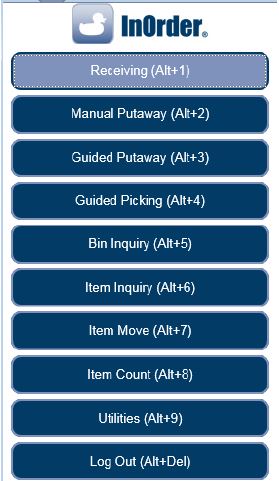 The RF user is guided through the receiving process to first select or lookup a purchase order. The RF User then selects a receiving bin location. Buttons for common receiving bins and hold codes may be configured to represent your specific bins and codes.
 If there are existing, open receipt transactions for the same purchase order (these may be receipt transactions that were paused by the current user or a receipt transaction started by another RF user for a team receiving scenario), the InOrder RF user chooses whether to receive on an existing receipt transaction or start a new receipt transaction.
The receiving section lists open purchase order line items. This section is useful for receiving small purchase orders (few line items). The open PO line items are presented and may be received one at a time via a button click and confirmation.
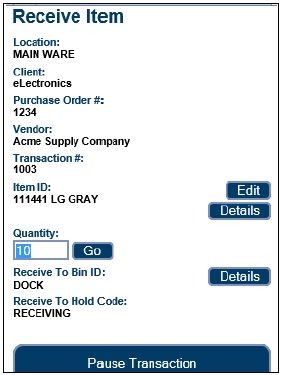 If an item is damaged, a button directs the RF user to a new page to receive the PO line item as damaged.
Options are also provided to manually receive the purchase order. This option is useful when receiving very large purchase orders with many line items. The item to receive is scanned and the quantity is entered.
A “Receive All” option automatically receives all open line items / quantities for the purchase order. The “View Received Items” button displays a list of line items received for the current purchase order.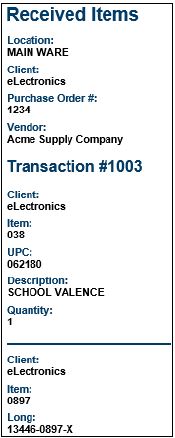 Check out these other great InOrder WMS RF features:
See InOrder ERP Software at IRCE 2015
In June, the InOrder Team is attending the IRCE, which is the world’s largest eCommerce event. If you’re looking for a leading ERP system with a strong eCommerce platform, stop by our booth (#813) and ask what InOrder can do for you.
If you’re in the Chicago area for the IRCE and you’re looking for good food, check out Tony’s list of places within a 30 minute drive of McCormick Place.
Thomas Jefferson Foundation Relies on InOrder
The Thomas Jefferson Foundation recently turned on an integration from Yahoo Store to InOrder utilizing the InOrder EDI module. This EDI module allows communication to and from an EDI Service Vendor or translation software, enabling seamless EDI communication between InOrder and your Trading Partners. In this case, Morse Data Corporation built a customized EDI integration directly using Yahoo Store’s XML services.
The Thomas Jefferson Foundation preserves and maintains Monticello, the third president’s home in Charlottesville, Virginia. The Foundation engages a global audience in a dialogue with Thomas Jefferson’s ideas. The Foundation seeks to facilitate conversations and to use its extensive research and knowledge to stimulate interactions on a variety of topics that were of keen interest to Thomas Jefferson, the most powerful of which are liberty and self- government. Through virtual, off-site and on-site engagement, including retail operations, the Foundation seeks to excite the world about Jefferson’s relevance today and ignite a passion for history. For additional information about Monticello or the Thomas Jefferson Foundation, please visit http://www.monticello.org.
InOrder ERP Offers Sliding Royalty Scales to Adjust Rates Based on Sales
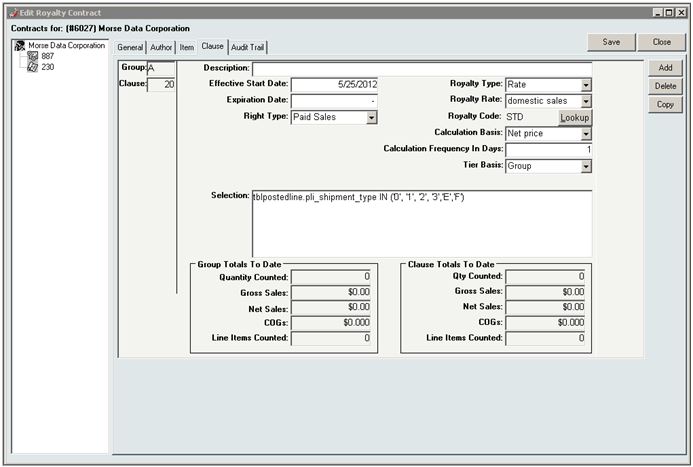
The InOrder ERP [Royalty Contract] window allows you to declare “contract clauses” that select line items that will earn royalties. For example, you can create a clause that pays 10% royalty on “Domestic sales with discount less than 40%” or “All Canada Sales.” InOrder also lets you group these clauses so you can simplify the clause selections. For example, you can have the following group of clauses “Discount greater than 40%,” “Domestic Sales,” and “Foreign Sales.” In this case, any sales with high discounts will pay royalty on the first clause in the group. Otherwise the sale will pay on one of the other two clauses. To illustrate the grouping feature, we can create another clause in a separate group, which earns 1% bonus royalty for any sales that occurred before a certain date. This royalty bonus could be computed on the same contract, next to the other calculation because it is in a separate group. Each clause can earn the author royalty based on a flat percentage / amount, or a sliding scale that adjusts the rate based on sales to date for this specific clause.
This function also allows sliding scales to adjust the rate based on sales to date across all clauses in the clause group, even if some of those clauses pay 0% royalty. This allows you to offer sliding scales that are based on all sales that meet selection criteria for any clause in that clause group, but only pay royalties on the sales selected by that clause itself.
To use this feature, Set the Royalty Type to Rate and select the Tier Basis on the [Royalty Contract] Clause tab. The following selections are available:
- Clause – This selection calculates each clause independently.
- Group – This selection calculates all clauses in a clause group together, which means that sales for all classes in the clause group are used to jump to the next tier in the scale. For example, Group A contains two clauses, 10 and 20. Clause 10 pays x% up to 500 sold and y% over 500, but calculates only on sales in the US. Clause 20 pays X% up to 500 sold and Z% over 500, but calculates only on sales outside of the US. If 300 are sold in the US and 300 outside of the US, Clause 10 pays Y% and Clause 20 pays Z% because the total sold is over 500.
Morse Data Corporation Offers Data Conversion Services!
When you purchase InOrder as your ERP system, our Discovery process has you covered. First, we work with you to fully assess your legacy data, and then we provide you with a detailed Data Conversion Proposal, by phase and category. This allows you to choose precisely which data and level of detail you would like your InOrder system to have when you turn it on.
Our data conversion team experts work with you throughout the process, as we build a reproducible data conversion process that extracts, cleanses, and imports your data. This allows you and your staff to learn and test the new InOrder ERP system using data that you are familiar with. Over the years we have refined this process, and so many of our techniques will surprise you, but they are extremely effective.
Checking the converted data on the new InOrder ERP system not only helps your staff to get familiar with the new system, it helps them feel more at home, and more involved in the conversion process.
We convert Your Data to your new InOrder ERP System!
Welcome Aboard, Joe!
 We are pleased to introduce Joe Banass as the newest full time member of our Development Team.
Joe has been with Morse Data as an intern since last May. He completed his finals from DePaul University in November and has earned his Bachelor of Science in Computer Science from the College of Computing and Digital Media.
Joe is one of many college interns who have decided to make Morse Data their home and we are excited to have him on board.
Rod’s Western Palace Relies on InOrder
Tony Marchese, Morse Data’s Vice President of Software Systems,
recently performed an annual software audit at Rod’s Western Palace.

Rod’s Western Palace went live with InOrder in 2012. Rod’s relies on InOrder for inventory control, warehouse control, multi-channel order management including Point of Sale at several locations, Gift Cards, and InOrder’s PA-DSS certification to support their PCI DSS compliance.
Rod’s Western Palace, located in Columbus, Ohio, is a leading supplier of western apparel and tack. Rod’s boasts 20,000 square feet of retail space, which includes the main store and Rod’s Tack Barn. Even larger than their store is their website and catalog operation.

Rod’s Western Palace regularly attends trade shows and events, including the All American Quarter Horse Congress, which is known as “The largest single-breed horse show in the world.” Rod’s is there with InOrder’s Point of Sale to make sure attendees have access to all the western essentials they need during the show.
Rod’s is also the official sponsor of Miss Rodeo America for rodeo apparel and accessories, such as belts, hats, boots, and show clothing.
You can read more about Rods Western Palace and browse their great selection of western apparel and tack on their website.
InOrder ERP Guides Warehouse Personnel through the Warehouse with RF Guided Putaway
Warehouse Management, in part, means controlling where inventory is put away and how it gets to the correct storage location in the most efficient way possible. InOrder does it with precision and innovation using tried and true logic while keeping up with the latest technology.
Guided putaway tasks are generated by inventory transactions. An item being received may be put away directly using the inventory receipt transaction, by processing received inventory in the Receipt QC window to generate a put-away inventory transfer, or by manually entering an inventory transfer after the receipt.
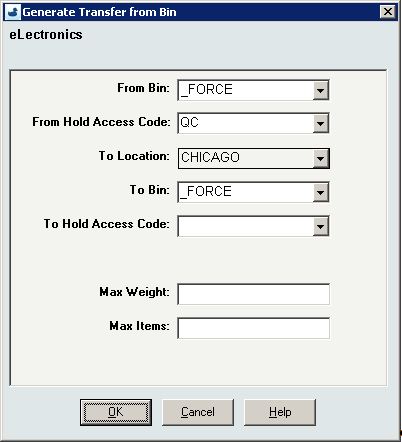
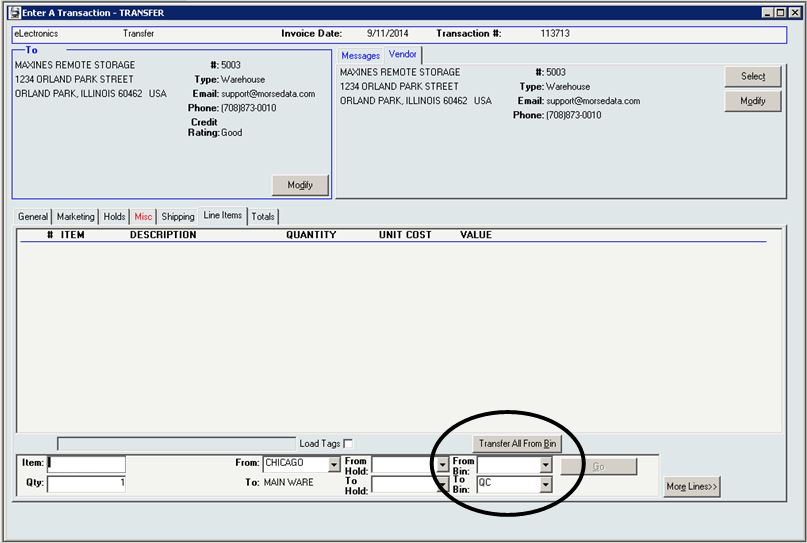
Inventory transfers may also be generated to move all contents of a selected warehouse bin, to their final destination, en masse (rather than individual bin moves).
 The [Inventory Transaction] window’s line item entry section for inventory transfers provides convenient entry of both “From” and “To” Bins.
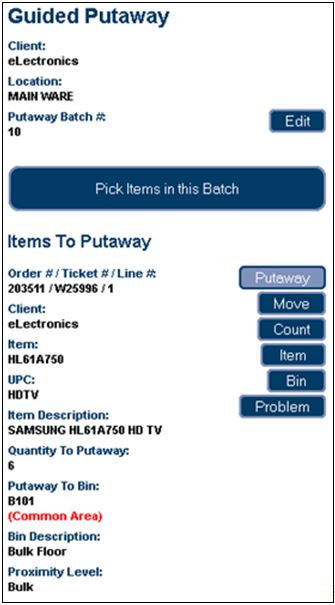
 As with Guided Picking, these tasks are also assigned by the warehouse manager.
The Guided Putaway process includes scanning the item in the receiving area (picking), entering the quantity being putaway, and scanning the label of the putaway bin as the item is put away into the bin. One or more of these scans may be bypassed using security privileges.
The following options are available for RF Putaway:
- Pick and Putaway Items in Batch – This process directs the RF user to first pick all items in the batch, if applicable, then the RF user is directed to putaway the items.
- Pick Entire Batch – This option is available if your batch includes items being picked from a single bin location (such as the dock, for example). Then items may be putaway.
Welcome Back Adeel
 We first introduced Adeel when he was an intern at Morse Data. He started here in December of 2010, and was with us until he graduated from DePaul University in June 2013, with a Bachelor of Science in Computer Science. After spending the last year working in the grocery supply software vertical market, Adeel will be joining us again, starting this month, and we are excited to welcome him back as a permanent member of our team.