
Helpful Articles for Your Business
Planning your ERP project doesn’t have to make you lose your cool. Here are some movie quotes to help you keep your sense of humor.
Criminals are always trying to take advantage – even at tax time!
https://www.halock.com/blog/alert-adversaries-requesting-w-2s-simple-social-engineering-scheme/
Read this article to see if you’re coming up short on the checkout process
http://www.pymnts.com/news/retail/2017/price-cart-abandonment-ecommerce/
Are you following these best practices for warehouse eCommerce?
http://www.mmh.com/article/7_warehouse_e_commerce_best_practices_for_2017


Endicia – InOrder ERP Partner Spotlight
Morse Data Corp. works with several business partners to increase your productivity and help you keep your customers happy. One of these partners is Endicia.
Endicia is the leading provider of e-commerce shipping technologies and services. By integrating Endicia with InOrder, you have access to Endicia’s certified U.S. Postal Service solutions. Whether you are a high-volume warehouse shipper, operating an e-commerce site from a garage, or simply trying to get invoices out before the day is over, Endicia can help save time, reduce costs, and increase productivity.
Endicia is one of many of Morse Data’s partners. InOrder is a real-time, tightly integrated, single database ERP system for multi-channel merchants, Internet retails, publishers, and fulfillment solutions providers. You can read some of our reviews here.
To find out more about integrating InOrder with any of these solutions, give us a call.
Resolutions – Customization that You Control with InOrder ERP
Resolutions aren’t just promises you make to yourself. With InOrder, resolutions handle complex relationships using a set of parameters. They represent exceptions to your standard rules and override other related settings. You can set up rules to derive a value based on any criteria supported by programming.
For example, sometimes, certain types of inventory items cannot be shipped to certain countries. You simply define a Resolution Code and Description…

… then add supporting fields to select the criteria to use – in this case, specifying the inventory items that cannot be shipped to the specific countries. A column is created for each of your criteria fields and the output value. By configuring various permutations of your criteria fields, you may specify unique output values that will be resolved when those criteria are met. You may also specify a default or “catch-all” case for criteria by choosing *ALL* for any cases that do not meet a specific case.

When a Resolution is evaluated, the entries are checked for a match from the top down. The first match found sends an output value to the window being used. This allows you to set up any derivation hierarchy that you require, providing the columns that you wish to evaluate are available in your resolution definition.
When an order is placed for these products to these countries, it is automatically canceled with a notification message.
Contact us for more information about using Resolutions with InOrder.
3 Ways to Use Mobile to Attract eCommerce Customers
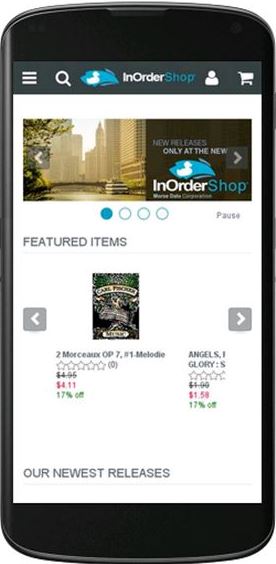 With the explosion of the use of mobile devices, it is only logical that eCommerce businesses use it to their advantage and lead traffic to their eCommerce websites. Here are ways embracing mobile technology can help you stay competitive.
Maps
People often use their mobile phones to look for stores in the area, or to get directions from their location. This is a great opportunity to lead them to your website with a link from your listing.
Apps
Use a mobile app to notify subscribers of your specials, offer coupons, and even offer details about products they viewed. Apps can be more unique than text messages in what they provide. You can use apps to work with other marketing campaigns, personalized offers, and social media efforts. Coupons and special offers that are available only through your app can help you track the usefulness of these efforts.
Text
Text messages don’t require a special app to use and are simple to send. Here are several good ways to use text messaging to attract customers to your web store.
- Use text messages to confirm orders, relay order shipping and delivery status.
- Send links to customers requesting reviews of products they recently purchased.
- Coupons and Flash Sales – Text messaging is an interesting way to offer special coupons or flash sales just for customers and text subscribers, as well as offers that are not available on your website. Exclusive messages can keep customers interested in your messages and make them feel special.
- Keep your messages brief and on topic. Be clear about who you are, the benefits of acting, and by when.
How often it’s appropriate to make contact is determined by your business. When you use text messaging, be careful not to overwhelm your subscribers with too many messages.
And always provide a link to your web store.
ERP in the Cloud
 Running ERP software in the cloud has advantages and disadvantages, so whether it’s a sound decision is determined by your business.
Getting Started
The main advantage of running ERP software in the cloud is that it typically takes less resources (hardware and software) to get started with a new ERP system than with an in-house implementation. Compared to buying and maintaining everything yourself, these savings can be considerable. Whether you have an IT staff / IT vendor and the ability to allocate these resources to an in-house ERP system can help determine if these expenses are justified.
Stability and Security
If your business is Internet-dependent, hosting your site in the cloud and may be a good idea. This way, if your town or city loses power due to a natural disaster or other reasons, your online business isn’t affected. (Generally, companies like Rackspace have redundancies that ensure their clients’ networks keep working even if power is out in a local area.)
However, cloud computing doesn’t necessarily mean your problems go away. In March 2012, for example, Amazon Web Services (AWS) went down – an outage that affected many popular sites, including Pinterest and Instagram. AWS was down again in 2015– and took Netflix with it.
Security is often a critical concern for ERP buyers. How does your business require you to handle your data? Must you be in control of it, or can you turn it over to the cloud-based host?
Maintenance and Support
Whether you choose cloud-based software or you keep your ERP system in house, expect recurring fees for support, training, and updates. So over time, the cost differences may not be so clear.
Buying an ERP version “out of the box,” eliminates customization, so implementation is quicker than it would be otherwise. However, it’s wise to make sure customization and updates are possible as your business grows, especially if your industry requires special processes. While you might be able to work with your vendors to see what changes can be made and how updates are handled, keeping your system in-house provides the greatest ability for customizing and growth.
What’s been your experience with cloud computing? Feel free to leave a comment about it.
Have you been thinking about it? If so, give us a call – we’ll be glad to help answer any questions you may have.
Helpful Articles for Your Business
Do you accept mobile payments? Business Insider explores the rise of mobile payment technology:
http://www.businessinsider.com/ecommerce-payment-technologies-overview-trends-2016-10
It just never stops – cyber thieves are relentless, and we have to be just as relentless in being alert. This article from Halock discusses the big business of ransomware. https://www.halock.com/blog/ransomware-multi-level-marketing-business/
According to Adobe Digital Insights, sales on Cyber Monday broke records. We hope your holiday season was this good! http://www.pymnts.com/news/ecommerce/2016/cyber-monday-breaks-ecommerce-records-surpasses-expectations/
After the holiday shopping season is over, you still have a lot of work to do. Contact your customers for feedback to increase sales. https://www.getinorder.com/blog/index.php/increase-sales-by-soliciting-customer-feedback/
InOrder Supports TSYS Integration
Morse Data Corp. works with several integration partners to increase your productivity and help you keep your customers happy. One of these partners is TSYS, a leader in the electronic payments industry.
Earlier this year, TSYS acquired TransFirst, one of several payment gateways that has been supported by InOrder for many years. This acquisition created the third largest integrated payments provider in the U.S.
TSYS has received several recognitions in 2016, including one of FORTUNE’s Fastest-Growing Companies, one of the World’s Most Ethical Companies, Military Time’s EDGE 2016 Best Vets: Employers (No. 66), Visa Quality Performance Award for Lowest Response Time, Visa Quality Performance Award for Assured Transaction Rate, NICE Customer Excellence Award for customer experience, and many others.
TSYS is one of Morse Data’s many integration partners. InOrder is a real-time, tightly integrated, single database ERP system for multi-channel merchants, Internet retails, publishers, and fulfillment solutions providers. You can read some of our reviews here.
To find out more about integrating InOrder with TSYS, give us a call.
Solutions to 4 Problems that Cause Online Shoppers to Abandon Their Carts
30% of online shoppers do not complete the checkout process. That’s a lot of lost revenue. Sometimes shoppers get distracted, and sometimes they simply need more time to shop. Other times, they get frustrated and give up on the order. Here are four common reasons for cart abandonment, and solutions to help you get back those sales.
Problem: Not Enough Reviews
Reviews can increase sales by steering and bolstering confidence as shoppers are considering their purchases.
Additionally, it is important to know what your customers think of your products because then you know how you can improve your offerings, and where you should consider raising or lowering prices.
Solution: After each purchase, ask for a review of both the shopping experience and the product. This lets the customer know that you still care even after the sale. Make sure the product was received and the customer is happy with it. Ask for a referral to a friend, offering a discount or coupon for the favor.
With InOrder’s Ratings and Reviews page you can enable live crowd sourcing so your customers can provide feedback for products or product categories. In addition, you can enable product or category- specific on line forums or Q&A sections. Customer feedback can be auto-approved or held for review based on your criteria. It can also be viewed in the Customer Timelines or even viewed at the product level from the Inventory window or on your reports.
Problem: Customers Can’t Find Products
If shoppers search for something specific, it means they know what they want, and they want to find it immediately. Check your search analytic results to see how shoppers are searching for your products. Remember that a search engine-optimized design gives you additional edge over the competition.
Solution:
If you have multiple product categories, make sure your customers can easily find what they’re looking for. Provide them with the ability to combine different search criteria, in whatever combinations they choose, with tools such as Facet Filtering. InOrder’s SOLR search engine integration and Facet Filtering enhancements make it easier than ever for your customers to find the products they are looking for. Fixes you make in your main inventory database take effect on your website in real time, without waiting for cumbersome data feeds to occur.
Problem: Checkout is too Complicated or No Guest Checkout
If the checkout process requires customers to create an account, or if there are unexpected fees or high shipping amounts, shoppers might not complete the checkout process.
Solution: Keep the checkout process simple and quick. Reveal all fees up front and show your shoppers the checkout flow to let them know what to expect. Keep it efficient with as few steps as possible. Giving customers an up-front shipping estimate, or the option to bypass registration (when appropriate) can eliminate some of the breakdown at checkout.
Problem: You Can’t be Reached
Too often, online businesses use Email only as a means of contact, or a phone number is not easy to find. If shoppers have a question about your business or products, or a problem navigating your site, make sure you can help without making them wait. Customer Service should always be at your customers’ fingertips.
Solution: Make sure your customers can reach you immediately with any questions. Display your phone number where it can be easily and quickly seen. If shoppers have questions or problems navigating your site, make sure you can help without making them wait. Keep Customer Service always at your customers’ fingertips, and make sure your customer service reps can pull up the customer’s shopping cart, edit it, and help the customer get through checkout if necessary.
Reducing Cart Abandonment
When customers (and potential customers) leave items in their carts, messages with links to the carts can help guide them to checkout. A series of 2-3 messages at specific intervals provides subtle reminders that keep you in mind.
Read this article for more help about recovering abandoned carts.
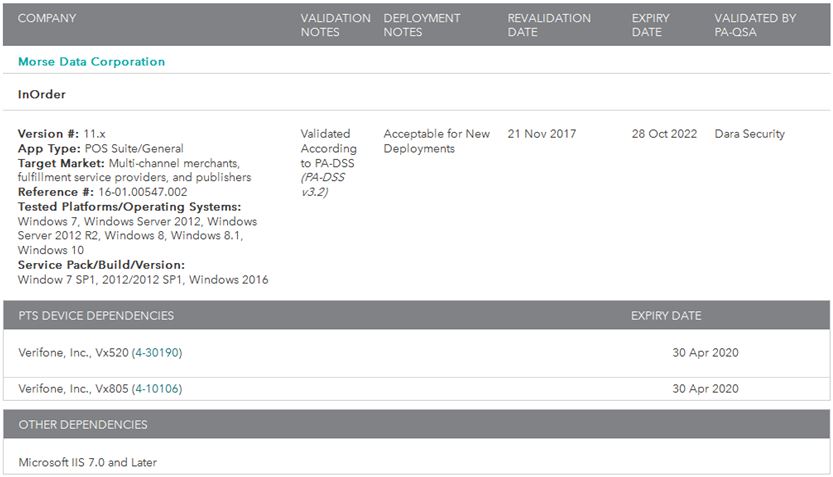
InOrder Enterprise Management Software Version 11.x is a PA-DSS v3.2 Validated Payment Application
We are proud to announce that InOrder version 11.x has been successfully validated according to Payment Card Industry Data Security Standards (PCI-DSS) Payment Application Data Security Standard (PA-DSS) v3.2, and may be used by merchants who are PCI-DSS compliant.
The PCI Security Standards require merchants and service providers that store, process or transmit customer payment card data to adhere to information security controls and processes that ensure data protection.
InOrder was first validated in 2010, and has been re-validated annually. The annual revalidation involves reporting all software changes to a Qualified Security Assessor (QSA) for review and approval by the PCI Security Standards Council. Since our validation was scheduled to expire this year, a new full validation was required. To achieve this, we worked with Dara Security, a PA-DSS QSA, who thoroughly tested the software according to PCI-DSS PA-DSS v3.2 standards and submitted a report along with the InOrder PA-DSS Implementation Guide to the PCI Security Standards Council. InOrder 11.x is now the most recent version acceptable for new deployments.
Dara Security provides information security services involving standards such as PCI DSS and PA-DSS, with expertise in a range of industry, federal and state regulations. For more information about Dara Security, please visit their website.
For more information about PCI-DSS and PA-DSS, please visit the PCI Security Standards Council website.
5Tips for Selecting the Perfect ERP System
Researching ERP software can be a daunting task. After all, you’re looking for a system to help run your business. It will impact your customer service, how you manage your warehouse, your bottom line, and even your customers.
You must know what you need and how you will use it, prepare specific examples for your prospective vendor, and evaluate their solutions. As you research ERP software, make sure you consider these items:
How Will the ERP System Benefit Your Business?
An ERP system integrates information across your organization. It relies on a single database and automates the flow of information. A well-designed ERP system incorporates the aspects of your business to give you a clear view of it. When considering an ERP system, ask yourself if it will provide your business with these benefits:
- Will it improve my bottom line?
- How can it help increase and maintain customer satisfaction?
- Can it help my business attract new business?
- How can I use it to make my processes and my personnel more efficient?
- What resources does it provide for future growth?
Know What You Need
Make a checklist of your processes, what you need to help complete them, and any additional features you’d like to consider. Prioritize them to help with your decisions when making your selection. Your checklist can be as long as you need it to be, and might include standard features, such as inventory management, order entry, and reporting. It might also include industry-specific features, such as commissions, royalties, or subscriptions.
Evaluate Systems
- Prepare for demos. Document real-life scenarios that you need solved, and ask each vendor to demonstrate solutions.
- Compare how each vendor accomplishes the same functions and make sure they provide the solutions you need.
- Evaluate each system and how it meets your solution criteria.
Evaluate Vendors
Selecting a vendor is as important as selecting an ERP system. Be sure they are experts, professional, and available when you need them. Some things to consider:
- What is the vendor’s implementation process?
- When is the vendor available for technical support? How responsive is the vendor when you have questions or need assistance?
- How often is the system upgraded and what’s involved?
- Request references and follow up on them.
Be Realistic
Understand what’s involved in selecting and implementing an ERP system. You’re asking it to do a lot, and it can meet your needs when you’re realistic about what to expect. It takes as much commitment from you as from the vendor and the system. Not only during implementation, but for the life of the system. As people within your organization come and go and your business changes, additional maintenance and training is required. As your ERP system continuously improves, so can your business.
Once you make your selection, think about implementation. For help with this, download our white paper Ten Tips for a Successful ERP Implementation.