5 Easy Ways to Generate Income With Your ERP System
Generate Income With Your ERP System
In addition to supporting your business, every ERP system should have capabilities that help you build your business. Here are five features of great ERP systems that you can use to drive traffic to your store, add customers, and build orders.
Cross-Sell / Upsell
When a customer views or orders any item, this feature provides an alternate item or additional item to complement the one originally viewed. When used on an eCommerce site, items are displayed to the customers. When used with a POS or other order entry system, items are displayed to the customer service rep to suggest to the customer.
But don’t stop there! Make sure the suggestions make sense. For example, are you showing items that you have in stock? Are you grouping related items by the reason they are related?
Loyalty Programs
Use loyalty programs to reward your loyal customers and offer free or discounted items and other incentives. For example, you could offer points to customers for many activities that build your business, such as these:
- Each dollar spent
- Placing the first order or creating an account
- Buying a specific item
- Spending a minimum amount
- Ordering during specific times
- Referring friends to your website
- Joining a list
- Ordering frequently
- Buying extra points
Customers can redeem points in the form of free merchandise, dollar amounts, merchandise credit, or shipping discounts. Using a Loyalty Program not only generates additional income, but is a way to express appreciation to your customers.
Promotions
Promotions provide incentives to customers for ordering, or for increasing the size of their order. For example, you might include a free item with every order over $100. Promotions can also be used to entice customers to buy from other product categories they have not tried yet, or to test prices and new product offerings.
Installment Billing
Installment Billing allows you to make your products available immediately to your customers while accepting payments over time. Installment Billing can be used for subscriptions or large purchases, which customers might otherwise put off indefinitely. You can even link an installment plan to a promotion so your customers can take advantage of special purchasing opportunities before an offer expires. Installment Billing is the perfect tool for providing your customers with a personalized and professional shopping experience.
Email Marketing
Email Marketing provides an efficient way to communicate with your customers through your ERP system. Email marketing is used to let your customers know about new products and promotions, and to drive traffic to your website with newsletters, reminders, and other targeted marketing efforts via Email. Effective Email marketing pieces include the “abandoned cart reminder” and the “we’re sorry so here is a discount.” These types of emails are known to catch customers’ attention by letting them know that you care about them and their business personally (in the context of previous interaction with them, as opposed to a general “cold” marketing effort).
Click here for Email marketing messages every ERP system should have.


4 Email Marketing Messages Every ERP System Should Have
You know it’s critical to be able to communicate with your customers through your ERP system. You need to acknowledge orders, notify customers about shipments, approve returns, reset passwords, send digital products, and provide various services through Email messages. In addition to supporting your business, every ERP System should have Email Marketing capabilities that help you build your business. To let your customers know about new products and promotions, and to drive traffic to your website with newsletters, reminders, and other targeted marketing efforts via Email, make sure your ERP System can send these messages.
Welcome Messages
Welcome messages are sent to customers who create new accounts and can set the tone for your new relationship. They remind new customers of their basic account information that may be needed to return, such as their login information, customer number, etc. They are sent to thank new customers and announce any coupons, points, or other promotion for creating the account. Welcome messages may also contain links, discuss benefits of the company, privacy policies, customer support information, other promotional offerings, and more.
Abandoned Cart Email Series
These all-important messages can generate income for your business by converting lost revenue. Include a link to the cart so your customers can simply pick up where they left off. You can even offer promotion codes to encourage customers to complete their orders or add items to their carts.
A good practice is to send abandoned cart Emails as a series. For example, you can either define a series for Emails that are sent at specific time intervals and stop after the final Email is sent, or based on minimum/maximum delay settings until the maximum delay is reached.
Back in Stock Notification
Use these messages to drive traffic back to your site by notifying shoppers when items they want become available or promote related items as alternatives. A great ERP system will even receive requests directly from shoppers to let them know when an item is back in stock.
Email Blasts
Email Blasts distribute Email messages to members of a mailing list to advertise new products or upcoming sales, distribute newsletters, and more.
Other Considerations
Be sure to look for Email tracking as well. Tracking clicks and reads shows your customer services reps when a customer is interested in a specific offering or item. Other information related to customer contact is also tracked, such as orders, returns, inquiries, mailings, and call lists, and even your conversions so you know which promotions are the most successful. A great ERP system organizes all of these Email functionalities by customer and prospect, so customer service and list management functions can see and act on a clear and integrated timeline of events. This helps customer service reps provide first-rate, personalized service to your customers.
All of these Email functionalities are tracked by customer and prospect, so customer service and list management functions can see a clear and integrated timeline of events in one place.
When evaluating or setting up your ERP Email Marketing messages, be sure you can send text or html-based messages, or both, so you can reach all your customers where they want to be reached. Ideally, the system will have templates to get you up and running faster, and let you personalize your content for top-notch targeted marketing.
InOrder Supports AvaTax Pro
Last summer, we proudly announced that we were a certified Avalara partner, with seamless and transparent integration between InOrder ERP software and AvaTax. This integration simplifies the tax calculation process for InOrder users, easily calculating the final sales tax amount on every invoice.
InOrder supports both AvaTax Basic and AvaTax Pro. Benefits of AvaTax Pro include access to tax research for over 2400 products & services, and 100,000 taxability rules, as well as ongoing tax research and maintenance. Another benefit with AvaTax Pro is that Avalara manages taxability for you, which is very helpful if you sell a variety of products and services, your tax rules vary between jurisdictions, or you have nexus in multiple locations.
If you want the perfect solution for calculating and filing sales tax, contact us for more information about integrating InOrder with AvaTax.
InOrder ERP System’s Scannable Timesheet Entry adds Efficiency to the Warehouse and Accuracy to Job Costing
Entering timesheets is easy when you’re sitting at a desk. Simply open the timekeeping software and enter your time as you complete your tasks. But when personnel are moving around a warehouse all day, tracking time can get a little tricky. Every employee does not have his or her own computer station, and having employees log in and out of one station all day isn’t very efficient.
Using the Job Cost module of InOrder ERP, warehouse personnel simply scan their badges and the barcodes of the task they are working on from a daily Active Task Menu. InOrder keeps track of the time between each scan. Typically, a project manager or warehouse manager can also scan a task and then scan the badge of each person who will work on it. The project manager can also track who is still clocked in, and then press one button to end a shift completely.

InOrder ERP Open Enrollment
Learn how to get the most out of InOrder. Join us in Orland Park, IL to learn how to make InOrder work better for you. We have classes for all user levels, from basic setup and introduction to advanced classes for more complex processes. Do you have new employees who need to learn InOrder? Have you recently had a major upgrade? Have you added modules or enhancements? We can help you get everyone up to speed to use InOrder to its fullest advantage.
If you prefer, you can schedule a class at your office using your data. Call us for details at 800-860-9515.
What’s in a Well-Designed Enterprise Resource Planning (ERP) System?
When you’re looking for a well-designed ERP system to support your business, here are a few things to keep in mind. 
A well-designed ERP system integrates your information across your organization. This is accomplished using a single database that automates the flow of information within the system. A well-designed ERP system incorporates many aspects of business – from CRM for providing quality service and optimizing selling opportunities – to real-time inventory and warehouse management to keep all of your organization’s information accurate at all times – to reports that provide you with the information you need to plan ahead and move ahead.
A good ERP system is modular, which allows you to start with only the components you need, and add features and functionality as you grow. It is flexible and can be customized to accommodate the changing needs of your business to keep up with your industry. Each component is tightly integrated so an update in one area communicates the information to other areas, promoting efficiency and accuracy to result in higher returns on your investment.
When shopping for your ERP system, be sure you have control over your use of the software by customizing your business rules. This allows you to control important core behaviors within the system without costly modifications and programming.
Specific features to look for when considering an ERP system are determined by your business requirements. You already know the importance of CRM, inventory management, warehouse management, and order management. You may also want to consider eCommerce for selling online and opportunities to attract new customers. If you accept credit card payments, you’ll also need to be sure your ERP system is PA-DSS-Validated to meet your PCI-DSS requirements.
Consider using your ERP system to communicate with your customers. Let them know about new products and promotions. Abandoned Cart Email messages are proven to be effective in increasing sales, as well. You can also drive traffic to your website with newsletters, reminders, and other targeted marketing efforts via Email.
In addition to all the capabilities of a well-designed ERP system, look for a good ERP vendor who is responsive to you, with implementation assistance to make the transition as smooth as possible. Be sure it provides training and technical support to make sure the system is in the hands of qualified users, as well as continuous improvement and on-going communication to be sure you are always aware of the most current technology.
Increase Sales While Generating Regular Income with Installment Billing in Your ERP System
The Installment Billing function in the InOrder ERP system can be used for large purchases for which customers can make multiple payments, as well as subscriptions, kits, or any other item you sell. You can make your products available immediately to your customers while accepting payments over time. Linking an installment plan to a promotion allows your customers to take advantage of special purchasing opportunities. InOrder Installment Billing is the perfect tool for providing your customers with a personalized and professional shopping experience.
InOrder provides an accurate and efficient payment schedule for each order using a billing plan. Simply add the payment – InOrder does the rest. InOrder Installment Billing Plans work with Customer Service orders, Order Entry orders, and with orders entered on your web store. Your customers can buy when they’re ready to buy.

Setup is quick and straightforward. Installment plans are defined to identify the installment plan, determine the minimum amounts, dates, payment schedule, order classes, and promotions. Associating installment plans with order classes provides templates for each of your order types. They provide default settings for shipping, handling, promotions, territories, pricing, payments, messages, etc. This gives you control and consistency, while still being flexible with the ability to verify or override specific information.
Totals for orders with installment plan payments continue to reflect the original order total. Because the order itself can be modified and re-totaled indefinitely, the actual billing events (including manually edited installment billing events) and amounts (with optional payment amounts) are re-computed each time the order is re-totaled.
Future installment payments are shown in the A/R Lookup window. For each customer with an installment plan, you can see how much is due, and when it is expected.
For more information about using installment plans with InOrder, please contact us or click here to request a demo.
Tell Your Customers What to Expect to Help Them Make a Good Buying Decision and Remain a Loyal Customer
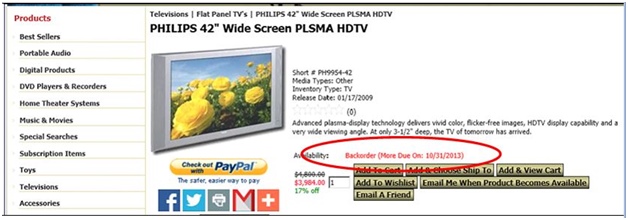
If items are back-ordered, tell your customers when to expect them. Why is this so important? So your customers can determine whether or not they really want to place an order even if they know it will be delayed. If you think this sounds a little counter-productive, continue reading.
Consider this: A shopper places an order in early December for a Christmas gift. When the order is delivered; however, one item is not included. The item may have been back-ordered or substituted. What do you think the customer will do? Return the order and keep shopping? If the missing item was substituted, will the customer give the substituted item as the (possibly unwanted) gift? Will the customer continue shopping (elsewhere) for the rest of the gift? How do you think that customer will feel about that type of treatment? Will that customer be able to trust that merchant for an important order again? Under those circumstances, I know what I would do because a similar situation happened to me. I would have preferred to not place the order at all because I still had to shop for what I already ordered (and was led to believe I would receive), with precious time lost in the process.
A good ERP system can prevent this type of disappointment by letting your customers know what to expect when they order from you. And with that comes the knowledge that they can trust you when they have important orders to place. Your customers will appreciate the extra communication and you will earn more loyal customers.
Reserving Inventory Keeps More Customers Happy
What happens when a wholesale customer unexpectedly orders the last of your inventory for a particular product? How long do your retail customers have to wait for the backorder? And how many customers will you lose because they don’t want to wait?
With a good ERP system, you can prevent this from causing you to lose revenue from non-wholesale orders. Simply reserve a specific quantity of each item for your retail customers. When an order is placed by a wholesale customer, that reserved quantity isn’t even made available.
Using InOrder, setup consists of identifying customer types that are allowed to purchase from reserved stock, and setting the reserved quantity on the inventory item. Here’s how:
Identifying Customer Types
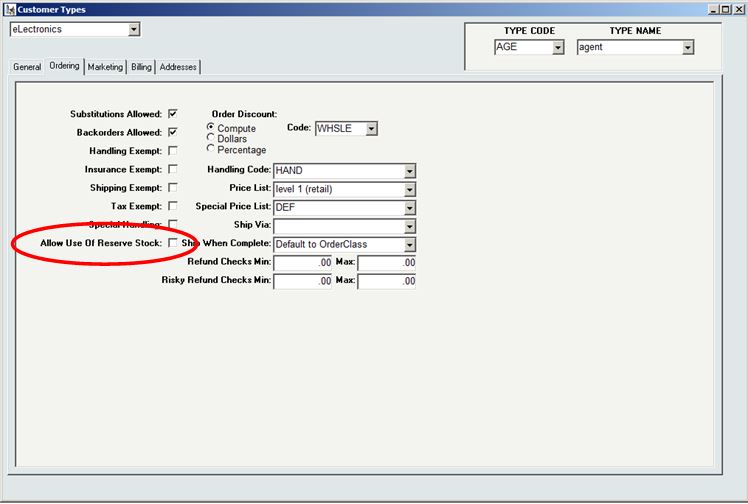
For each customer type allowed to purchase from the reserved inventory, check the “Allow Use of Reserved Stock” checkbox in the [Customer Types] window. Customer types ‘IN’ and ‘RT’ are automatically allowed to purchase reserved stock.
Reserving Inventory
The Physical tab of [Inventory] has a field labeled “Reserve” for each dimension and location of the item. Use this field to identify the amount of stock to reserve. This stock will be available for purchase to only the customer types identified with the Allow Use of Reserve Stock checkbox on the [Customer Types] window.
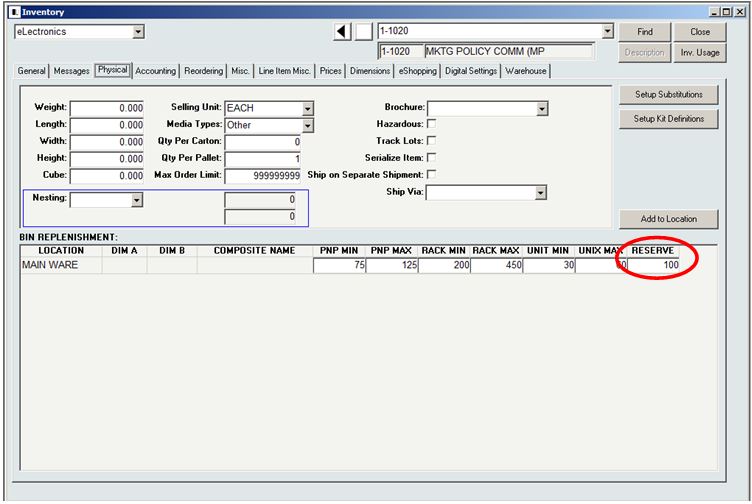
Reserved stock may be viewed on the [Inventory Lookup] and [Inventory Lookup 2] windows.
When you offer the same items to multiple customer types and have large orders to fill, reserving stock is a great way to help keep more customers happy.
Lancaster Archery Relies on InOrder
InOrder is constantly evolving and improving, so it’s beneficial for long-time InOrder clients to evaluate how they’re using the software to determine whether improvements can be made. Equally important is adequate training to make sure the knowledge and support of InOrder is in the hands of qualified users.
Steph Hughes, one of Morse Data’s Implementation Specialists, recently had the pleasure of visiting Lancaster Archery Supply (LAS) to assist with evaluation and training.
LAS relies on InOrder – a real-time, tightly integrated ERP system – to manage its online, catalog, and retail orders.
Based in Lancaster, PA, LAS is the respected leader in the industry – having fueled the growth of archery by providing archery equipment to businesses, organization, and individuals worldwide since 1983. LAS is active in archery events around the country, including (among many others) the Lancaster Archery Classic. They also have leagues available, and their recently opened Lancaster Archery Academy offers archery training for all ages.
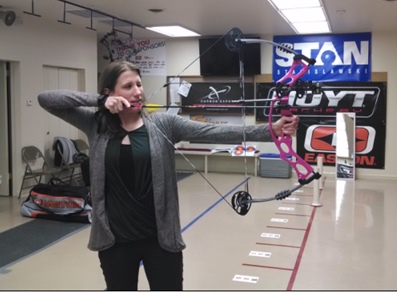
Here’s a picture of Steph practicing her technique at LAS. Steph has a better bow than Katniss Everdeen, thanks to Lancaster Archery Supply.