Category: ERP Business Software
InOrder ERP Open Enrollment
Learn how to get the most out of InOrder. Join us in Orland Park, IL to learn how to make InOrder work better for you. We have classes for all user levels, from basic setup and introduction to advanced classes for more complex processes. Do you have new employees who need to learn InOrder? Have you recently had a major upgrade? Have you added modules or enhancements? We can help you get everyone up to speed to use InOrder to its fullest advantage.
If you prefer, you can schedule a class at your office using your data. Call us for details at 800-860-9515.


What’s in a Well-Designed Enterprise Resource Planning (ERP) System?
When you’re looking for a well-designed ERP system to support your business, here are a few things to keep in mind. 
A well-designed ERP system integrates your information across your organization. This is accomplished using a single database that automates the flow of information within the system. A well-designed ERP system incorporates many aspects of business – from CRM for providing quality service and optimizing selling opportunities – to real-time inventory and warehouse management to keep all of your organization’s information accurate at all times – to reports that provide you with the information you need to plan ahead and move ahead.
A good ERP system is modular, which allows you to start with only the components you need, and add features and functionality as you grow. It is flexible and can be customized to accommodate the changing needs of your business to keep up with your industry. Each component is tightly integrated so an update in one area communicates the information to other areas, promoting efficiency and accuracy to result in higher returns on your investment.
When shopping for your ERP system, be sure you have control over your use of the software by customizing your business rules. This allows you to control important core behaviors within the system without costly modifications and programming.
Specific features to look for when considering an ERP system are determined by your business requirements. You already know the importance of CRM, inventory management, warehouse management, and order management. You may also want to consider eCommerce for selling online and opportunities to attract new customers. If you accept credit card payments, you’ll also need to be sure your ERP system is PA-DSS-Validated to meet your PCI-DSS requirements.
Consider using your ERP system to communicate with your customers. Let them know about new products and promotions. Abandoned Cart Email messages are proven to be effective in increasing sales, as well. You can also drive traffic to your website with newsletters, reminders, and other targeted marketing efforts via Email.
In addition to all the capabilities of a well-designed ERP system, look for a good ERP vendor who is responsive to you, with implementation assistance to make the transition as smooth as possible. Be sure it provides training and technical support to make sure the system is in the hands of qualified users, as well as continuous improvement and on-going communication to be sure you are always aware of the most current technology.
Increase Sales While Generating Regular Income with Installment Billing in Your ERP System
The Installment Billing function in the InOrder ERP system can be used for large purchases for which customers can make multiple payments, as well as subscriptions, kits, or any other item you sell. You can make your products available immediately to your customers while accepting payments over time. Linking an installment plan to a promotion allows your customers to take advantage of special purchasing opportunities. InOrder Installment Billing is the perfect tool for providing your customers with a personalized and professional shopping experience.
InOrder provides an accurate and efficient payment schedule for each order using a billing plan. Simply add the payment – InOrder does the rest. InOrder Installment Billing Plans work with Customer Service orders, Order Entry orders, and with orders entered on your web store. Your customers can buy when they’re ready to buy.

Setup is quick and straightforward. Installment plans are defined to identify the installment plan, determine the minimum amounts, dates, payment schedule, order classes, and promotions. Associating installment plans with order classes provides templates for each of your order types. They provide default settings for shipping, handling, promotions, territories, pricing, payments, messages, etc. This gives you control and consistency, while still being flexible with the ability to verify or override specific information.
Totals for orders with installment plan payments continue to reflect the original order total. Because the order itself can be modified and re-totaled indefinitely, the actual billing events (including manually edited installment billing events) and amounts (with optional payment amounts) are re-computed each time the order is re-totaled.
Future installment payments are shown in the A/R Lookup window. For each customer with an installment plan, you can see how much is due, and when it is expected.
For more information about using installment plans with InOrder, please contact us or click here to request a demo.
Tell Your Customers What to Expect to Help Them Make a Good Buying Decision and Remain a Loyal Customer
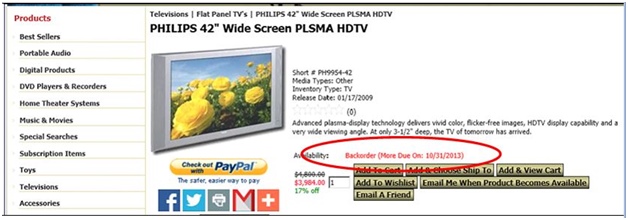
If items are back-ordered, tell your customers when to expect them. Why is this so important? So your customers can determine whether or not they really want to place an order even if they know it will be delayed. If you think this sounds a little counter-productive, continue reading.
Consider this: A shopper places an order in early December for a Christmas gift. When the order is delivered; however, one item is not included. The item may have been back-ordered or substituted. What do you think the customer will do? Return the order and keep shopping? If the missing item was substituted, will the customer give the substituted item as the (possibly unwanted) gift? Will the customer continue shopping (elsewhere) for the rest of the gift? How do you think that customer will feel about that type of treatment? Will that customer be able to trust that merchant for an important order again? Under those circumstances, I know what I would do because a similar situation happened to me. I would have preferred to not place the order at all because I still had to shop for what I already ordered (and was led to believe I would receive), with precious time lost in the process.
A good ERP system can prevent this type of disappointment by letting your customers know what to expect when they order from you. And with that comes the knowledge that they can trust you when they have important orders to place. Your customers will appreciate the extra communication and you will earn more loyal customers.
Reserving Inventory Keeps More Customers Happy
What happens when a wholesale customer unexpectedly orders the last of your inventory for a particular product? How long do your retail customers have to wait for the backorder? And how many customers will you lose because they don’t want to wait?
With a good ERP system, you can prevent this from causing you to lose revenue from non-wholesale orders. Simply reserve a specific quantity of each item for your retail customers. When an order is placed by a wholesale customer, that reserved quantity isn’t even made available.
Using InOrder, setup consists of identifying customer types that are allowed to purchase from reserved stock, and setting the reserved quantity on the inventory item. Here’s how:
Identifying Customer Types
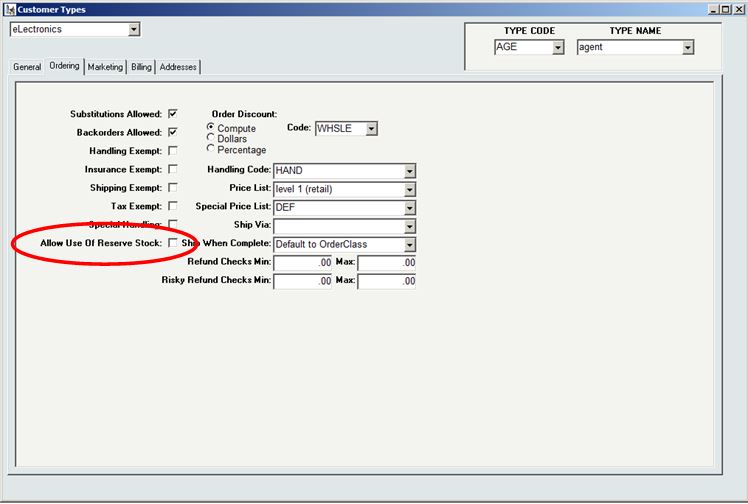
For each customer type allowed to purchase from the reserved inventory, check the “Allow Use of Reserved Stock” checkbox in the [Customer Types] window. Customer types ‘IN’ and ‘RT’ are automatically allowed to purchase reserved stock.
Reserving Inventory
The Physical tab of [Inventory] has a field labeled “Reserve” for each dimension and location of the item. Use this field to identify the amount of stock to reserve. This stock will be available for purchase to only the customer types identified with the Allow Use of Reserve Stock checkbox on the [Customer Types] window.
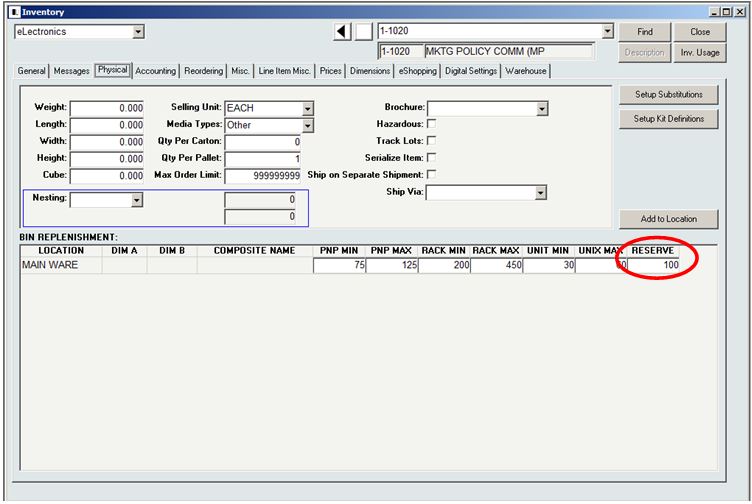
Reserved stock may be viewed on the [Inventory Lookup] and [Inventory Lookup 2] windows.
When you offer the same items to multiple customer types and have large orders to fill, reserving stock is a great way to help keep more customers happy.
Morse Data’s List of Integrated Shipping Solutions Includes Endicia’s Certified U.S. Postal Service Solutions
Morse Data Corporation is an integrated partner of Endicia. By integrating Endicia with InOrder, Morse Data clients now have access to Endicia’s certified U.S. Postal Service solutions. Whether you are a high-volume warehouse shipper, operating an e-commerce site from a garage, or simply trying to get invoices out before the day is over, Endicia can help save time, reduce costs, and increase productivity.
Endicia is the leading provider of e-commerce shipping technologies and services. Endicia delivers value by creating breakthrough shipping solutions that help global businesses, small and large, run their operations more smoothly and function more successfully. Endicia also offers seamless access to USPS® shipping services through integrations with more than 200 e-commerce partner applications. A trusted partner of the U.S. Postal Service® since 1987, Endicia has printed more than $10B in postage.
InOrder customers can use this link to sign up for a free trial.
USA Fulfillment Selects InOrder
USA Fulfillment is updating its legacy system with InOrder ERP software to support its order management and warehouse management activities.
The selection process, which took over a year, included interviews and demos of 8 ERP systems. InOrder was selected for its superior order management, warehouse management, RF, lot control, and replenishment capabilities. In addition, InOrder meets USA Fulfillment’s requirements for PA-DSS (Payment Application Data Security Standard) compliant software.
With the InOrder ERP eCommerce Order and Inventory Management software, USA Fulfillment will have real-time access to availability of stock and ship dates, and call center reps will have access to the same real-time inventory information.
In business since 1983, and based in Chestertown, MD, USA Fulfillment provides eCommerce services, warehousing, shipping, order filling, and 24/7 call center for eCommerce businesses. For more information, visit http://www.usafill.com.
Opportunities for B2B Companies Using eCommerce
Do you know who all your customers are? If you said yes and you don’t have an eCommerce store, then how do you know you’re not missing out on opportunities to grow your business? How do you really know you’re reaching everyone you can? In addition to their traditional customer bases, B2B companies with eCommerce stores can attract new customers in surprising ways.
Anyone browsing the internet could find your eCommerce store. If, for example, he or she happens to work for a small company that can use your services or products, you’ve reached a potential customer! And, in many cases, consumers are also creating an entirely new market for B2B companies.
An article by Paul Demery, “B2B Leaps Onto the Web” in the November 2013 issue of the Internet Retailer magazine, discusses new skills and technologies B2B companies are using for these new opportunities. From managing inventory and pricing, to redesigning eCommerce stores to accommodating additional customer types, to connecting with the new customer markets, B2B companies are taking advantage of these opportunities to grow their businesses.
Some statistics cited in the article from B2B respondents of surveys:
- 44% said average order values are higher through their eCommerce sites than orders placed by phone, fax, or in person. 11% said their average order values decreased.
- 24% said they remain the same, and 20% said they don’t know.
- 52% said their customer support costs decreased for customers who place orders through eCommerce sites.
- 56% said they profit only if customers use the eCommerce sites without their assistance.
- 44% said they expect to improve their order sizes through eCommerce, and 43% expect eCommerce to result in more returning customers.
As the article shows, managing and keeping product information accurate and consistent for multiple customer bases, such as other businesses and direct consumers, possibly in multiple countries, is a big challenge.
If you are a B2B company considering an eCommerce store, you could be taking the first step in attracting new business. A system with a central database is crucial. When thinking about your ERP system, keep these capabilities in mind:
- Recommend related products for more selling opportunities.
- Make sure customers can search for products and get results quickly.
- Help your customers help themselves. Let them maintain their own account information, and let them tell you how often they want to hear from you.
- Provide pictures of your products where possible.
- If items are backordered, tell your customers when to expect them.
- Offer personalization.
- Automatically send reminders when items are left in carts but not purchased.
- Establish B2B accounts separate from consumer accounts.
- Keep your pricing structure appropriate for the customer type. For example, don’t sell an item to a consumer for less than what you charge your wholesale customers. Make sure your system accommodates multiple customer types.
- Personalize your website for each type of customer, presenting information appropriately about your items.
- Use a single database system with integrated inventory and order management and real-time inventory data.
- Keep your system flexible and configurable by appropriate management.
- Provide your customer service reps with the information they need to engage with all your customers.
- Make reordering easy.
- Make sure you keep enough inventory for consumers when offering the same items to your wholesale customers.
- Use reports to monitor your performance.
What are other capabilities needed for B2B companies serving multiple customer bases? What challenges have you met? What opportunities?
Track More Email Campaigns and Show Customer Service Reps More Detail
Tracking Email has always been a part of the InOrder Email Marketing Enhancement. Now it’s also part of Digital Delivery and Email Communications. In addition to Email Blasts, users of these Enhancements can also track activity resulting from sending Emails to customers for various order and promotional messages.
The functionality uses keycodes, tracking pixels, and URL references to record when a message is sent, the type of message sent, when the message is opened (open rates), and the number of visits to the web site resulting from the message (click-through rate) to measure conversions. This data can also be used to monitor when Email is not being opened, or when it results in a new recipient from a forwarded message. This is helpful for keeping mailing lists current, which is important for maintaining sender reputation. Used with InOrder’s capacity to enable shoppers to choose which Email they receive, this function can help increase the effectiveness of selected messages.
When a message has been sent, it is logged on the customer’s timeline, providing customer service reps more opportunity to enhance the service experience when a customer calls.

For more information about how this feature can help you measure your Email ROI, contact us at 888-667-7332 or sales@morsedata.com.
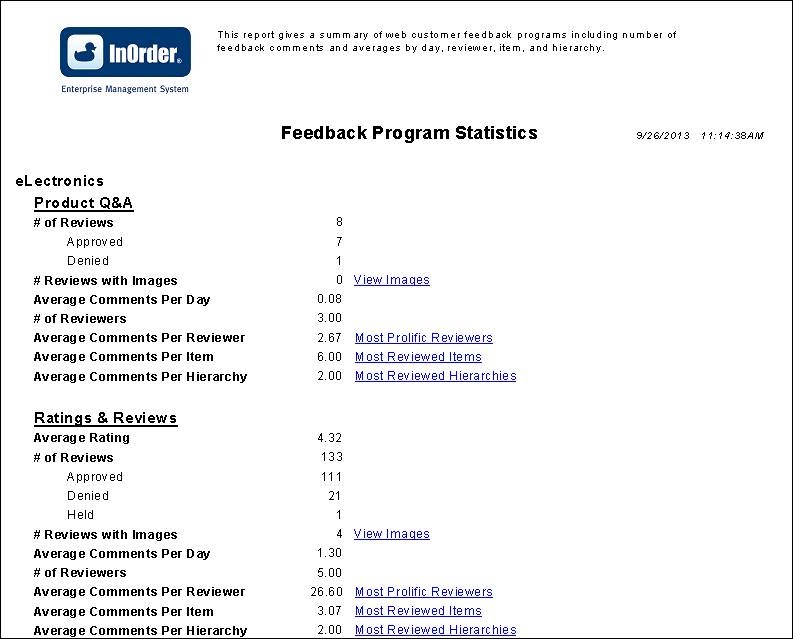
New Report for Web Customer Feedback Program
If you are using the Web Customer Feedback Program Module, you’ll be interested in the new report to see your statistics for a date range. The links in blue in the report allow one or more levels of drill-down that can be used to view and analyze your customer feedback.