
5 Tips for Adding a Retail Mobile App to Your eCommerce Business
I find some retail mobile apps to be very helpful. I use my favorite app to find current sales and the latest coupons. When I travel, I use it to find the nearest store. Sometimes, I even get coupons that aren’t available on the store’s website, and it links me to the eCommerce store where I can browse, check reviews, or shop. Finally, there are more menu items that I haven’t even explored – I can use these if I want to, but they don’t interfere with what I use most.
There are many great retailers, but not all of them have apps. Even when they’re available, over half the shoppers questioned for the UPS 2016 Pulse of the Online Shopper Study preferred using a retailer’s website over a mobile app. Some of the reasons provided included the lack of a store experience and technology – either it was uncomfortable or too hard to use.
So what makes a mobile retail app useful?
- It’s helpful – Exchange the lack of a store experience for tips or ideas for using your products, but keep this feature simple to use and not overwhelming. Provide product reviews to help shoppers make decisions, and make your contact information easy to find so help is quickly available.
- It’s simple – Provide a menu that is easy to find but not in the way.
- It makes users feel special – Give your app users something extra, such as a coupon that is not on your website, or an extra coupon that is.
- It doesn’t intrude – Give app users control of how and when they want to hear from you through your app, such as notification settings.
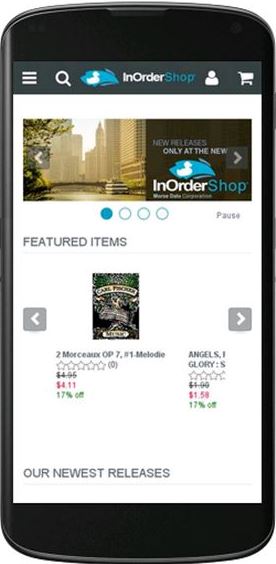
- It invites shoppers – Provide a list of store locations, with options to call and get directions. Link to your responsive mobile website for shopping. Allow customers who buy online and pick up in the store to use the app to notify the store when they arrive and avoid longer wait times.
Mobile apps can be worthwhile for some retailers. If you’re considering a mobile app for your business, use these tips to help shoppers comfortably use your app, and interact with your business whenever they can, where ever they are.


Drive Your Revenue with InOrder Royalties
If you’re a publisher, your authors are important to your business, and InOrder supports your compensation programs for the people who support your business objectives. Use InOrder to define and pay royalties to authors and agents.

Here are highlights of how royalties are used with InOrder:
- Contract clauses pay royalties based on dollar amounts, percentages, resolutions, or sliding scales and may even vary by date range.
- Define multi-clause royalty contracts with sophisticated filtering criteria when necessary using SQL Where clauses.
- Royalty statements, royalty check printing, and 1099s are supported.
- Royalty payables accrue as frequently as daily and statements with payments can be generated whenever necessary.
- Royalty payables are kept separate from general InOrder Accounts Payable.
- Contracts can link to one or more authors and one or more inventory item.
- Advances and manual checks are supported.
- Contracts can be entered retroactively.
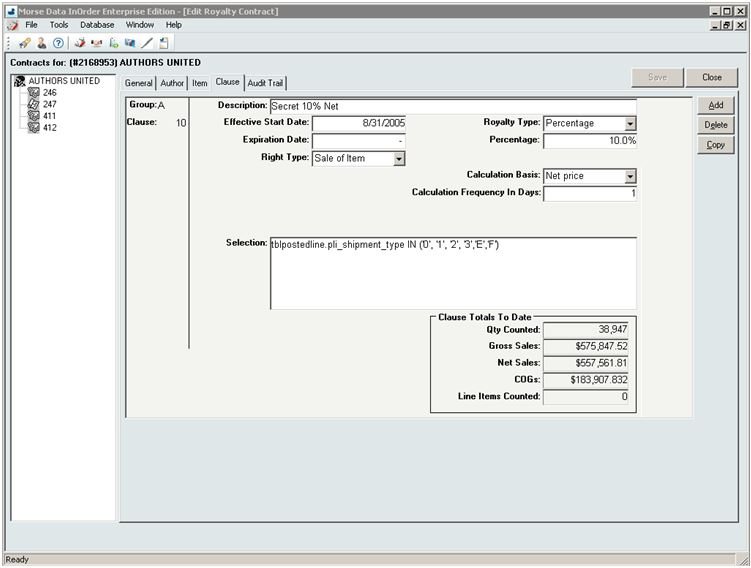
Contact us to get your Royalties InOrder.
InOrder ERP and IRCE 2017
We’re back from IRCE 2017 and as always, we’re excited about all the activities we saw and great people we met!
Many workshops at IRCE 2017 focused on B2B topics. One workshop (Amazon & Me) provided details from experts about listing products and managing product content, whether to sell as a third party or first party, fulfillment, marketing on Amazon, analyzing data, and negotiating with Amazon. Another workshop topic was about using eCommerce for B2B opportunities, the future of B2B eCommerce, ideas for successful B2B eCommerce strategies, finding new customers, personalization, mobile B2B eCommerce, challenges, and even a critique of B2B websites.
If you’ve been to IRCE 2017 or if you use InOrder, this might sound familiar. InOrder ERP has always supported B2B. Using InOrder, you can build rules and behaviors based on B2B vs. retail in terms of marketing, merchandising, pricing, picking / packing / shipping, customer service, and even contact management for follow-up efforts.
For example, InOrder’s eCommerce module has a built in B2B web site for wholesale orders that can be accessed by your B2B customers. In addition, established business customers can immediately see and search inventory with pricing agreements reflected, and can use their lines of credit when making on-line purchases. Their shipping arrangements are even automatically applied to web orders. InOrder’s EDI with Customers feature can also be tied in for acknowledgements of web orders, carton license plates, and advance shipping notices.

B2B customers want the same conveniences as retail customers do. They might not respond to “Call for Pricing” messages on your web site; however, they may be more likely to order when the pricing information is readily available. And they want other conveniences, like quick search results, pictures, and descriptions. They want easy reordering and if products are backordered, they need to know when to expect them. And once they log in to an established web account, they want personalized services, like the ability to see their negotiated prices and discounts applied as they shop on-line, with a presentation relevant to them.
If you are a B2B company considering an eCommerce store, contact us to request a demo showing how InOrder can help you attract new business.
4 Measures to Combat eCommerce Fraud and Theft
Mobile fraud is on the rise, and, as is the case with your eCommerce shopping website, your mobile eCommerce site requires vigilance to protect your customers’ sensitive data – especially when processing orders. Be sure you have measures in place to reduce mobile fraud, and train your employees to recognize signs of fraud. Your ERP system can also be a valuable weapon against would-be thieves and costly credit card chargebacks from fraud attempts.
Be sure you have these prevention measures in place to combat mobile fraud.
Fraud Scoring
To decrease fraudulent orders from being processed, use your ERP system to assess orders as they are received based on a variety of criteria known to indicate fraudulent purchases. This may include whether or not an item is considered risky, or even an area where orders are shipped. Simply knowing where fraud occurs can help protect your customers, so using address validation services is also helpful.
Integrated Solutions
Nobody wants to think that trusted partners are stealing from them – whether they’re shoppers, employees, or even vendors. But fraud and theft doesn’t only come from outside sources. Check your ERP system’s audit logging for dates, user names, and tasks each user performs. This enables you to isolate and trace other types of theft, such as generation of bogus customer refunds, gift cards, or credit memos.
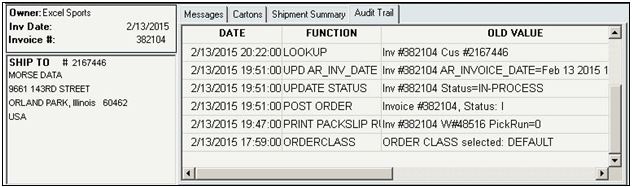
Your ERP system’s Purchasing, Payables, and Inventory systems are all connected, so you can compare what was ordered – to what was received – to what you are paying your vendors.
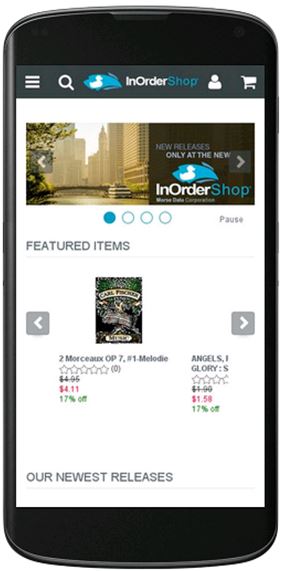 The best eCommerce systems use responsive design for mobile web using Google’s recommended responsive design pattern. With this design, a single cart functions for both PC and mobile, with a similar look and feel, regardless of device size, no longer requiring multiple web sites. What this means for fraud protection is that you don’t have to worry about carrying out the same protection measures on separate systems.
Training
Your employees play a significant part in protecting your business against fraud and theft. However, if they don’t know what to watch for, what to protect, or how, then how can they help you? One way is to follow your procedures. Define a security policy, tell your employees about it, and train them on it.
Stronger Security Measures
If you’re thinking about accepting credit card payments, you must make sure your system meets specific security standards to protect sensitive data. The PCI Security Standards website is a good place to start for information. If you currently accept credit card payments, you already know that your ERP system is PA-DSS-Validated to meet your PCI-DSS requirements.
When you protect against fraud and theft, your employees, vendors, and customers discover that they can trust you. With their trust comes respect and confidence that your business will continue to grow. Use these measures to improve and protect your customers’ shopping experience, achieve their trust, and prove that you take them seriously.
Contact us for a free demo of how InOrder’s eCommerce system helps combat eCommerce fraud and theft.
Does Your ERP System Allow Flexible Ordering to Prevent Frustration, Make Customers Happy, and Save You Money?
When customers shop your web store, they probably expect the same flexibility they experience in a physical store. Policies such as returns, exchanges, credits, coupons, and even questions or changes during checkout may be common at a physical register, but can your customers get that same great service online? With a good ERP system, all of these features are available and within your control.
Consider Mary, who shops online, enters her payment information, and submits her order. Then she remembers one small, inexpensive item she forgot to order. She quickly tries to add the forgotten item to her order, but she can’t find a way to do it herself. Mary looks for a Customer Service number – hopefully, if she acts quickly enough, she can add the item without a duplicate shipping charge. When she calls, the Customer Service rep is able to help her, but only by creating a new order and waiving the shipping charges. Mary is thankful for the help, but the Customer Service rep was apologizing for the inability to accommodate a seemingly simple request. And the business took a hit on the shipping charge (which was more than the cost of the item).
Waiving a shipping charge is a small price to make a customer happy, but it isn’t necessary. This signifies a problem with the system, which can quickly become a significant expense.
With InOrder, you can choose to allow orders to be edited even after packing.
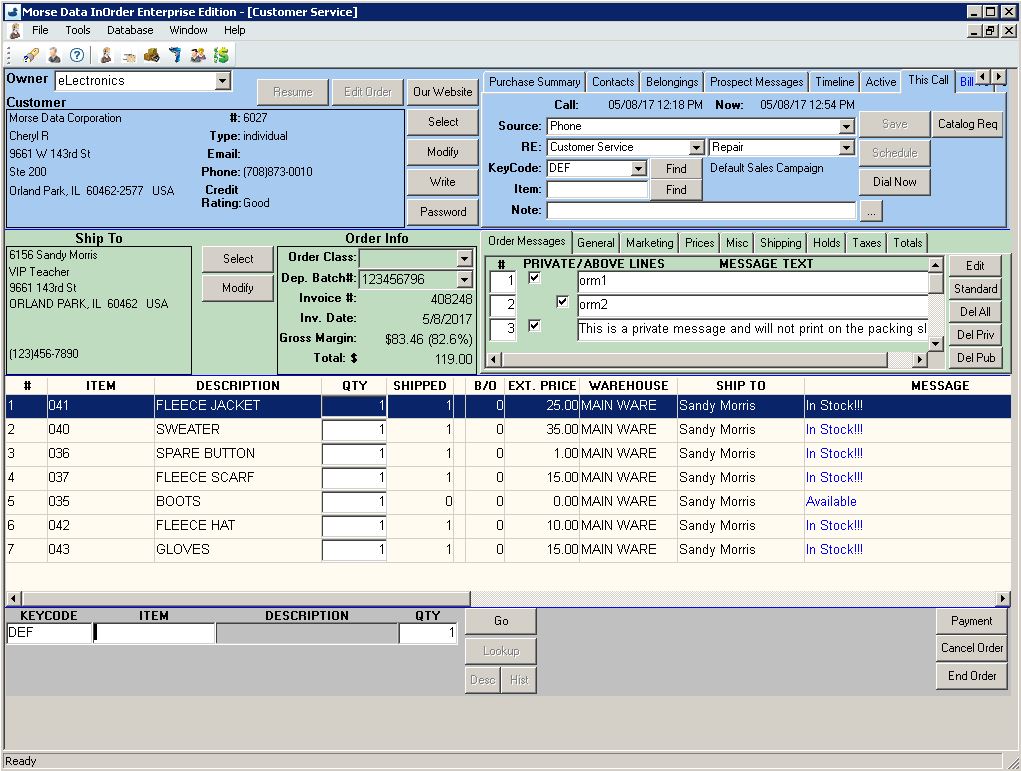
Having the right ERP system can prevent frustration for both customers and Customer Service reps, and saves you money. Whether you allow changes for shipping information, billing information, or line items for orders should be up to you – not your software.
Call us for a free demo to see more of how InOrder can help your business grow.
7 Tips to Keep Your eCommerce Customers Engaged
 Keeping eCommerce customers engaged is as important as getting new customers. After all, you work hard to select quality products, advertise your business, and attract people to your website. So it makes sense to do your best to give them good reason to keep coming back. Here are some helpful tips:
- Give customers ideas for using your products. If you have a product that solves a problem, tell them.
- Provide instructions and videos showing how to use your products.
- Keep customers engaged with Ratings, Reviews, Comments, and Q&A. Reply to feedback, add comments to a thread, encourage questions, and offer suggestions.
- Offer rewards and coupons for participating.
- Embrace Your Comparison Shoppers. People research products. As shoppers, we check out all our options. We gather information about what’s available, we read reviews, and then we decide where to shop. Motivate shoppers to use your website for researching your products and make it easy for them to buy from you by providing what they need.
- Show your latest features and new products.
- Create excitement with a VIP Program. Use multiple levels so people can attain them, rather than simply joining and being a member.
Along with these activities, always provide exceptional customer service and quality products. Most shoppers prefer that over delivery speed and lack of attention. Spend time getting to know your customers and their ordering preferences.
Many shoppers appreciate information and online activities that involve what interests them. Keep them interested with education, participation, and fun. Use your own website for a gathering place, or find out where your customers go for online social activities, such as Facebook or Instagram. Use these tips to help them stay interested in what you have to offer.
Contact us for a free demo of how InOrder can help you keep your eCommerce customers engaged.
Beware of the Latest Coupon Scam
Most shoppers love coupons. Before shopping, many people may first search online for coupons from their favorite stores. And with many websites providing links to coupons, it can be much easier to find them. Unfortunately, it’s also easier for thieves to scam unsuspecting shoppers.
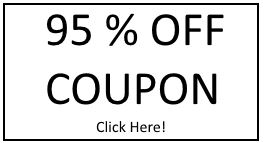 A recent trend for thieves is to post coupons on Facebook. These coupons, usually too good to resist, lure shoppers to click on them and provide personal information, which is then used by thieves to steal identities, money, and anything else they can get away with. To add insult to injury, the coupon isn’t even legitimate.
While it is imperative to have a security process and train your employees to protect your business, it is also important to try to educate your customers about keeping their information safe. This can go a long way in helping to avoid breeches – both for customers and your business. Here are some tips:
- Let customers know your coupon policy and where to find them.
- Don’t require personal information in exchange for a coupon. Doing so may confuse your customers and prevent them from recognizing a scam that requires personal information.
- Remind your customers to NEVER provide personal information in exchange for your coupon.
- Make it easy to find your contact information for questions. Display your phone number where it can be easily and quickly seen. If a shopper has a question or problem navigating your site, make sure you can help.
Coupons, promotions codes, sales, and special offers are proven ways to significantly influence purchases. Consumers will even use them to plan what they buy, where they will buy it, and when. Do what you can to promote this activity, and don’t let thieves spoil it for you.
Contact us for a free demo for offering coupons with InOrder.
Get Your Wholesale Shopping InOrder
InOrder provides support for wholesale ordering, including wholesale orders that require items to be ordered in multiples of the item quantity per carton.
Whenever a line item is added to an order, it is checked to determine if wholesale ordering is in effect. If it is, then the quantity ordered must be a multiple of item carton quantity. The item quantity is rounded up to the carton quantity, and a line item message indicates that the line item was rounded up. A popup alert may also be displayed.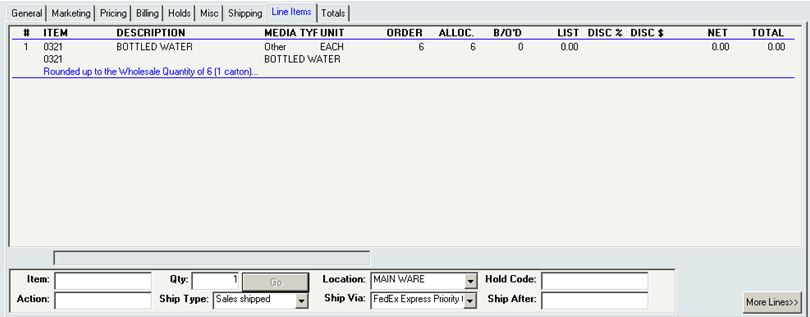
Enforcement of wholesale order requirements may be changed at the line item level. When this setting is changed on the order and one or more line items already exist, line items that are already on the order are not affected. Therefore, this setting can be temporarily bypassed by turning it off, adding the line item, and turning it on again. This allows special overrides, when necessary, at the line item level.
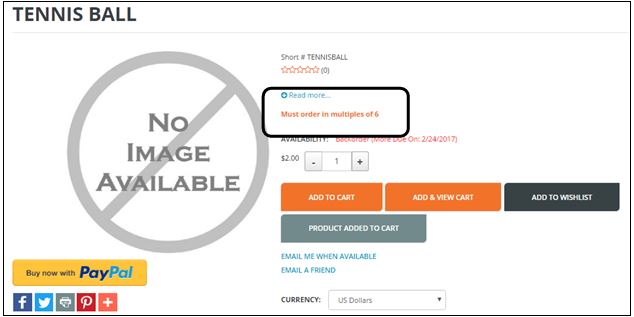
This feature is also supported for Electronic Order Filling and EDI orders. On the web site, the Item Details page is also designed to show a message if there are wholesale ordering requirements for the item. You can customize this message with a simple configuration setting.
For more information about wholesale shopping with InOrder, please contact sales@morsedata.com and ask for your free demo.
Helpful Articles for Your Business
Thinking of closing physical stores? Think again. Phil Wahba discusses how physical stores are supporting online sales.
http://fortune.com/2017/03/30/e-commerce-brick-mortor-stores-retail-shopping/
When you’ve finished reading the first article, be sure to read this one about embracing your comparison shoppers to build confidence and trust, and interact with them.
https://www.getinorder.com/blog/index.php/does-your-erp-software-embrace-your-comparison-shoppers/
If you use SEO, social media, or other digital advertising, machine learning is important to you. This MultiChannel Merchant article discusses machine learning as it impacts eCommerce.
http://multichannelmerchant.com/ecommerce/machine-learning-will-impact-ecommerce-13032017/
Will the cyber world ever be without threats? Maybe not. So your employees should always be aware of who and what is lurking out there, and how to protect your business interests. Check out another poster from Halock to remind them of a few simple rules.
What to Look for When Selecting the Perfect ERP Vendor
Selecting a vendor is as important as selecting an ERP system. ERP vendors must be experts in their field and, to an extent, yours. They must also be professional and available when you need them, and provide clear communication to keep you informed of important changes. Here are important things to consider about potential vendors when evaluating ERP systems.
- What is the implementation process? Is there a dedicated Project Manager who is readily available? The implementation of an ERP System is a large undertaking that needs careful planning with the proper time and resources allocated to avoid surprises during Go-Live. Since this is not something your company does on a periodic basis, a number of unknowns could end up causing you a lot of unnecessary problems and expense. Be sure the vendor has plenty of experience.
- What is the vendor’s availability for support? This indicates how responsive the vendor will be when you have questions or need assistance. How often is the system upgraded and what is involved? It is important that your system always has the latest updates for security and functionality – without disrupting your business.
- What about references? Request them and follow up on them. Reviews for vendors are as important as they are when shopping online. Experience with your industry is a plus.
- What types of communication are provided? Notices of updates are important for security and training, as well as details about what’s in each update. General information about the system is always helpful, and of course, documentation on how to use the system is a must. It is beneficial to you when the vendor is actively in touch and keeping you informed.
Make sure you can work with the vendor to get what is important to your business within a specific time-frame. Top-notch support is key. It takes commitment – not only during implementation, but for the life of the system.
To help with a smooth implementation, follow these tips from things we’ve learned over the years. And when you’re ready to check out ERP systems, contact us for a free demo of InOrder.