
Welcome Back Adeel
 We first introduced Adeel when he was an intern at Morse Data. He started here in December of 2010, and was with us until he graduated from DePaul University in June 2013, with a Bachelor of Science in Computer Science. After spending the last year working in the grocery supply software vertical market, Adeel will be joining us again, starting this month, and we are excited to welcome him back as a permanent member of our team.


InOrder Supports PCI DSS Compliance Efforts for Protecting Stored Cardholder Data
PCI DSS contains requirements for the protection of stored cardholder data using cryptographic keys. These keys must be changed at least once a year. This is a straightforward procedure for you and your key custodians using the InOrder Key Management Wizard.
The network administration / security personnel, along with the designated Key Custodians, run the InOrder Key Encryption Wizard to change the key. If a key is old or suspected to be compromised, it is replaced. This procedure is audited by the system so your PCI QSA can confirm it has been done.
The InOrder Key Management Wizard supports PCI DSS compliance efforts by assisting with the following tasks for handling cryptographic key material:
- Generation of strong cryptographic keys
- Secure cryptographic key storage by generating key encrypting keys
- Split knowledge and dual control of cryptographic keys
- Periodic cryptographic key changes
- Rendering cryptographic material irretrievable by retirement or replacement of old or suspected compromised cryptographic keys
- Re-encrypting historic data with new keys
- Requirement for cryptographic key custodians to acknowledge that they understand and accept their key custodian responsibilities
- Backup and restore of keys
- Audit of all key maintenance operations
- Required use of complex passwords
- Restricting key access to the fewest number of custodians necessary
- Storing keys securely in the fewest possible locations and forms
Please refer directly to PCI DSS for your responsibilities under these requirements. If you have specific questions relating to your responsibilities for PCI DSS compliance, please direct them to your Qualified Security Assessor (QSA).
InOrder ERP Supports USPS Changes Prices for Priority Mail Services
USPS has recently announced price changes for its Priority Mail Service. These changes, which begin on September 7, 2014, include an increase of prices at Post Offices and postal retail outlets, and a decrease of prices for Commercial Plus and Commercial Base online shipping services.
Please obtain the new rates from USPS and be sure to import them into InOrder before September 7. For assistance importing these new rates, please contact InOrder Customer Support.
If you use the Endicia software interface to InOrder, you must update your Endicia software by August 31, 2014 to a version that supports these new rates and services. The updated Endicia software will print the correct postage for packages postmarked September 6 or earlier, as well as advanced date postage at the new rates.
If you use any other shipping interface for USPS rates, please contact your vendor for instructions.
Change your Passwords to Guard Your Information Against the Latest and Largest Theft of Credentials
As you may have heard today, over a billion records, including usernames, passwords, and email addresses were stolen from 420,000 websites. This is said to be the largest known collection of stolen internet credentials.
According to the NY Times, victims are not yet identified and most of the hacked websites are still vulnerable, and the stolen data may already be used. Is your personal information part of this collection? You may never know, so watch your credit card balances, keep track of your credit report, change all your passwords, and use a different password for each website. Here are good things to keep in mind when you change your passwords:
- Do not use group, shared, or generic accounts and passwords.
- Change your passwords at least every 90 days.
- Use a minimum password length of at least seven characters.
- Use passwords with both numeric and alphabetic characters.
- Do not use a password that is the same as any of the last four passwords you have used.
If you have additional advice for keeping your personal information safe, you’re welcome to add it here.
InOrder Enterprise Management Software Version 9.7 is a PA-DSS Validated Payment Application
We are proud to announce that InOrder version 9.7 has been successfully validated according to Payment Card Industry Data Security Standards (PCI-DSS) Payment Application Data Security Standard (PA-DSS) v2.0, and may be used by merchants who are PCI-DSS compliant.
The PCI Security Standards require merchants and service providers that store, process or transmit customer payment card data to adhere to information security controls and processes that ensure data protection.
InOrder has been successfully revalidated annually since it was originally certified in 2012. To achieve PA-DSS validation, a report documenting all software changes since the previous validation was provided to Trustwave, a PA-DSS Qualified Security Assessor (QSA) who audited compliance of the software, and submitted the report with the InOrder PA-DSS Implementation Guide to the PCI Security Standards Council. These reports are also available for our clients and their PCI-QSAs.
Trustwave is a security company that provides services and solutions that include security for compliance and risk, SpiderLabs, and managed security, as well as network, database, and application security services and products. For more information about Trustwave, please visit their website.
For more information about PCI-DSS and PA-DSS, please visit the PCI Security Standards Council website.
Generating Income with InOrder Using Promotions
As we previously said in our article about generating income with your ERP system, promotions provide incentives to customers for ordering, or for increasing the size of their orders. For example, you might include a free item with every order over $100. Promotions can also be used to entice customers to buy from other product categories they have not tried yet, or to test prices and new product offerings.
Here are more profitable ways to use promotions:
- Use promotional shipping charges to offer free or discounted shipping for an order.
- Offer buy-one-get-one sales. These are popular ways for customers to buy two gifts for less, or give a gift while shopping for themselves.

- Encourage customers to spend more using tiered discounts. For example, give a 5% discount to customer who spend $50, 10% discount for spending $100, etc.
- Offer discounts on items related to each other when they’re bought together, such as batteries or cell phone accessories.
- Host a sale for a preferred group of customers. Send an Email with exclusive access to the sale.

Use InOrder to easily tailor promotions to your business. Keycodes, which are uniquely connected to mailing lists used in promotions, may be used with Google click-tracking. You can use this to track the links clicked by your customers from Email messages you have sent to them.
Generating Income with Loyalty Programs
Loyalty Programs continue our series on 5 ways to generate income with your ERP system. Loyalty programs give customers incentives / reasons to buy. They bring customers back so they buy more and buy again.
Loyalty programs provide benefits for both your business and your customers by generating additional income and expressing appreciation to your customers. You can reward your loyal customers by offering free or discounted items and other incentives. For example, offering points for placing orders or spending a minimum amount encourages order building while giving something in return. You can offer points for many more activities that build your business, including these:
- Each dollar spent
- Placing the first order or creating an account
- Buying a specific item
- Spending a minimum amount
- Ordering during a specific time
- Referring a specific number of friends to your website
- Joining a mailing list
- Ordering frequently
- Buying extra points
You can even offer points for sale. There are many, many possibilities. With InOrder, the loyalty earning level for an order can be changed while editing the order.
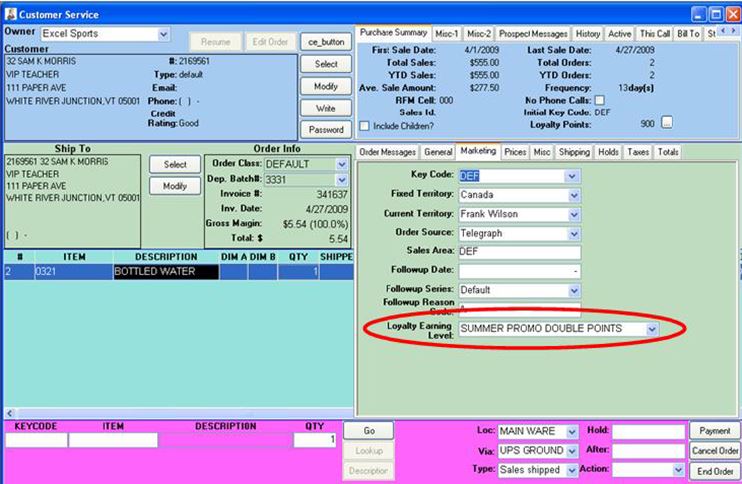
Points are earned and redeemed by placing an order. When a loyalty award is added to an order, the points are instantly deducted from the customer’s loyalty award account. You can give your customers choices, and redeem points in the form of free merchandise, dollar amounts, merchandise credit, and shipping discounts.
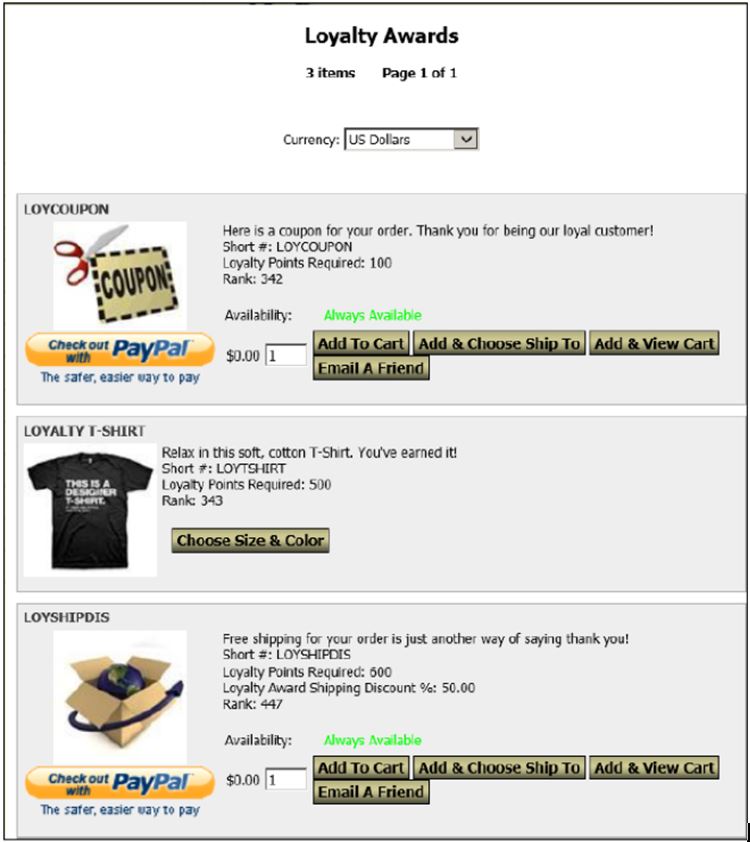
You set the limits. Points and awards may be handled a number of ways:
- Points can be awarded based on dollars or using resolutions based on quantity.
- Award points for the items of your choice.
- Assign earning levels based on customer types and order classes.
- Points may be manually overridden.
- Points are awarded when the order posts.
- Points may or may not expire.
- Identify the awards to offer.
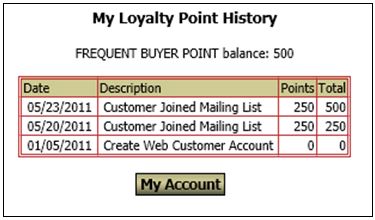
Track point balances and redemptions. Reports list each customer’s loyalty point balance and point redemptions for a date range by inventory item. Customer service reps can view earning details, balances, and access orders/transactions that generated or redeemed points. Customer may view their point balance and history on-line.
Generating Income with InOrder Using Installment Billing
As we said in our article about generating income with your ERP system, installment billing can help you generate income by making your products available immediately to your customers while accepting payments over time. Installment billing can be used for subscriptions or large purchases, which customers might otherwise put off indefinitely. With installment billing, your customers can buy when they’re ready to buy. You can even link an installment plan to a promotion so your customers can take advantage of special purchasing opportunities before an offer expires. Installment billing is the perfect tool for providing your customers with a personalized and professional shopping experience.
InOrder provides an accurate and efficient payment schedule for each order using a billing plan. Simply add the payment and InOrder does the rest. InOrder Installment Billing Plans work with Customer Service orders, Order Entry orders, and with orders entered on your web store.
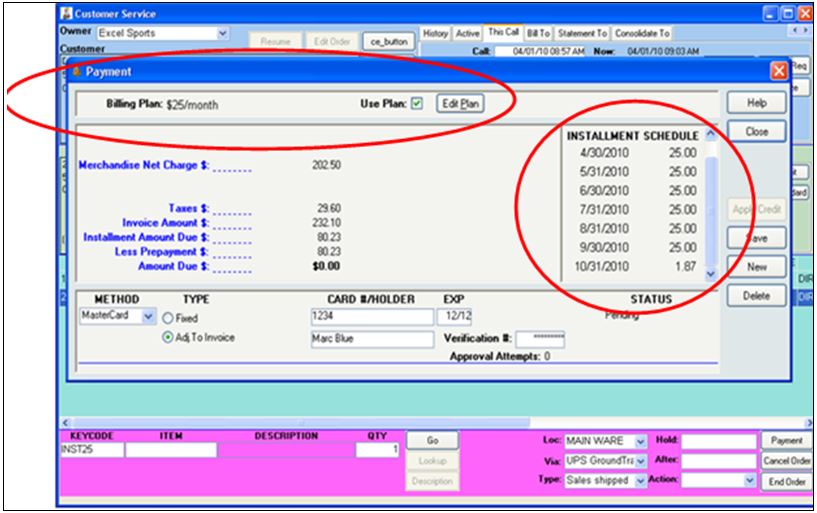 Setup is easy. Installment plans are defined to identify the installment plan, determine the minimum amounts, dates, payment schedule, order classes, and promotions. Associating installment plans with order classes provides templates for each of your order types. They provide default settings for shipping, handling, promotions, territories, pricing, payments, messages, etc. This gives you control and consistency, while still being flexible with the ability to verify or override specific information.
 Automatically generate payment transactions and invoices. Simply run the installment processor. You can even schedule it to run automatically, and notify your customers of payment transactions with Emails InOrder.
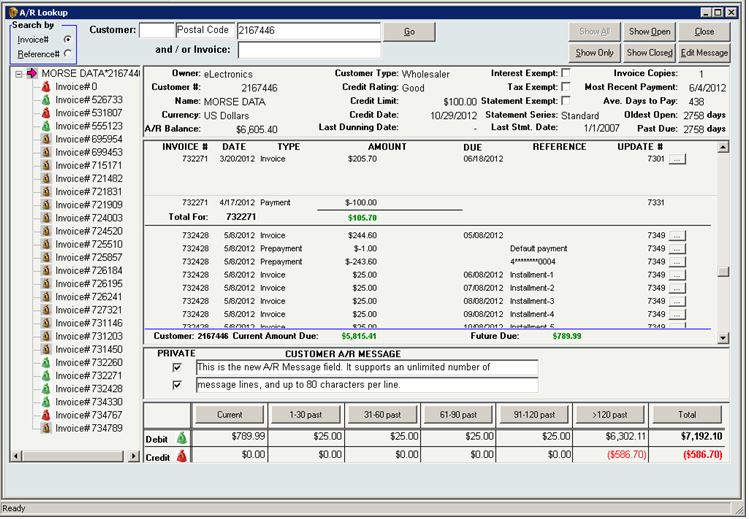
Users with the proper security may edit installment schedules – even for posted orders. 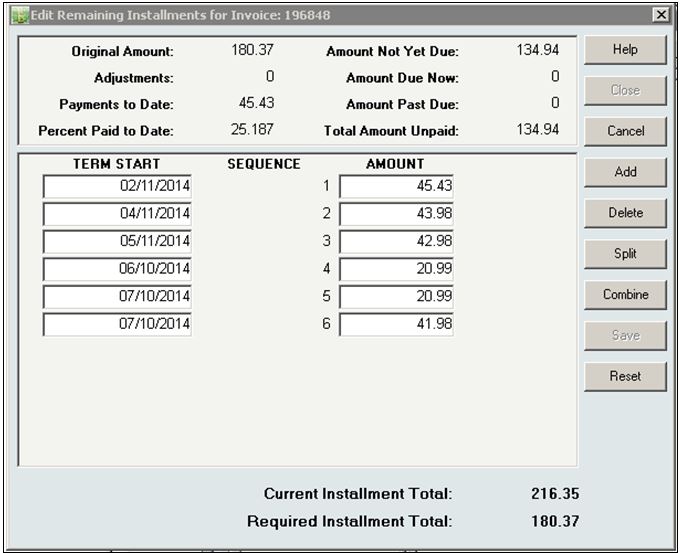 Statements, reports, and dunning letters support Installment Billing information display. Future installment payments are shown in the A/R Lookup window. For each customer with an installment plan, you can see how much is due, and when it is expected.
 Merchandise returns are handled as efficiently as always. Issue a credit memo for the original invoice for the refund amount and receivables will be reduced.
Tips for Generating Income Using InOrder ERP to Cross-Sell/Up-Sell/Add-On
Last month, we discussed five ways to generate income with your ERP system. This month, we will show you how InOrder does this. Let’s begin with cross-selling / up-selling / add-ons.
Merchants have been employing these techniques for a very long time. And they don’t need the Internet to do it. You may notice these efforts in most stores. Cashiers ask if you found everything you were looking for. Sales people may lead you to a refrigerator with more features. Magazines and snacks are at the registers in a last-minute effort to increase sales. And, of course, don’t forget the accessories! Filters, batteries, protective cases, etc., all enhance the use of the products while adding to the bottom line.
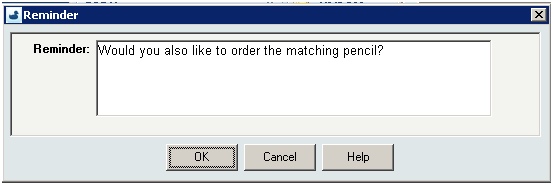
InOrder uses multiple item relationships for additional cross-selling and up-selling opportunities. Select specific items and you can add multiple items to the order at one time. This also includes lists of kit items and substitutions to allow your customers to purchase extra (or separate) kit components, or substitute a component with another item. InOrder lets you know which items are available for purchase before offering them to your customers.

When you’re planning your inventory for cross-selling, make sure the suggestions make sense. For example, show items you have in stock, and group related items by the reason they are related.
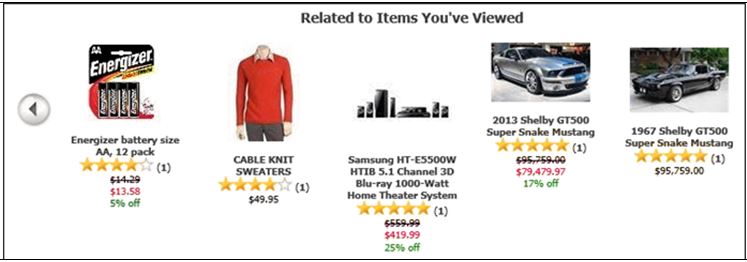
On the web, you can use carousels to display related items, accessories, cross-sells, and more. Hike it up another notch to generate items that rank as best sellers.
When an item is added to an order as result of an up-sell or a cross-sell, the original item ordered gets registered on the line item so reports can be generated to show line items that were the result of a successful up-sell or cross-sell.
Protect Your Customers With Fraud Scoring Protection
To decrease fraudulent orders from being processed, orders placed with InOrder’s Enterprise Management Software may be assessed as they are received based on a variety of criteria known to indicate fraudulent purchases.
How it Works
Fraud point values are defined and assigned to criteria to compute a fraud score for each order source. Fraud scoring criteria may include whether or not an item is considered risky, and may be weighted to establish how risky an item is relative to other items.
As criteria are met, point values are added and saved on the order. If the overall score exceeds the defined threshold values, the order is placed on hold for review and/or manager approval.
Fraud scores may be computed in real-time as each line item is added to an order, or once for all items when the order has ended.
The [Order Lookup], [Order Entry], and [Customer Service] windows show the order’s saved fraud score.
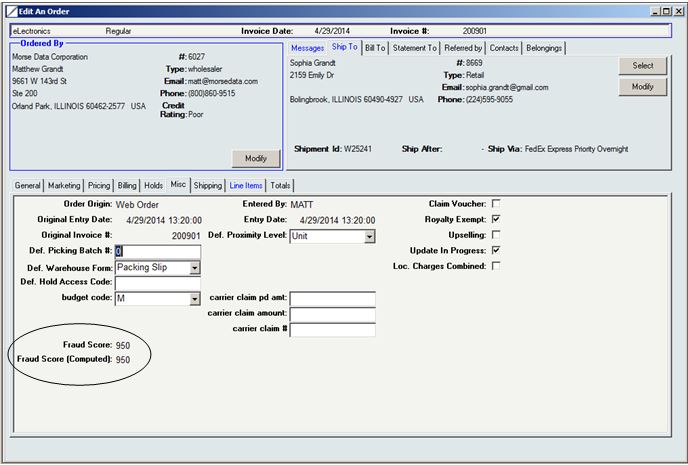
InOrder Fraud Scoring Protection
A new report, Frequent Returns and Replacements, lists customers who exceed a number of returns / replacements within a date range, along with their returns and replacements. Also included are order level messages, and the customer’s lifetime sales and returns.