
Category: Morse Data News and Events
Do You Enjoy a Process of Continuous Improvement?
It’s beneficial for any long-time software users to evaluate how they’re using their software, to determine whether improvements can be made in their processes. For example, the InOrder Enterprise System is constantly evolving and improving. New versions are created and tested on a weekly basis.
Is your staff doing manual tasks that can be automated? Can your system automate tasks such as these?
- Sending gift card numbers.
- Processing deposit batches.
- Avoiding backorder of multiple retail orders as a result of stock rundown by high volume customers.
- Providing shipping and delivery estimates.
- Sending back-in-stock notifications to increase sales.
- Recovering abandoned carts to increase your revenue.
- Prompting customers to visit your website using your packing slips, receipts, Email confirmations, “we-re sorry” and other order follow-up Email series.
Are you getting the most out of your web cart? How fast can customers find your products? The InOrder eCommerce Module has grown by leaps and bounds in just the past year, adding to our commitment to help you improve the shopping experience you deliver, while lowering costs and increasing sales. For example:
- Top of the line search capabilities, like Solr Search and Facet Filtering, to get your products in front of shoppers fast
- Multiple carousels of related products for up-selling and cross-selling opportunities
Can your customers do this using your web cart?
- Quickly find what they want.
- Track shipments; get up-to-date order and backorder status.
- View loyalty point balances and earnings, and redeem them online.
- Check gift card balances online.
- Manage their orders and their subscriptions, including vacation holds and renewals.
- Manage their own email list memberships, including email frequencies by type of Email.
- Download and manage their digital purchases.
- Post and share product reviews, customer service Q&A, surveys, and expert forums related to specific products or general product groups.
- Share your products on social media, such as Twitter, Facebook, and Pinterest.
- Repeat previous orders and gift orders, and use a true address book to create their own new gift orders.
Do your customer service reps have the tools they need to provide your customers first-rate service and improve your bottom line? Can your reps do this:
- Call customers; enter orders, returns, and quote prices; view customers’ website visits, product reviews and other feedback; check points, subscriptions, and history; send letters and more – all from one place.
- See what your shoppers looked at, to provide a more personalized shopping and service experience.
- Offer multiple up, down, circular, diagonal, and cross-selling opportunities over the phone.
Can you use other business tools, like these?
- Use the latest technology to track activity resulting from your Emails to customers, and have the capability to improve Email deliverability.
- Check inventory or reserve stock from your phone or tablet.
- Refund gift cards.
- Keep your customers coming back with loyalty award programs.
Even more questions – Are you maximizing your SQL Server uptime? Are you thinking about moving to a cloud environment?
Yes, this is a huge list! InOrder is packed with big functions, and each version adds more, to help you improve your bottom line.
Even if you have these features, are you using them to your fullest advantage? Equally as important as having the best technology is knowing what it can do for your business, and using it to continuously improve your workflows. Have your employees reverted to old processes? Adequate training means the knowledge and support of InOrder is in the hands of qualified users.
If it’s been awhile since you’ve upgraded, give us a call and request our documents that provide details about what’s new with InOrder – and be sure you’re getting your copy of InOvation, which is our monthly update just for clients to outline new and useful features. Morse Data is committed to Change Management and Continuous Process Improvement. It can be overwhelming to figure out a change strategy, and we can help.


Employee Spotlight
We would like to introduce Jackie Harney, one of our Customer Support Representatives.
 Jackie brings over 15 years experience in roles providing technical support, business analysis, and project implementation to Morse Data. Jackie graduated from Illinois State University with a degree in computer science, and takes continuing education classes because she loves learning new things.
“I am impressed by InOrder’s customizable functional design, which allows clients to tweak the system to mirror their internal processes,” says Jackie. “I love helping companies use technology so they can focus on what they do best.”
In her free time, she enjoys landscaping, woodworking, volunteering, painting, and knitting, but her favorite pastime is spending time with her daughters whenever they are in town.
USA Fulfillment Selects InOrder
USA Fulfillment is updating its legacy system with InOrder ERP software to support its order management and warehouse management activities.
The selection process, which took over a year, included interviews and demos of 8 ERP systems. InOrder was selected for its superior order management, warehouse management, RF, lot control, and replenishment capabilities. In addition, InOrder meets USA Fulfillment’s requirements for PA-DSS (Payment Application Data Security Standard) compliant software.
With the InOrder ERP eCommerce Order and Inventory Management software, USA Fulfillment will have real-time access to availability of stock and ship dates, and call center reps will have access to the same real-time inventory information.
In business since 1983, and based in Chestertown, MD, USA Fulfillment provides eCommerce services, warehousing, shipping, order filling, and 24/7 call center for eCommerce businesses. For more information, visit http://www.usafill.com.
How Fast Can Customers Find Your Products?
When shoppers search for a specific product on your website, how quickly can they find it? If shoppers search for something specific, it means they know what they want, and they want to find it immediately. Shoppers spend just seconds deciding whether to make a purchase. If they cannot quickly zero in on what they are looking for on your website, you may as well not sell it.
Online shoppers often have a good idea what they’re looking for when they get started. You accommodate this by organizing your website to help shoppers find products easier and faster. But how can you get your products in front of shoppers fast enough?
Setting up your products to match how shoppers are searching for them and using top of the line search capabilities, such as Solr Search and Facet Filtering, will improve the speed of finding products in search results.
Check your search analytics (InOrder reports, Google Analytics, etc.) to see how users are searching your products. What do your shoppers search for and what are the results? Determine which attributes are searched most often, commonly misspelled terms, and how results are being filtered. If necessary, use InOrder’s superb flexibility for any modifications by setting up products to match how users are searching for them.
When setting up filters, place more important filters on top. Facet Filtering help customers fine tune their search results. It enables shoppers to make additional selections within search results based on their individual interests, eliminating the need to sift through too many results. This feature is most beneficial when there are thousands of items in inventory. Shoppers expect this capability, and it provides a lot of power for minimal set up.
Shoppers will find what they are looking for. Why not make sure they find it on your web store?
Getting Screen Samples in Windows
When a user needs assistance with a program, it is helpful (and sometimes necessary) to send a picture with the question, error, or answer. Making a copy of what is on your screen (also referred to as “capturing”) is easy. You can either copy everything on your screen, or a specific window, or only a portion of it. When a copy is made, it is placed on the Windows Clipboard, where it stays until you copy something else or exit the program. Once the copy is on the Clipboard, you can then “paste” it into Microsoft Word or Outlook, or even to Microsoft Paint for editing. Here’s how:
Capturing the Entire Screen
To capture the screen of one or more monitors, press the Print Screen button on your keyboard.
Capturing a Specific Window of the Screen
This is helpful if you are using multiple monitors.
- Click the window to make sure it’s active.
- Press and hold the Alt button on your keyboard, and press the Print Screen button.
- Click the window you want to capture.
Capturing a Portion of a Window or Screen
The most powerful way to capture a screen sample is to use the Snipping Tool that is included with Windows Vista, Windows 7, and 8. To use the Snipping Tool, lasso the part of the screen you want to copy. To “Lasso,” click on one corner of the window, but hold down the mouse button once you click it. Then drag the mouse diagonally to the opposite corner and let up the mouse button.
Pasting the Screen Sample
After you have captured your screen sample, paste it into Microsoft Word, Outlook, or Paint for editing. A quick shortcut to paste the screen sample is CTRL+V.
(Extra Tip: You can also use the CTRL key shortcuts to cut and copy. Just about any place you can use a right-click menu to cut, copy, or paste, you can also use CTRL key shortcuts for the same functions: Use CTRL+X to cut, CTRL+C to copy, and CTRL+V to paste.)
Once you have mastered these skills, it is easy to report something on your PC to your IT department, by putting screenshots into a Microsoft Word document. Below each picture, type a description of what is happening.
Want to capture a copy of your screen on your smart phone? Google the make and model of phone you have, followed by “screen capture” or “screenshot” to get the key combination that you need.
The Famous Rubber Duck
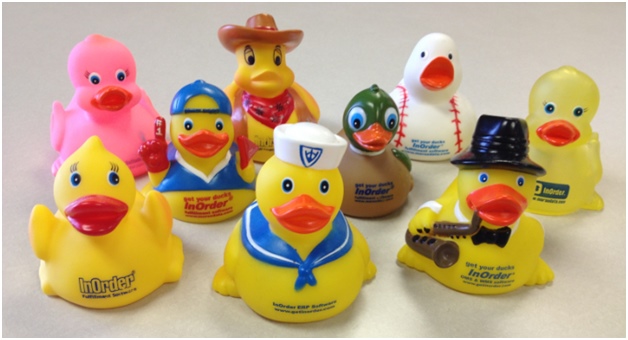
The rubber duck was inducted into the National Toy Hall of Fame this year!
Check out the details here http://www.toyhalloffame.org/toys/rubber-duck.
Of course, we think it’s cool. We put a lot of thought into our selection of rubber ducks each year. Do you have a favorite?
Opportunities for B2B Companies Using eCommerce
Do you know who all your customers are? If you said yes and you don’t have an eCommerce store, then how do you know you’re not missing out on opportunities to grow your business? How do you really know you’re reaching everyone you can? In addition to their traditional customer bases, B2B companies with eCommerce stores can attract new customers in surprising ways.
Anyone browsing the internet could find your eCommerce store. If, for example, he or she happens to work for a small company that can use your services or products, you’ve reached a potential customer! And, in many cases, consumers are also creating an entirely new market for B2B companies.
An article by Paul Demery, “B2B Leaps Onto the Web” in the November 2013 issue of the Internet Retailer magazine, discusses new skills and technologies B2B companies are using for these new opportunities. From managing inventory and pricing, to redesigning eCommerce stores to accommodating additional customer types, to connecting with the new customer markets, B2B companies are taking advantage of these opportunities to grow their businesses.
Some statistics cited in the article from B2B respondents of surveys:
- 44% said average order values are higher through their eCommerce sites than orders placed by phone, fax, or in person. 11% said their average order values decreased.
- 24% said they remain the same, and 20% said they don’t know.
- 52% said their customer support costs decreased for customers who place orders through eCommerce sites.
- 56% said they profit only if customers use the eCommerce sites without their assistance.
- 44% said they expect to improve their order sizes through eCommerce, and 43% expect eCommerce to result in more returning customers.
As the article shows, managing and keeping product information accurate and consistent for multiple customer bases, such as other businesses and direct consumers, possibly in multiple countries, is a big challenge.
If you are a B2B company considering an eCommerce store, you could be taking the first step in attracting new business. A system with a central database is crucial. When thinking about your ERP system, keep these capabilities in mind:
- Recommend related products for more selling opportunities.
- Make sure customers can search for products and get results quickly.
- Help your customers help themselves. Let them maintain their own account information, and let them tell you how often they want to hear from you.
- Provide pictures of your products where possible.
- If items are backordered, tell your customers when to expect them.
- Offer personalization.
- Automatically send reminders when items are left in carts but not purchased.
- Establish B2B accounts separate from consumer accounts.
- Keep your pricing structure appropriate for the customer type. For example, don’t sell an item to a consumer for less than what you charge your wholesale customers. Make sure your system accommodates multiple customer types.
- Personalize your website for each type of customer, presenting information appropriately about your items.
- Use a single database system with integrated inventory and order management and real-time inventory data.
- Keep your system flexible and configurable by appropriate management.
- Provide your customer service reps with the information they need to engage with all your customers.
- Make reordering easy.
- Make sure you keep enough inventory for consumers when offering the same items to your wholesale customers.
- Use reports to monitor your performance.
What are other capabilities needed for B2B companies serving multiple customer bases? What challenges have you met? What opportunities?
New Report for Web Customer Feedback Program
If you are using the Web Customer Feedback Program Module, you’ll be interested in the new report to see your statistics for a date range. The links in blue in the report allow one or more levels of drill-down that can be used to view and analyze your customer feedback. 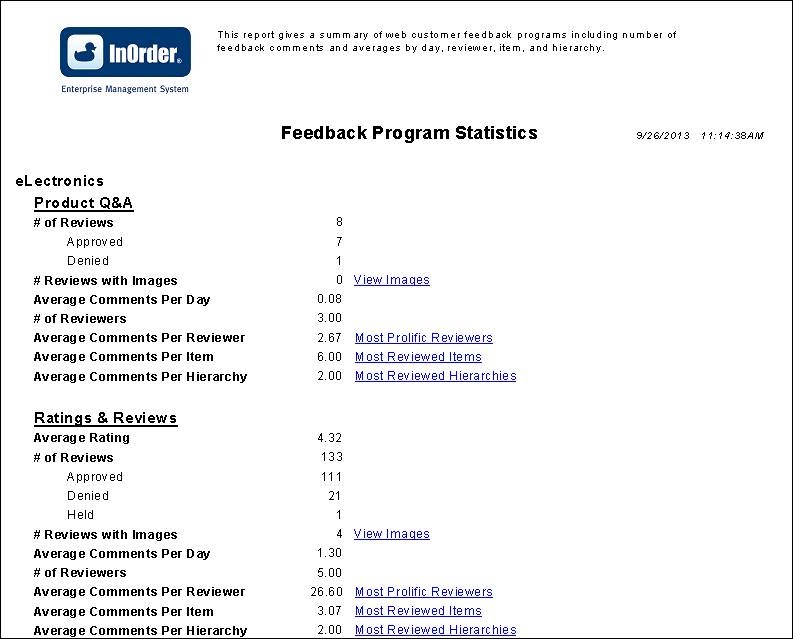
InOrder’s Web Cart Delivers Fast and Accurate Search Results with Solr Search and Facet Filtering
We’ve done it again. Just when you think it doesn’t get much better – we make it better. Our Web Cart, that is. Now InOrder Web Cart users can give their customers top-of-the-line search capabilities with Solr Search and Facet Filtering.
Solr is a search platform from the Apache LuceneTM project. Its many advanced search capabilities include distinguishing between plural and singular search, recognizing common typos and finding results. And it can be used with Facet Filtering.
Facet Filtering is a powerful capability that helps customers fine tune their search results. It enables shoppers to make additional selections within search results based on their individual interests, eliminating the need to sift through many search results. Setup is minimal, and shoppers expect it.
These features provide shoppers with faster and more accurate search results, adding to our commitment to help our customers improve the shopping experience they deliver, while lowering costs and increasing sales.
New Custom Shopping Cart Upgrade Service
We are excited to be offering a custom shopping cart upgrade service to our clients who have InOrder eCommerce full .Net Module Software Support, along with a recent version of the InOrder real-time eCommerce Web shopping cart that has been customized.
This new service includes the following and is tailored to each client’s specific needs:
- Registration of custom web cart changes when submitted to Morse Data Corporation
- Periodic upgrades to the customized InOrder web cart with the latest InOrder updates provided by Morse Data web cart experts who know the InOrder software and ensure nothing has been missed
This benefit allows in-house staff, third party developers, or Morse Data developers to continue making changes to customized shopping cart content with personalized look and feel. At the same time, web customers receive new InOrder eCommerce capabilities as they become available with the InOrder platform upgrades.
Pricing is based a website’s level of customization and options selected. Clients who are interested are encouraged to contact Morse Data Corporation’s Technical Office for details at 1-800-860-9515 and request a free cart analysis to determine pricing. If sign up occurs before October 31, 2013, the one-time startup fee will be reduced by 50%.