If you’re expecting heavy traffic for your eCommerce business during the upcoming holiday season, you must be ready for it. If not, you – and your customers – might be disappointed.
 Now is the time to test your website to make sure it performs to your expectations. Can you customers quickly find what they’re looking for? Can they shop your website with their mobile phones? Can they contact you easily? How smooth is your checkout process? What about payment processing – do you have a backup plan? These items, and more, are important to your success this holiday season.
Design and Speed
Shoppers spend just seconds deciding whether to make a purchase. Does your website load quickly, or does it make you feel like you’re in line at a crowded department store?
Mobile Shopping
Make sure your site is compatible with all devices. Using Google’s recommended Responsive Design Plan, your mobile store will automatically adjust to the sizes of all devices customers are using to provide optimal presentation. The design has the added bonus of a single cart, so multiple web sites are no long required.
This means a better shopping experience for your users, which can translate to more sales and higher search rankings.
Finding Products
Give your customers top of the line search capabilities with tools such as Facet Filtering. This is a powerful capability that helps customers fine tune their search results. An example of a search facet can be anything such as color group, size, manufacturer, price range, or whether or not a special feature is included. It enables shoppers to make additional selections within search results based on their individual interests, eliminating the need to sift through many search results.
Ratings and reviews are another must-have feature of every web store. You can even use them, along with other types of questions/answers, to interact with your customers and add content to your website.
Use real-time stock allocation so backorder notifications are presented as items are added to the shopping cart. This lets your customers know if they have to wait for something, or if they’ll get it when they need it. This is especially important for your reputation during the holidays. You don’t want to be the source of added frustration because you customer counted on you for a delivery, only to find out at the last minute that the product was out of stock when the order was placed.
Be Available
Be sure to display your phone number where it can be easily and quickly seen. If a shopper has a question or a problem navigating your site, you want to make sure you can help.
Easy Checkout
Keep your customers informed with shipping charges and estimated time for delivery. You don’t want to go through all the hard work of giving your customers a good shopping experience only to have them get stuck in the checkout process.
Make it as efficient as possible with as few steps as possible. Keep it simple and quick. Keep page and image loading fast so customers won’t give up on you because it’s taking too long, or because you require registration or want them to enter too much information.
Payment and Security
 It can be complicated for any business to keep up with all the cyber attacks and payment fraud going on around us. It’s particularly tough for small merchants, but you must be vigilant.
PCI Security Standards require merchants and service providers that store, process or transmit customer payment card data to adhere to information security controls and processes that ensure data protection. Keep up with your PCI DSS requirements, have a security process and an incident response plan, and train your employees on them.
Abandoned Carts
A significant amount of website visitors don’t complete their transactions, resulting in lost revenue. Sending reminders to customers who leave items in their carts can help recapture lost sales. Thank your customers for visiting and include a list of items they placed in their carts. A promotion code provides extra incentive to return and perhaps add a few more items to the cart before checkout.
eCommerce / ERP System
After the rush is over, evaluate how your eCommerce system performed to determine whether improvements can be made, and keep watching the InOrder blog for more details about features that help you improve the shopping experience you delivery, while lowering costs and increasing sales.
It’s a scary time of year, and Halock has a new poster about protecting yourself against cyber nightmares. While you’re there, check out their series of other free security tip posters.
Enhanced clarity, zero downtime, and narrowed focus are just three reasons this article uses to explain why ERP software can improve productivity.
‘Tis (almost) The Season … And now is the time to make sure your business is ready for it. This article at internetretailer.com discusses 5 ways to keep your e-commerce site from crashing this holiday.
High fraud risk areas aren’t limited to other countries. Risky zip codes are here too, and knowing where fraud occurs can help protect your customers. This is another of the many ways InOrder helps your business stay strong. InOrder uses specific fraud scoring criteria to alert you to possible fraudulent purchases.
Morse Data Corp. works with several business partners to increase your productivity and help you keep your customers happy. One of these partners is Avalara.
Avalara is the market-leading provider of sales tax and compliance automation services in the cloud. InOrder supports both AvaTax Basic and AvaTax Pro. The AvaTax integration simplifies the tax calculation process for InOrder users, easily calculating the final sales tax amount on every invoice. All this is possible even across multiple jurisdictions, and as sales tax rules change. Benefits of AvaTax Pro include access to tax research for over 2400 products & services, and 100,000 taxability rules, as well as ongoing tax research and maintenance. Another benefit with AvaTax Pro is that Avalara manages taxability for you, which is very helpful if you sell a variety of products and services, your tax rules vary between jurisdictions, or you have nexus in multiple locations.
Avalara is one of many of Morse Data’s partners. InOrder also integrates with 15 payment processors, eight shipping interfaces, Endicia, Solr Search, Facet Filtering, Adobe Omniture, two FAX interfaces, Peachtree, Quickbooks, and Adapta for General Ledger, and Experian Address Validation.
InOrder is a real-time, tightly integrated, single database ERP system for multi-channel merchants, Internet retails, publishers, and fulfillment solutions providers. You can read some of our reviews here.
To find out more about integrating InOrder with any of these solutions, give us a call.
You take care to keep your passwords safe, you follow all the recommendations to keep your personal data secure, and you keep your computer protected with backups, firewall, and anti-virus software.
But when you’re using your debit card, do you make sure nobody is looking when you enter your PIN or password? Is anyone looking over your shoulder while you check your bank account from your phone? When you’re shopping online, who can see you enter your payment information? If you take your work outside the office, what steps do you take to protect it? What about working with sensitive information at the office?
While this may sound too low-tech to worry about, it can be very serious if sensitive information is seen by prying eyes.
This article by HP discusses how dangerous this type of theft can be, how successful it is, who is vulnerable, and how you can protect yourself against it.
Some of the precautions it includes are simple: use internal firewalls to keep sensitive information confidential; make sure visitors and other employees don’t have access to workspaces with sensitive information; look around and wait until your environment is private.
The last suggestion is the most simple: When you’re in public, simply make sure no one is watching you work with your sensitive information. Stop and look before you enter that PIN or password, whether it’s on your phone or at the register, and don’t enter your credit card where someone else can see your screen. If you do, you’re not being paranoid – you’re protecting yourself.
A WorldPay Technical Glitch lasted weeks, as reported in this article. What should businesses do? What would you do if that happened to your payment processor – at Christmas time?
You implemented appropriate security checks in your checkout process. So you have nothing to worry about when it comes to security, right? Maybe…
Do you have an Incident Response Plan? This is essential to detect and deter threats. It includes training, strong passwords, testing, planning, and securing your data. According to a report by Trustwave, this short list of things to include in your response plan can help contain a security breach from weeks to one day:
- Train your staff on the best security practices.
- Enforce passphrases or strong passwords (minimum of seven characters and combination of upper/lower case letters, symbols, and numbers). Also use two-factor authentication when accessing the network. Many compromises are caused by weak passwords.
- Secure your data. Test and scan to identify and fix flaws early.
- Use penetration testing on your system to identify vulnerabilities and understand how your data can be attacked.
- Plan your response to a breach and practice the Plan.
Customer trust is also a big deal. Customers don’t want to think about security – they want you to. And if you’re not easy to contact, they may go elsewhere. Make sure your customers can reach you immediately with any questions. Display your phone number where it can be easily and quickly seen. If a shopper has a question or problem navigating your site, make sure you can help.
It can be complicated for any business to keep up with all the cyber attacks and payment fraud going on around us, but you must be vigilant. Keep up with your PCI DSS requirements, have a security process and an incident response plan, and train your employees on them. A good ERP system can help with features such as fraud scoring, and it will support your PCI DSS efforts to keep your sensitive data safe.
USPS has announced price changes for First-Class Mail Parcel and a new Priority Mail Express International service to Cuba. These changes begin on August 28, 2016.
If you use the Endicia software (or any other shipping manifest) to interface to InOrder, contact your vendor to confirm it is updating these rates.
If you charge pre-computed rates based on published shipping rates, please obtain the new rates from USPS and be sure to import them into InOrder before August 28. For assistance importing these rates, please contact InOrder Customer Support.
Shoppers want to know what they’re buying before they buy it. They want to know if they’ll like a product, how it works, and what others think about it. They also want to know about you.
Embrace your Comparison Shoppers
Be alert if you get an Email that appears to come from a high-ranking executive and contains a requests a transfer of funds.
This FTC article discusses how scammers are making big money posing as high-ranking executives requesting transfers of funds. These scams may even include Email hacking and phone calls from “The Boss.” The article also provides advice for protecting your company from this scam, including updating your procedures, and educating yourself and your employees.
Knowing when to verify requests for information is important – basically, whenever money or personal information is involved. Employee training is key. Educate your employees about this scam. Provide examples and advice on how to spot a fraudulent message. Also, educate your employees about other scams and methods used to trick them into sending money or personal information. Their tactics don’t stop at Email.
Dara Security offers these additional suggestions:
“For the most protection, if an email looks weird in anyway, follow up with the sender on the phone if you know them. This is the easiest and most cost effective way.
However, accidents happen and there is technology that can help.
A Mobile Device Management solution is very helpful in alerting an administrator of a compromised device and limiting the malware activity. Based on the type of mobile device in use and the mail system used, there are commercial products and in some case free products that may be part of your service if using a cloud-based email service like Google Mail. Google Mail has MDM capability that can limit an intrusion, issue an alert, and allow one to shutdown access. It can even allow for the disablement of the device if it is lost.”
It can be complicated for any business to keep up with all the cyber attacks and payment fraud going on around us, but you must be vigilant. Keep up with your PCI DSS requirements, have a security process and an incident response plan, and train your employees on them. A good ERP system can help with features such as fraud scoring, and it will support your PCI DSS efforts to keep your sensitive data safe.
Placing labels with barcodes on your products helps quickly identify them and can help prevent mistakes during picking, Point of Sale (POS), and physical inventory.
While inventory labels are usually produced when inventory is received into a warehouse, putaway, or transferred to a POS location, they can also be produced any time after a SKU is defined.
Four different types of inventory labels can be produced using the InOrder Inventory Labels Enhancement:
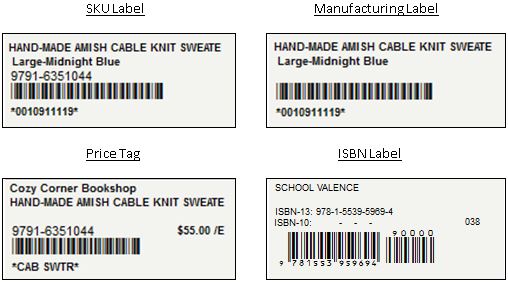
Label sizes are 2”x1” or 3”x1” and are printed with either of two fonts: the 3 of 9 barcode font (available with InOrder), or the Code 128 font from barcodewiz.com. The ISBN label uses only the Code 128 font from barcodewiz.com.

Fast and Efficient
Labels can be printed by SKU, by receipt, or by purchase order before receiving the items. Simply identify the label, the item, pricing information when applicable to the label, and the number of labels to print. The label can be identified, previewed, and printed from the same InOrder window.
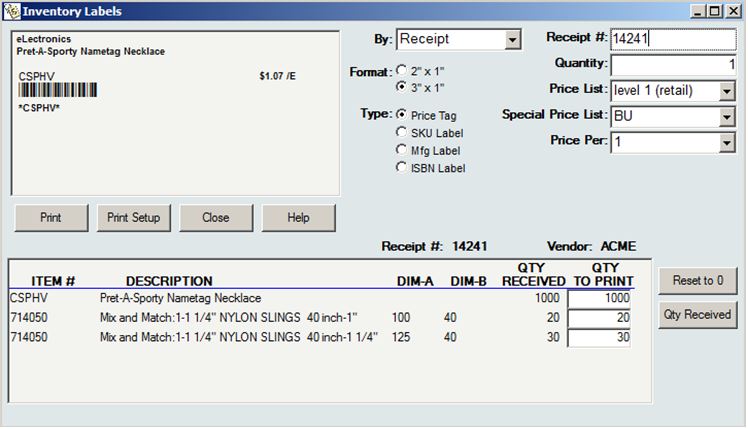
For more information about the InOrder Inventory Labels Enhancement, contact sales@morsedata.com.
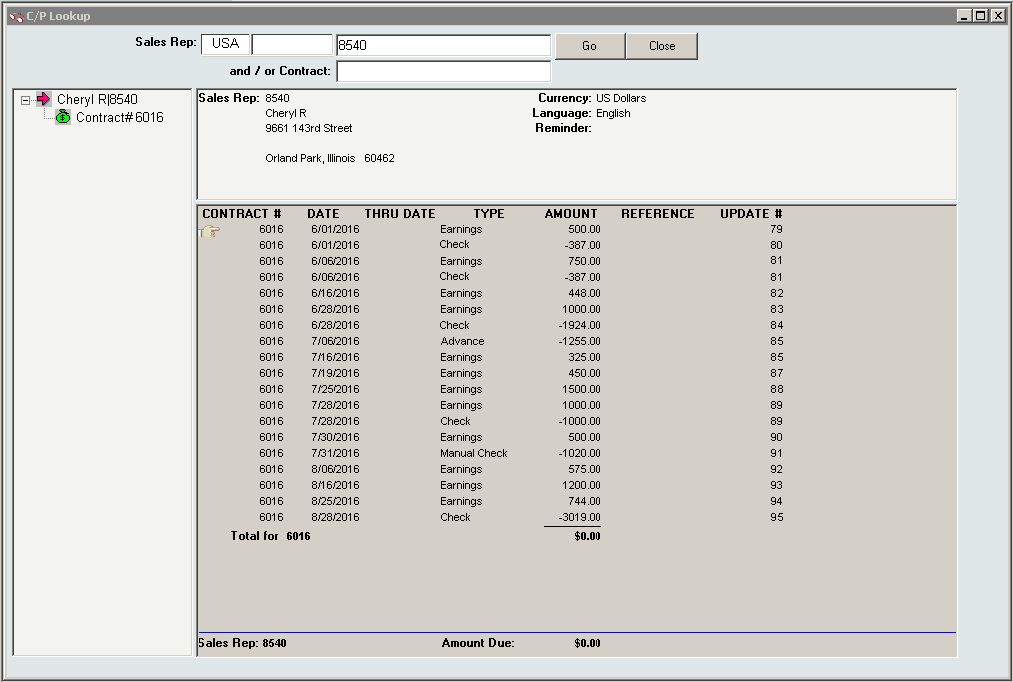
Your sales representatives promote your business and compliment your products. Do you reward them with base salary, commissions, percentage of revenue? InOrder supports your compensation programs for the people who support your business objectives.
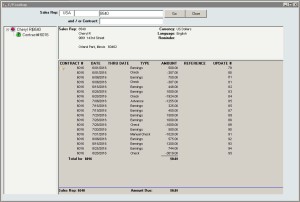
Here are highlights of the InOrder commissions Enhancement:
- Commissions payables accrue as frequently as daily and statements with payments can be generated whenever necessary.
- Commission payables are kept separate from general InOrder Accounts Payable.
- Security privilege and audit trail from A/P and A/R, plus a secondary audit trail to track all sales territory assignments and changes throughout the InOrder system.
- Allows a multi-level sales territory hierarchy, including assignment by geography and customer type with overrides by customer, order batch, or individual order.
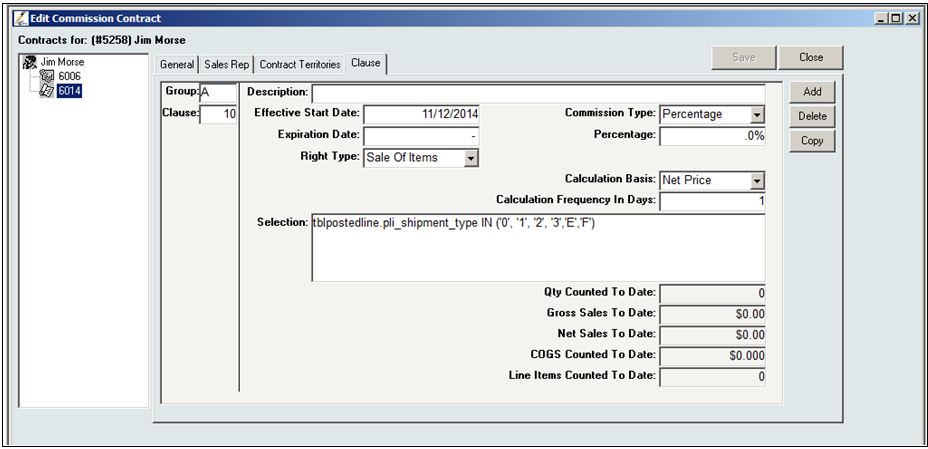
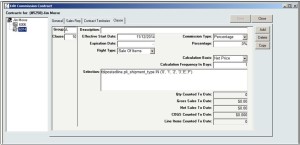
- Contract clauses pay commissions based on dollar amounts, percentages, resolutions, or sliding scales and may even vary by date range.
- Multi-clause commission contracts are defined with support for sophisticated filtering criteria when necessary using SQL Where clauses.
For more information about the InOrder Commissions Enhancement, contact Morse Data Corporation.